EasyManua.ls Logo

Panasonic CQ-RD545LEN - Page 12

Panasonic CQ-RD545LEN
69 pages
Print Icon
To Next Page IconTo Next Page
To Previous Page IconTo Previous Page
Loading...
RDS
(Radio
Data
System)
Reception
coninue
C.
PTY
Reception
(There
are
some
areas
where
PTY
service
may
not
be
available
because
of
the
future
function.)
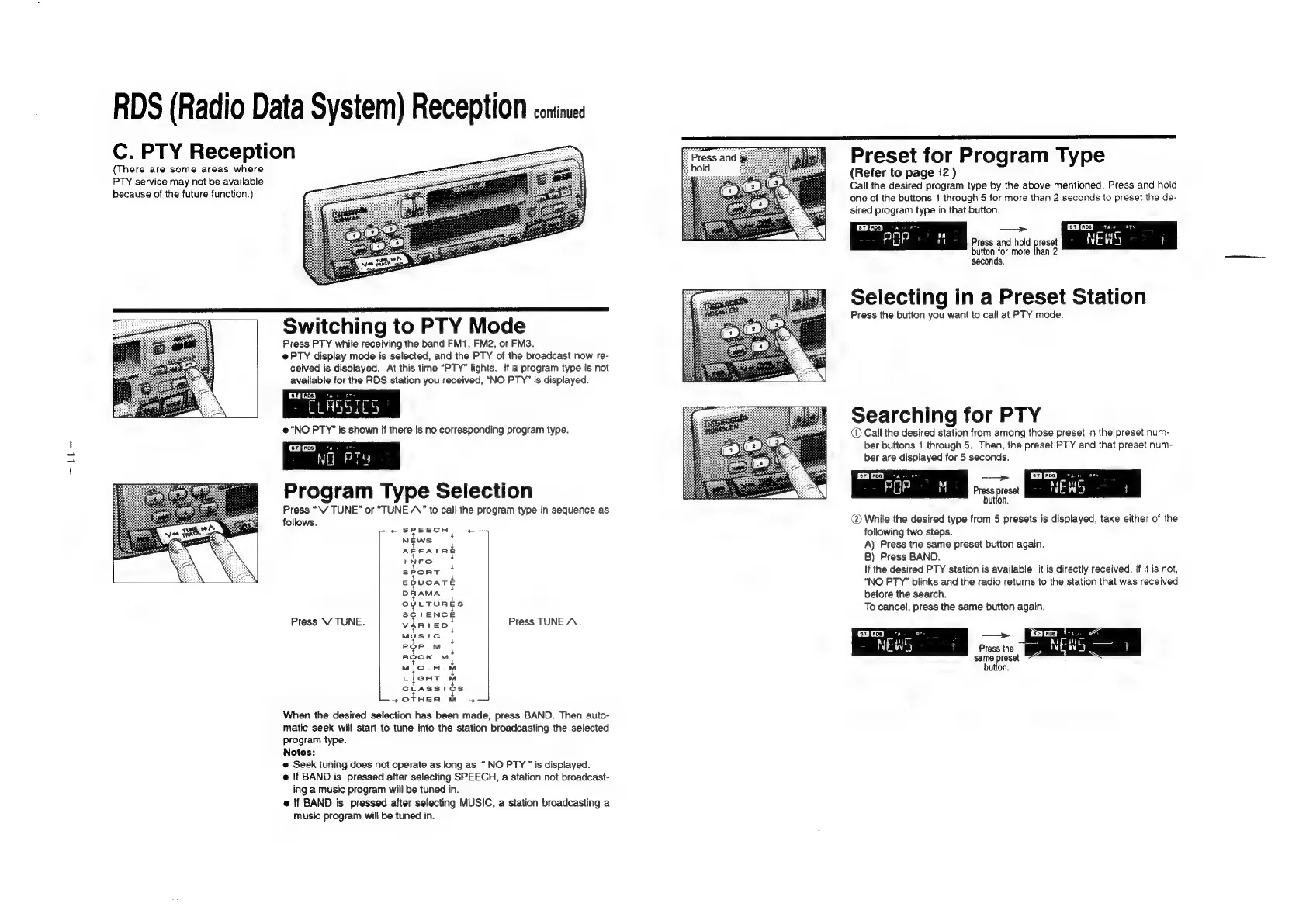
Switching
to
PTY
Mode
Press
PTY
while
receiving
the
band
FM1,
FM2,
or
FM3.
e@PTY
display
mode
is
selected,
and
the
PTY
of
the
broadcast
now
re-
ceived
is
displayed.
At
this
time
“PTY”
lights.
{f
a
program
type
is
not
available
for
the
RDS
station
you
received,
“NO
PTY”
is
displayed.
[ev
[rcs
ry
me
CLASSICS
e@
“NO
PTY”
is
shown
if
there
is
no
corresponding
program
type.
qgoa3
"ao
ove
NG
PTY
Program
Type
Selection
Press
“\V
TUNE”
or
“TUNE
A”
to
call
the
program
type
in
sequence
as
follows.
pe
SPEECH
|
NEWS
AFFAIR
INEO
stort
ERUS
Ar
DRAMA
CULTURES
SCIENCE
Press
V
TUNE.
VAReDS
MUS
!IC
POP
M
ROCK
M
M,.O.R.
Llant
lL
c
7
Asst
¢
s
+OTHER
M
4«—4
When
the
desired
selection
has
been
made,
press
BAND.
Then
auto-
matic
seek
will
start
to
tune
into
the
station
broadcasting
the
selected
program
type.
Notes:
@
Seek
tuning
does
not
operate
as
long
as
“NO
PTY
is
displayed.
@
If
BAND
is
pressed
after
selecting
SPEECH,
a
station
not
broadcast-
ing
a
music
program
will
be
tuned
in.
@
lf
BAND
is
pressed
after
selecting
MUSIC,
a
station
broadcasting
a
music
program
will
be
tuned
in.
+
+
s
+
+
+
3
+
Press
TUNE
A.
eo
re
Press
and
Preset
for
Program
Type
(Refer
to
page
12
)
Call
the
desired
program
type
by
the
above
mentioned.
Press
and
hold
one
of
the
buttons
1
through
5
for
more
than
2
seconds
to
preset
the
de-
sired
program
type
in
that
button.
fev]
ace
Benes
>
EHGED
tas
ety
nm
POP
M
Press
and
hold
preset
NEWS
t
button
for
more
than
2
seconds.
Selecting
in
a
Preset
Station
Press
the
button
you
want
to
call
at
PTY
mode.
Searching
for
PTY
Call
the
desired
station
from
among
those
preset
in
the
preset
num-
ber
buttons
1
through
5.
Then,
the
preset
PTY
and
that
preset
num-
ber
are
displayed
for
5
seconds.
RA
A
H
"
Press
preset
NEWS
|
button.
@
While
the
desired
type
from
5
presets
is
displayed,
take
either
of
the
following
two
steps.
A)
Press
the
same
preset
button
again.
B)
Press
BAND.
If
the
desired
PTY
station
is
available,
it
is
directly
received.
If
it
is
not,
“NO
PTY”
blinks
and
the
radio
returns
to
the
station
that
was
received
before
the
search.
To
cancel,
press
the
same
button
again.
[roe]
roe]
6
N
S
wy
H
Press
the
fa
N
x
WS
oo
me
preset
|

Related product manuals