3
English
Table of contents
Safety precautions ...................4-5
How to use...............................6-7
Cleaning Instruction .................... 8
Troubleshooting ..................... 9-10
Information................................ 11
Accessories
• Remote control
• AAA or R03 batteries × 2
• Remote control holder
• Screws for remote control
holder × 2
Quick guide
1
2
3
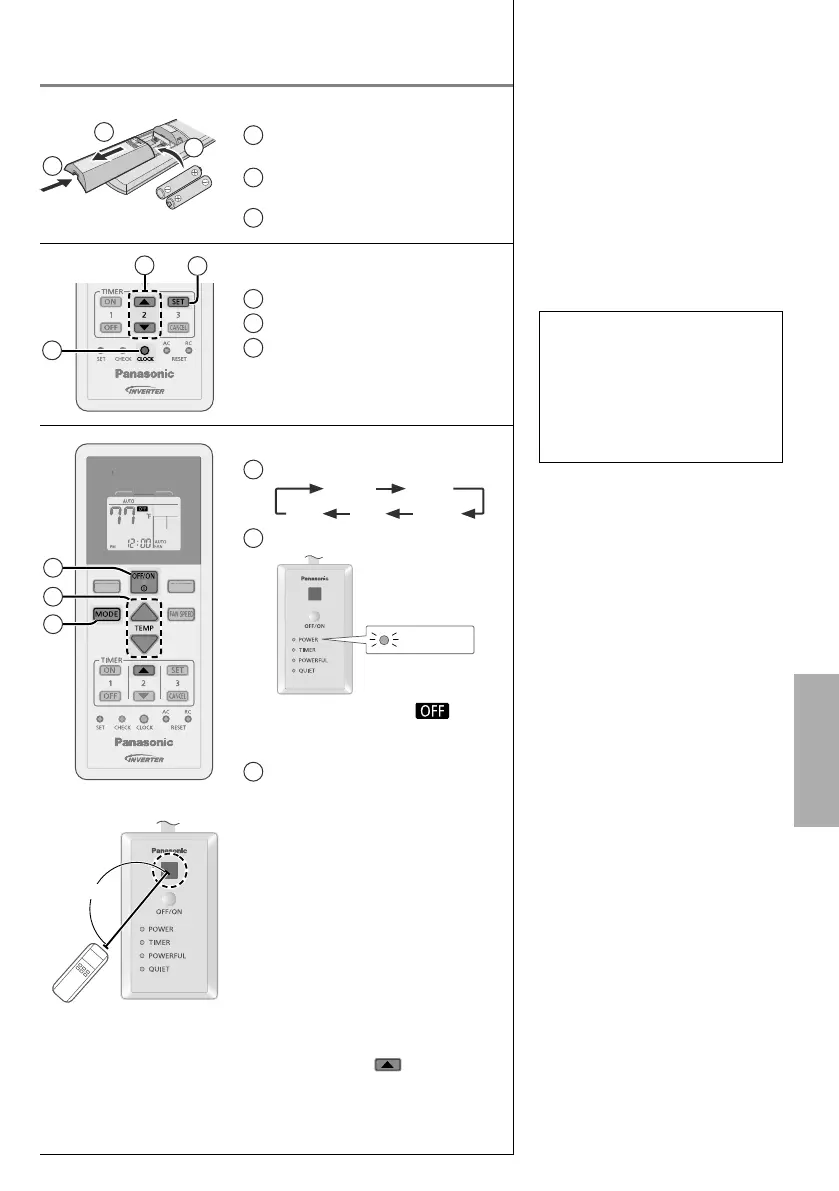
Inserting the batteries
1
Pull out the back cover of
remote control
2
Insert AAA or R03 batteries
(can be used ~ 1 year)
3
Close the cover
2
3
1
Clock setting
1
Press CLOCK
2
Set the time
3
Confi rm
POWERFUL
QUIET
AIR CONDITIONER
MODE
P
WERFU
UIET
AIR C
NDITI
NE
M
DE
1
2
3
26ft/8m
Basic operation
1
Select the desired mode
DRY
AUTO HEAT
COOLFAN
2
Start/stop the operation
POWER
•
Please note that the
indication is on display to start
the unit.
3
Select the desired temperature
•
Selection range
(Not applicable for FAN mode):
60°F ~ 86°F / 16°C ~ 30°C.
•
Operating the unit within the
recommended temperature range
may save energy.
HEAT : 68°F ~ 75°F /
20°C ~ 24°C.
COOL : 78°F ~ 82°F /
26°C ~ 28°C.
DRY : 2°F ~ 4°F /
1°C ~ 2°C
lower than room
temperature.
•
To dim or restore the unit’s indicator
brightness, press and hold for
5 seconds.
•
Use remote control within 26ft/8m
from the remote control receiver of
the indoor unit.



 To Next Page