English
13
How to use
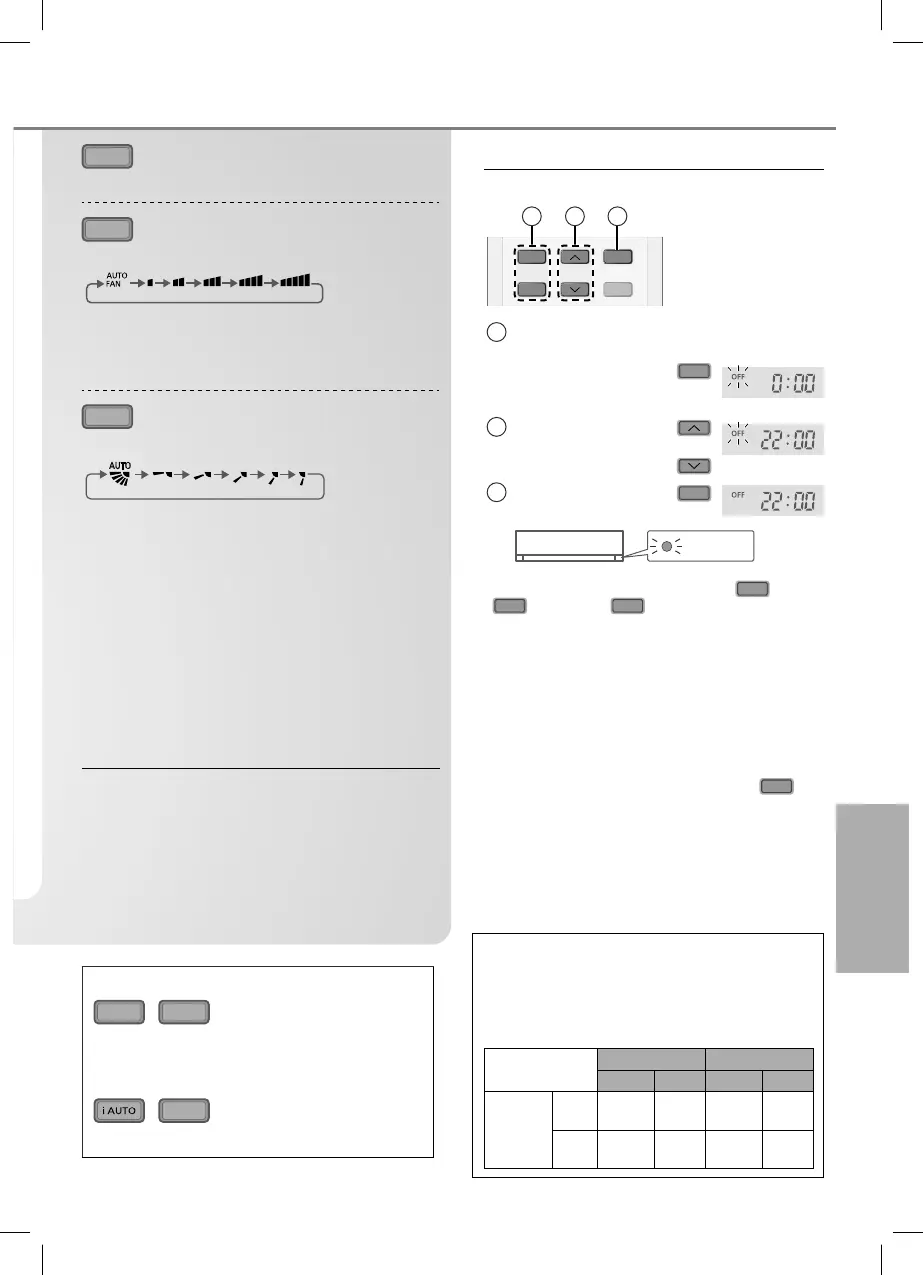
QUIET
To enjoy quiet operation
• This operation reduces airflow noise.
FAN SPEED
To select fan speed
(Remote control display)
• For AUTO, the indoor fan speed is automatically
adjusted according to the operation mode.
• If iAUTO mode is set, fan speed is fixed to
AUTO. To adjust fan speed, cancel iAUTO mode.
AIR SWING
To adjust vertical airflow direction
(Remote control display)
• Keeps the room ventilated.
• In COOL/DRY mode, if AUTO is set, the flap
swings up/down automatically.
• Do not adjust the flap by hand.
Auto Restart Control
• If power is resumed after a power failure, the
operation will restart automatically after a period
of time with previous operation mode and airflow
direction.
• This control is not applicable when TIMER is set.
Note
QUIET
,
SLEEP
• Can be activated in COOL and DRY mode
and can be cancelled by pressing the
respective button again.
,
QUIET
• Cannot be selected at the same time.
To set the timer
To turn ON or OFF the unit at a preset time.
ON
OFF
SET
TIMER
CANCEL
AN
E
1 2 3
1
Select ON or OFF
timer
Example:
OFF at 22:00
OFF
2
Set the time
3
Confirm
SET
TIMER
• To cancel ON or OFF timer, press
ON
or
OFF
then press
CANCEL
.
• When ON Timer is set, the unit may start
earlier (up to 15 minutes) before the actual
set time in order to achieve the desired
temperature on time.
• Timer operation is based on the clock set in
the remote control and repeats daily once set.
For clock setting, please refer to Quick guide.
• If timer is cancelled manually or due to power
failure, you can restore the previous setting
(once power is resumed) by pressing
SET
.
Operation conditions
Use this air conditioner under the following
temperature range.
DBT : Dry bulb temperature
WBT : Wet bulb temperature
Temperature
°C (°F)
Indoor Outdoor
DBT WBT DBT WBT
COOL
Max.
32
(89.6)
23
(73.4)
43
(109.4)
26
(78.8)
Min.
16
(60.8)
11
(51.8)
16
(60.8)
11
(51.8)
ACXF55-04390_YC0517-1.indb 13ACXF55-04390_YC0517-1.indb 13 6/2/2017 2:52:52 PM6/2/2017 2:52:52 PM



 To Next Page