5
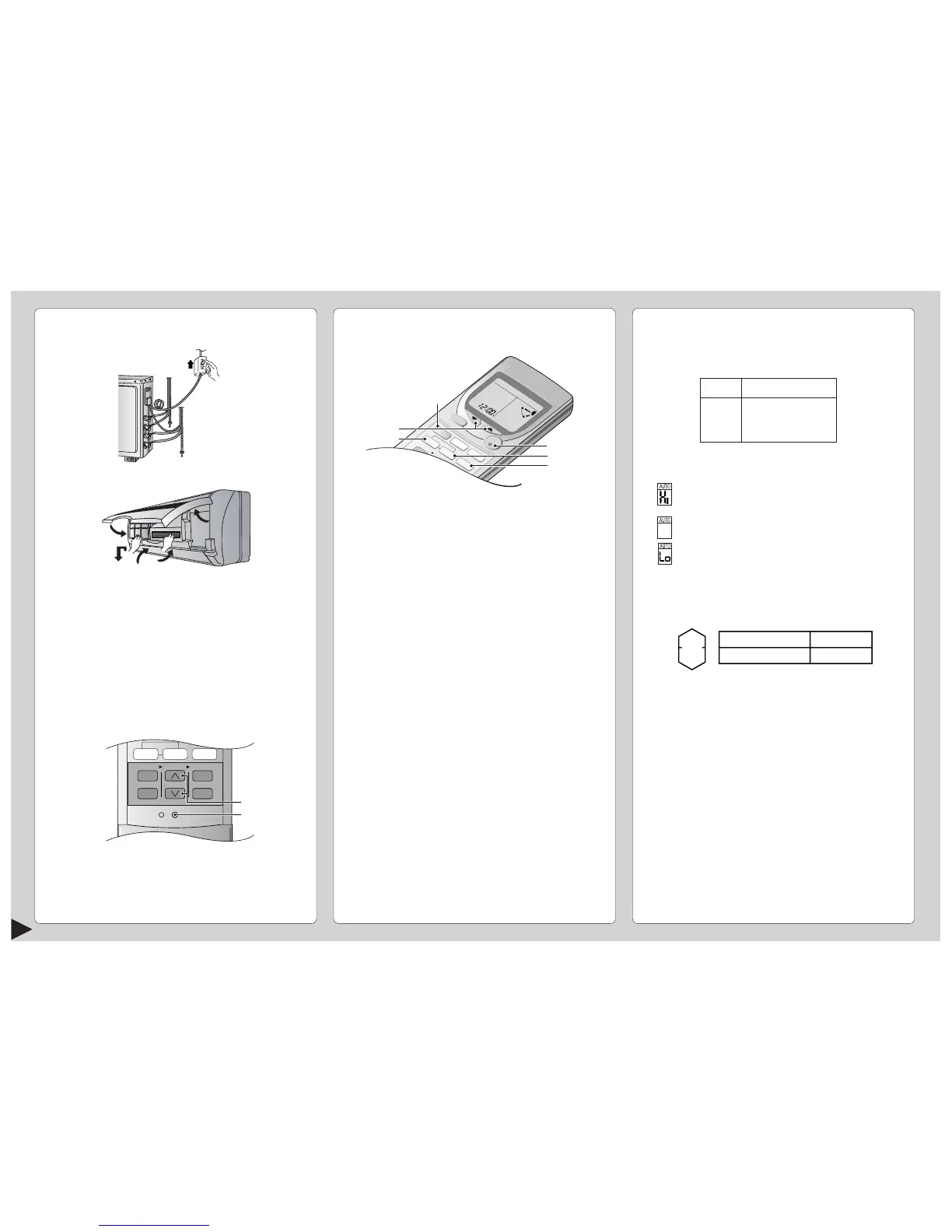
PREPARATION BEFORE OPERATION
■ Indoor Unit
1 Set the knife switch to “ON”
2 Open the front panel
3 Remove the air filters
4 Fit the air purifying filters in place
5 Insert the air filters
6 Close the front panel
■ Remote Control
– To set the current time
1 Press 1.
2 Then press 2 to increase or decrease the time.
3 Press 1 again.
Set time at display will light up.
6
2
4
5
3
■ Setting Temperature
• Press 3 to increase or decrease the temperature.
• The temperature can be set between 16°C ~ 30°C.
• Recommended temperature:
• During AUTO Operation, press 3 to select:-
• Operation with 2°C higher than the standard
temperature.
• Operation with the standard temperature.
• Operation with 2°C lower than the standard
temperature.
● Standard Temperature
• Once the Automatic Operation is selected, the indoor
temperature sensor operates automatically to select
the desired operation mode with Cooling or Soft Dry.
• After the operation mode has been selected, the
mode does not change.
HOW TO OPERATE
■ To start the operation
• Press 1.
• POWER indicator (green) on the indoor unit will light
up.
• To stop, press once more.
■ Setting Mode
• Press 2 to select:-
AUTO – Automatic Operation
COOL – Cooling Operation
DRY – Soft Dry Operation
FAN – Air Circulation Operation



 To Next Page