PRODUCT OVERVIEW & OPERATIONS PRODUCT OVERVIEW & OPERATIONS
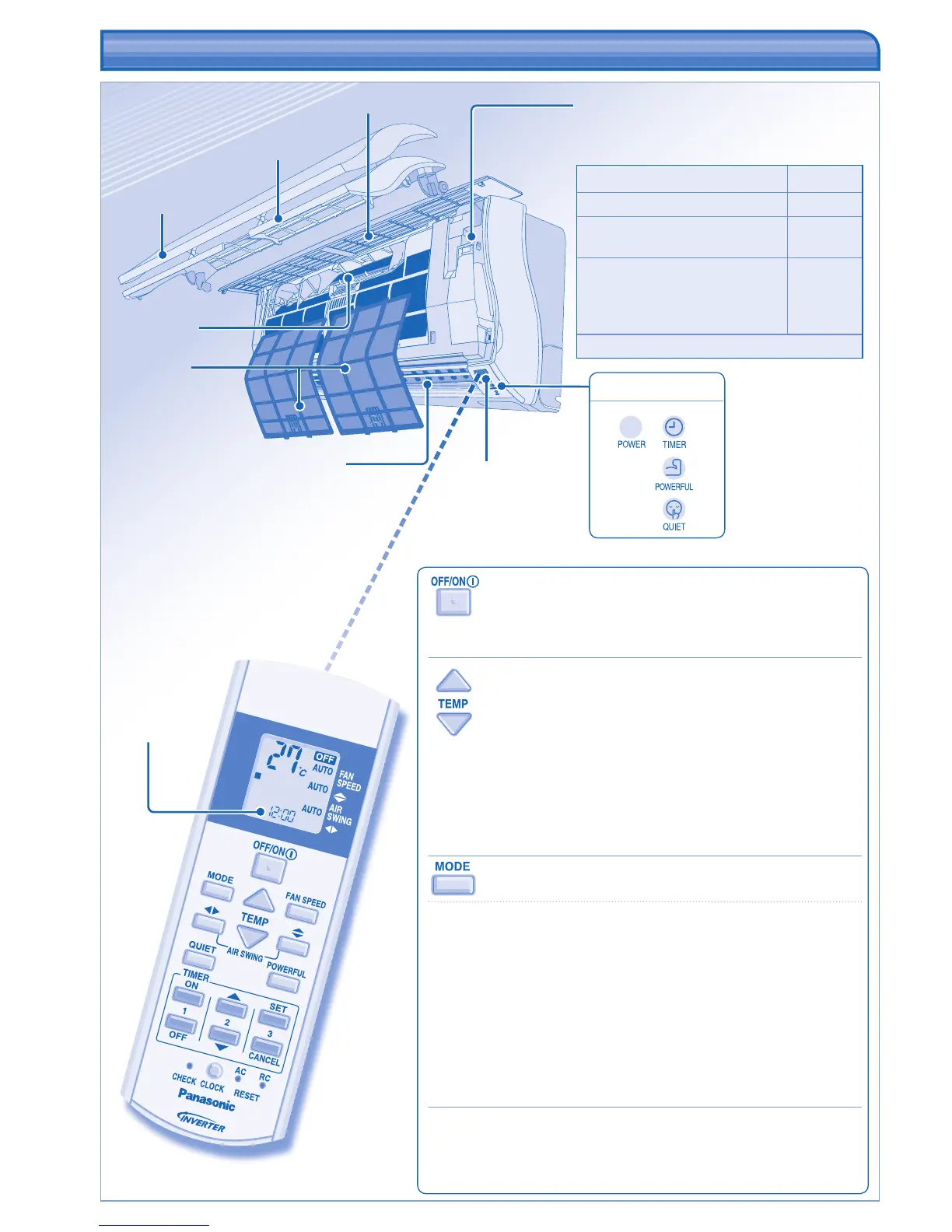
Front panel
Receiver
Auto OFF/ON button
• Used when remote control is misplaced or
malfunction.
Action Mode
Press once. Auto
Press and hold until 1 beep is
heard, then release.
Cooling
Press and hold until 1 beep is
heard, then release.
Press again until 2 beeps, then
release.
Heating
Press the button to turn off.
Airfl ow direction louver
• Do not adjust by hand.
Maximum distances: 8m
Remote control
display
INDICATOR
Top grill
Movable panel
Super alleru-
buster fi lter
TO TURN ON OR OFF THE UNIT
• Please be aware of the OFF indication on the remote control display
to prevent the unit from starting / stopping improperly.
TO SET TEMPERATURE
• Selection range: 16˚C ~ 30˚C.
• Operating the unit within the recommended temperature could
induce energy saving.
HEAT mode : 20˚C ~ 24˚C.
COOL mode : 26˚C ~ 28˚C.
DRY mode : 1˚C ~ 2˚C lower than room temperature.
TO SELECT OPERATION MODE
AUTO mode - For your convenience
• Unit selects operation mode every 30 minutes according to
temperature setting, outdoor and room temperature. During operation
mode selection the power indicator blinks.
HEAT mode - To enjoy warm air
• Unit takes a while to warm up. The power indicator blinks during this
operation.
COOL mode - To enjoy cool air
DRY mode - To dehumidify the environment
• Unit operates at low fan speed to give a gentle cooling operation.
MOVABLE PANEL
• Opens for air intake when operation starts, and closes when
operation stops. During this time, do not hold it as it may cause
malfunction or breakdown.
Air fi lters





 To Next Page