Procedures of deleting memory at twin control system
1. Set the “OFF” position for main power supply switch.
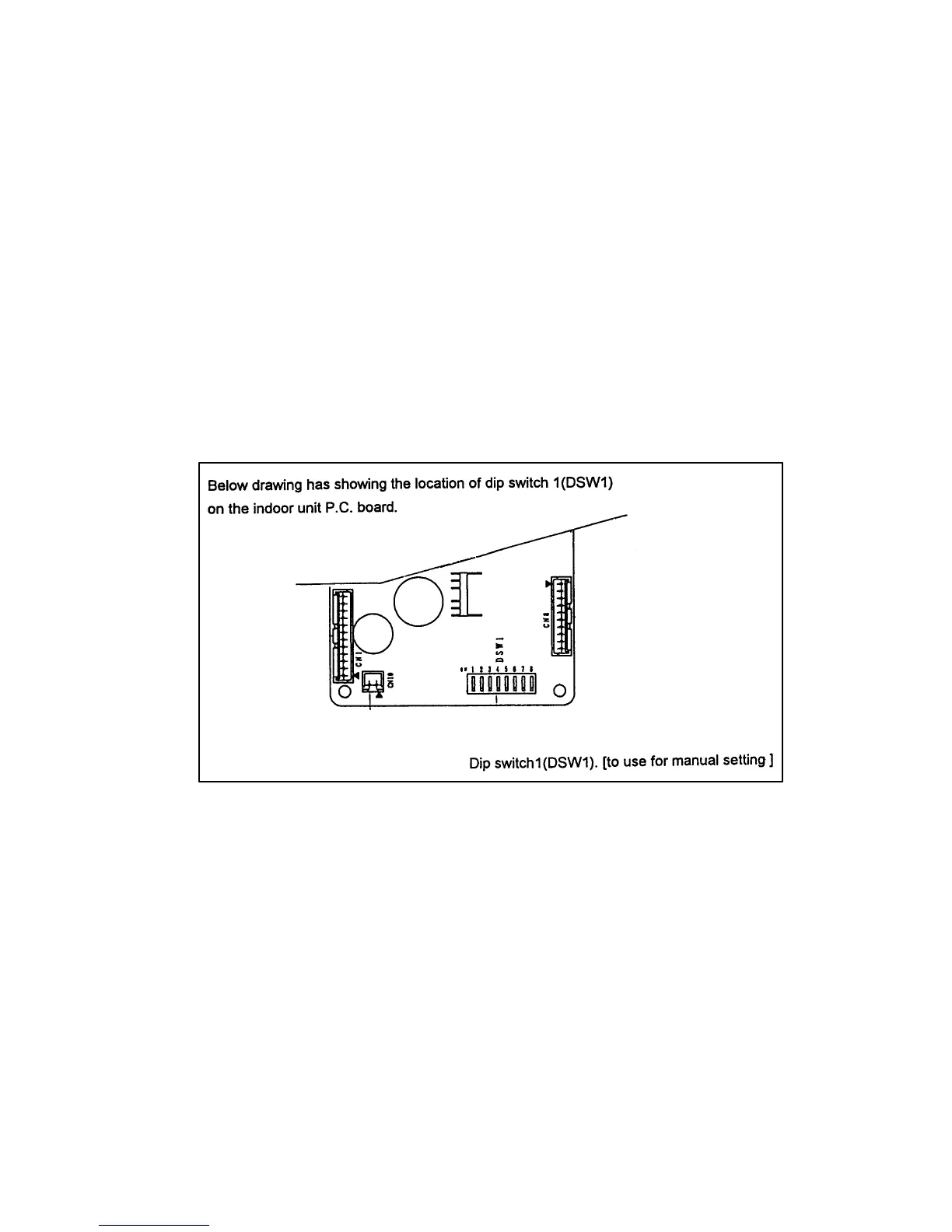
2. Set the “ON” position for No. 8 pin of dip switch (DSW1) on indoor unit P.C. board.
3. Take main power supply switch “ON” for one minute, and then main power supply switch off.
4. Set the “OFF” position for No. 8 pin of dip switch (DSW1).
Procedure of deleting memory at group control system
1. Set the “OFF” position for main power supply switch.
2. Set the “ON” position for No. 1 pin to No. 4 pin of dip switch (DSW1) on indoor unit P.C. board.
(No. 8 pin of dip switch (DSW1) should be “OFF” position)
3. Take main power supply switch “ON” for one minute, and then main power supply switch off.
4. Set the “OFF” position for No. 1, No. 2, No. 3 and No. 4 pin of dip switch (DSW1).
(Important notice)
Above procedures are for deleting memory on indoor unit P.C. board. And it is not for Address reset.
23.1. Indoor unit P.C. board layout.
83



 To Next Page