14
Cleaning instructions
For seasonal inspection after extended non-use
• Checking of remote control batteries.
• No obstruction at air inlet and air outlet vents.
• Use Auto OFF/ON button to select COOL operation. After 15 minutes of operation, it is normal to
have the following temperature difference between air inlet and air outlet vents:
COOL: ≥ 8 °C
For extended non-use
• Activate nanoe-G operation for 2~3 hours as an alternative to remove moisture left in the internal
parts to prevent mould growth.
• Turn off the power supply and unplug.
• Remove the remote control batteries.
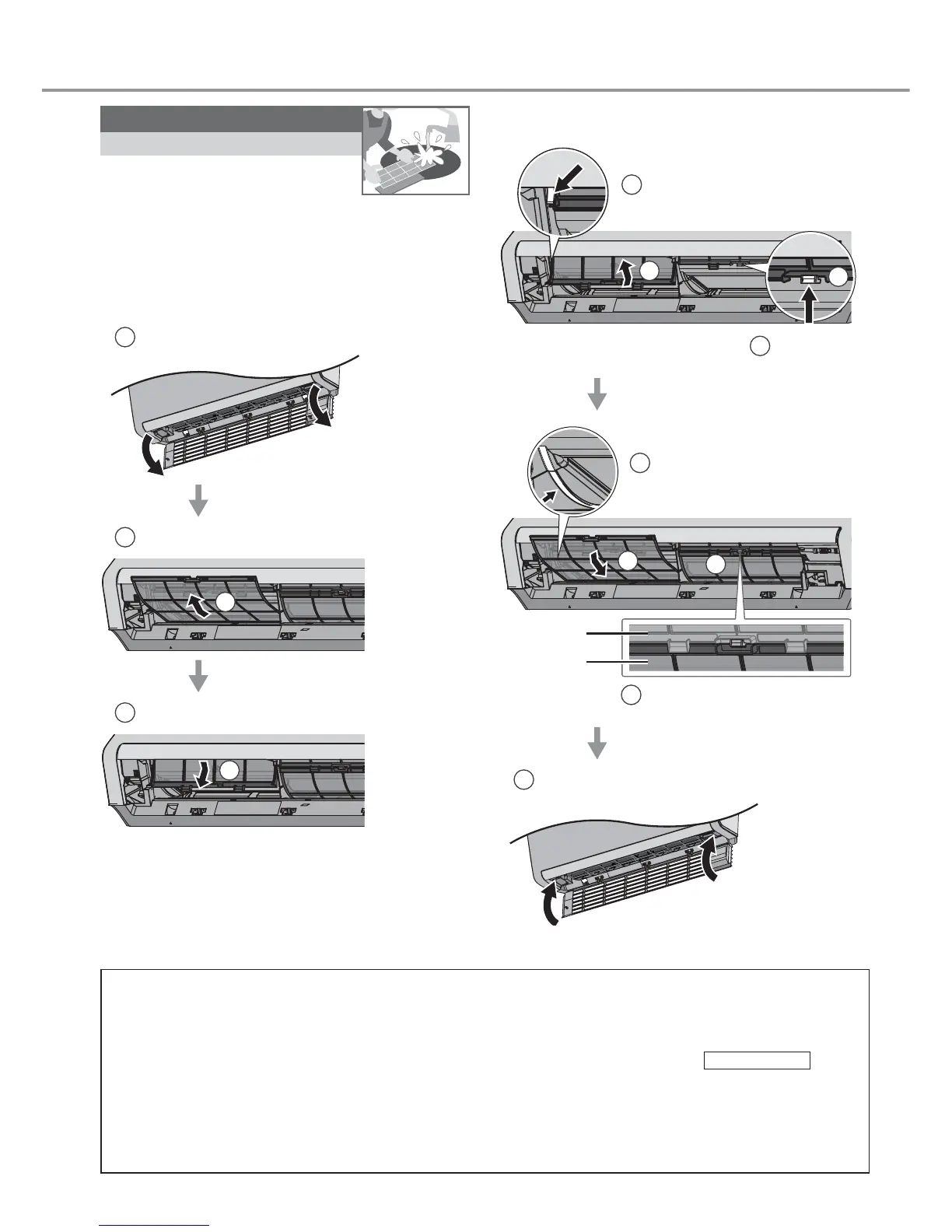
Air fi lters
Once every 2 weeks
• Wash/rinse the fi lters gently
with water to avoid damage to
the fi lter surface.
• Dry the fi lters thoroughly under shade, away
from fi re or direct sunlight.
• Replace any damaged fi lters.
Remove Air Filter
1
Open the intake grille
2
Remove Air fi lter B
2
3
Remove Air fi lter A
3
Attach Air Filter
1
2
Insert Air Filter A
to the guider
1
Insert to
the hooks
2
Air Filter B is slot under Air
Filter A hooks
4
Insert Air Filter B
to the guider
3
Air Filter A
Air Filter B
3
4
5
Close the intake grille



 To Next Page