Firmware Ver. 3.0 – Compatible with Frame.io Camera to Cloud
F-47
Changing the Connection Method
[] [] [Frame.io] [Connection Setup]
Select [Connection Method]
[Wi-Fi]
Connect to an access point via Wi-Fi.
[USB Tethering]
Connect using the USB tethering function of a smartphone.
• When a smartphone is used, the camera is connected to the internet via
mobile data communications (4G, 5G, etc.) enabling you to connect with
Frame.io from locations where a router is not available, when you are out
and about, for example.
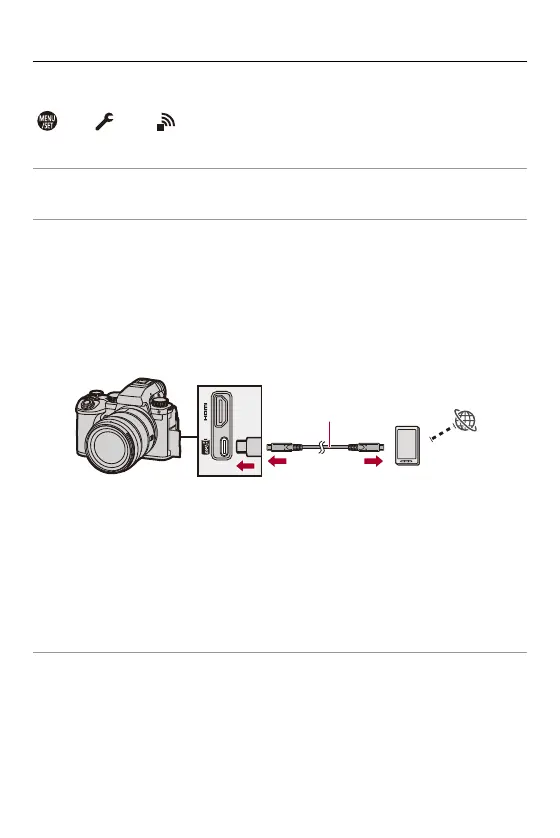
1 Connect the camera and the smartphone using a USB connection cable.
(A) USB connection cable (commercially available)
2 Enable the USB tethering function on the smartphone.
•
Select [USB Tethering] (for Android devices) or [Personal Hotspot] (for iOS
devices) on the smartphone.
•
If a confirmation message appears on the smartphone screen asking for
permission to enable access by the connected device, grant permission.
Connection is not complete until permission is given.
•
Please also refer to the operating instructions of your smartphone.
≥ If the connection method is changed while connected with Frame.io, the
connection with Frame.io is temporarily broken, and then it is
reestablished after the change.
(A)








 To Next Page