18
Playback
[RAM] [DVD-R] [DVD-A] [DVD-V] [VCD] [CD] [MP3]
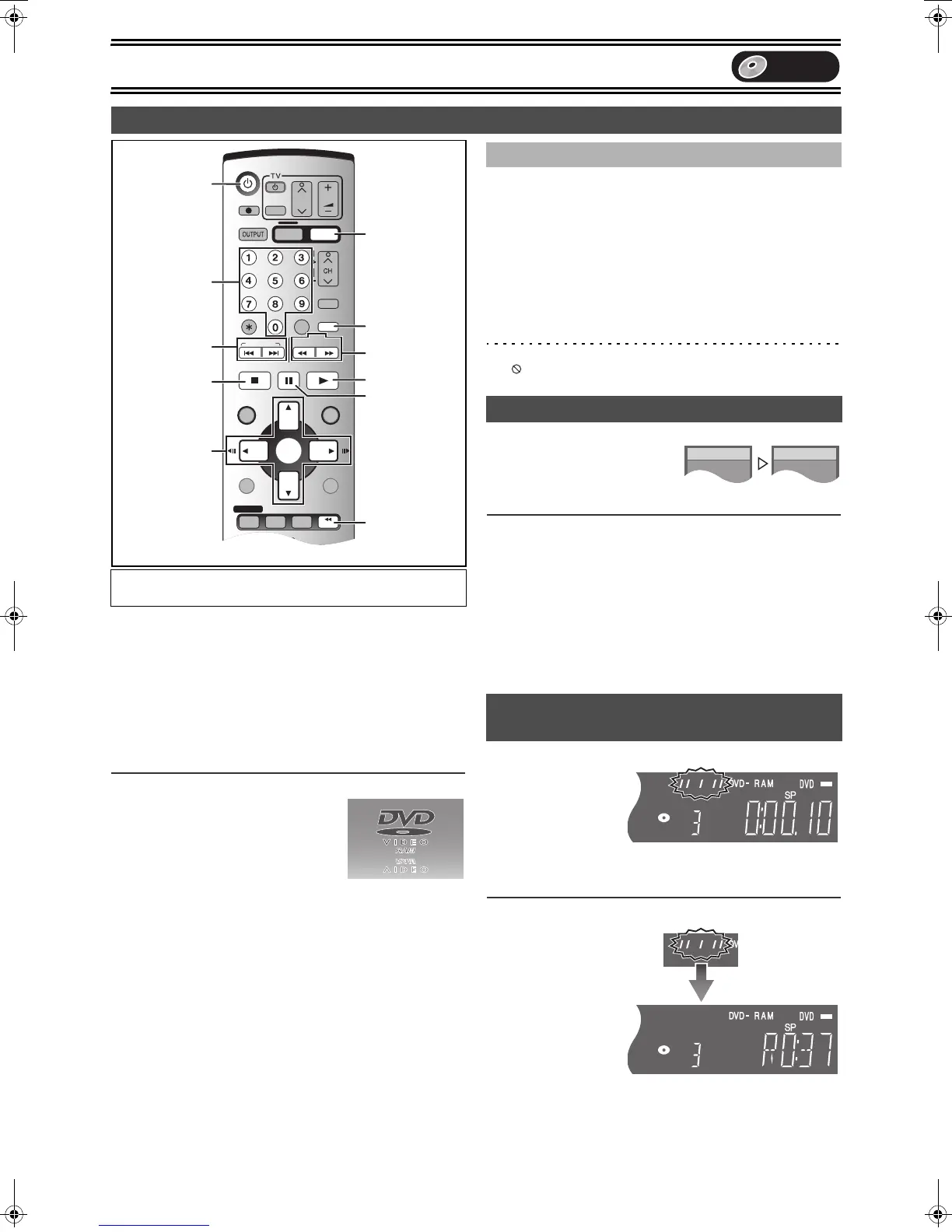
[1] Press [Í, DVD/VHS] to turn the unit on.
[2] Insert a disc.
(l 17)
[3] Press [1, PLAY].
The disc tray closes and playback begins.
(The unit takes some time to read the disc before play starts.)
≥Playback starts from the most recently recorded title.
[RAM] [DVD-R]
≥Playback starts from the beginning of the disc.
[DVD-A] [DVD-V] [VCD] [CD] [MP3]
∫To stop play
Press [∫, STOP]. (l right, “Resume
Function”)
≥A screen similar to the right may appear
when you stop play. Press [∫, STOP]
again and you can use this unit’s tuner to
watch TV. [DVD-A] [DVD-V] [VCD] [CD] [MP3]
∫To pause play
Press [;, PAUSE]. (Press again to restart playing.)
[DVD-A] [DVD-V] [VCD]
[VCD]
Press the numeric buttons to select an item.
e.g.: “5”: [0] )[5]
“15”: [1] )[5]
[DVD-A] [DVD-V]
Press [3, 4, 2, 1] to select an item and press [ENTER].
≥You can also use the numeric buttons to select an item.
Other buttons used to operate menus
Read the disc’s instructions for the further details about operation.
Note
≥If “ ” appears on the TV, the operation is prohibited by the unit or
disc.
[RAM] (Only with Dolby Digital)
You can increase the speed of play
without disrupting the soundtrack.
During Play
Press and hold [1, PLAY].
∫To return to normal speed
Press [1, PLAY].
Note
≥Output is in PCM when using a digital connection (l 12).
≥This is cancelled when you perform skip, pause, or when play
reaches a point where a programme recorded in sound other than
Dolby Digital starts.
≥This does not work if the setting is “Off” in “PLAY t1.3 & Audio
during Search” (l 44).
≥This does not work when recording is in XP or FR mode during
simultaneous recording and play (l 22). [RAM]
[RAM] [DVD-R] [DVD-A] [DVD-V] [VCD] [CD] [MP3]
[1] During play
Press
[∫,STOP].
≥The unit memorises
the position.
[2] Press [1, PLAY].
≥Play starts from where you stopped it.
∫To cancel the resume function
Press [∫, STOP] several
times while the unit
remembers the position.
(The position is also
cleared when you turn
the unit off.)
Playing discs
Preparation
≥Press [DVD].
SLOW/
SEARCH
REW
FF
DUBBING
DVD/VHS
CREATE
CHAPTER
SKIP/INDEX
PLAY
STOP
PAU SE
TRACKING/V-LOCK
AUDIOEXT LINK
FUNCTIONSDIRECT NAVIGATOR
TOP MENU
RETURN
SUB MENU
PROG/CHECK
VHS REC
TIME SLIP
STATUS
DVD REC REC MODE
DVD/VHS
CANCEL/RESET INPUT SELECT
DIRECT TV REC
TIMER
VHS
G-Code
CREATE
CHAPTER
CH
AV
VOLUME
DVD
JET REW
ENTER
DISPLAY
DVD
Í
6, 5
:, 9
TIME SLIP
CREATE
CHAPTER
1
;
∫
3, 4, 2, 1
2;, ;1
ENTER
Numeric
Buttons
∫ When a menu screen appears on the TV
Quick View (Play t1.3)
Starting play from where you stopped it
(Resume Function)
DVD
75VGN.book 18 ページ 2004年7月21日 水曜日 午前11時54分


 To Next Page