71
RQT8896
1 While stopped
Press [FUNCTION MENU].
2 Press [3, 4] to select “To Others”
and press [OK].
3 Press [3, 4] to select “Setup” and
press [OK].
4 Press [3, 4] to select “Tuning” and
press [1].
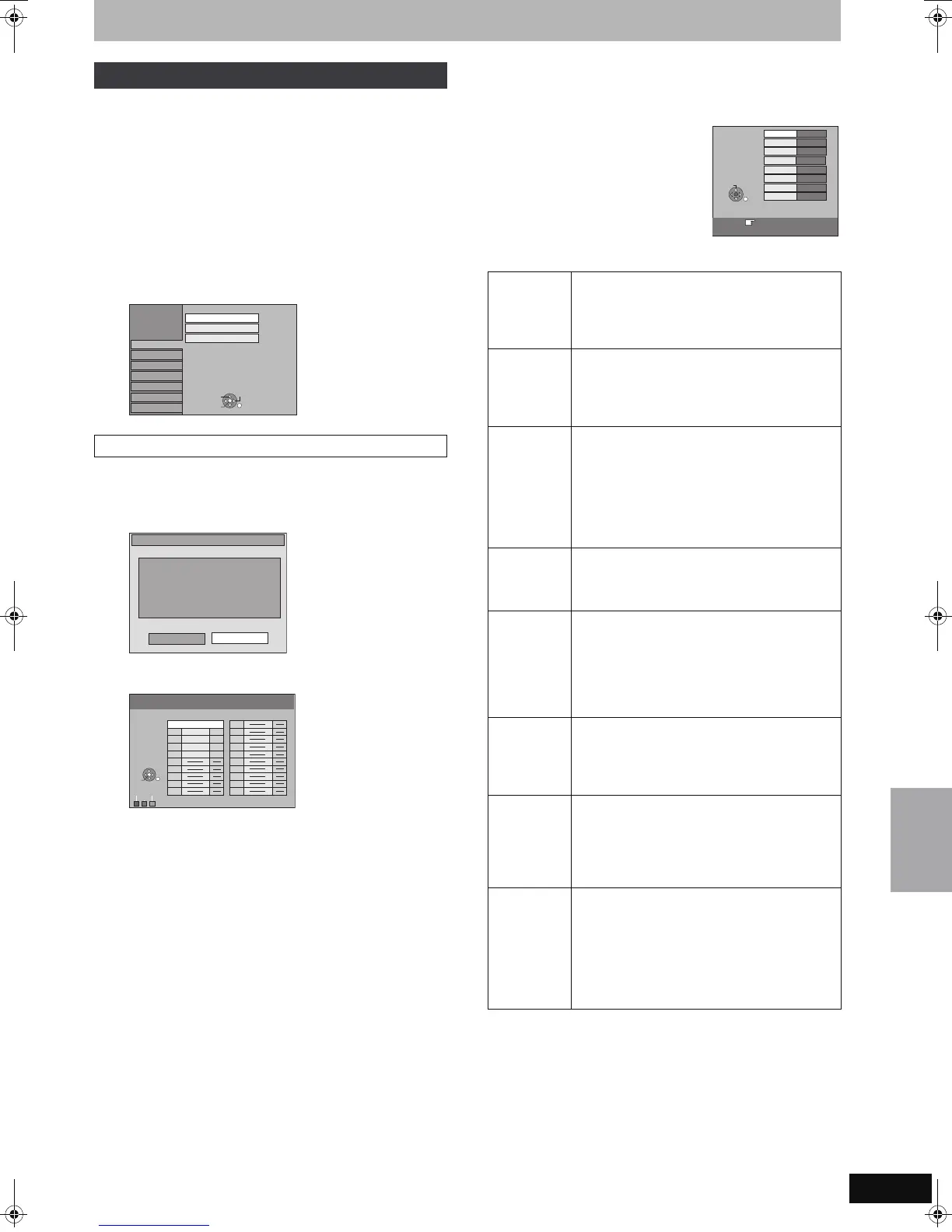
You can add or delete channels, or change programme positions.
5 Press [3, 4] to select “Manual
Tuning” and press [OK].
If you select “Yes” and press [OK], the following screen
appears.
To delete a programme position
Press [3, 4, 2, 1] to select a programme position and press the
“Red” button.
To add a blank programme position
Press [3, 4, 2, 1] to select a programme position and press the
“Green” button.
To move a TV station to another programme position
1 Press [3, 4, 2, 1] to select a programme position and press
the “Yellow” button.
2 Press [3, 4, 2, 1] to select the new programme position to
which you want to assign the TV station and press [OK].
[Note]
≥When the unit connected to a Q Link compatible TV with a fully
wired 21-pin Scart cable sets itself automatically (➡ 20), only
deletion of the programme position can be performed.
≥If you delete programme position of Host Channel, the GUIDE
Plus+ data is also deleted.
∫ To change the tuning settings for individual
programme position
6 Press [3, 4, 2, 1]
to select a
programme position
and press [OK].
Press [3, 4] to select an item and press [1].
You can make the following two settings by selecting the external
input channel (AV1, AV2, AV3) in step 5.
≥Video System (Auto/PAL/SECAM)
In order to record properly, make the appropriate settings to match
the connected equipment.
≥Title Page (Auto/Off)
Tuning
Manual Tuning
Setup
Disc
Picture
Sound
Display
Connection
Tuning
Manual Tuning
Auto-Setup Restart
Download from TV
Others
OK
RETURN
TAB
SELECT
Manual Tuning
NoYes
If you delete programme position
of Host channel, GUIDE Plus+ data
is also deleted. Continue?
Manual Tuning
Pos
Name
Ch
Pos
Name
Ch
Delete
Add
Move
1 ARD 4
2 ZDF
2
3 N3
5
4 HR3
8
5 BR3 10
6
7
8
9
10
11
12
13
14
15
16
17
18
19
20
OK
RETURN
SELECT
Pos To change the programme position in which
the TV stations are assigned
Press [3, 4] or numbered buttons to select the
number of the desired programme position and
press [OK].
Name To enter or change the name of a TV station
Press [3, 4, 2, 1] to enter station name and
press [OK].
If the station name needs a blank space, select
the blank between “Z” and “¢”.
Channel To enter newly available TV stations or change
the channel number of an already tuned TV
station
Press [3, 4] or the numbered buttons to enter
the channel number of the desired TV station.
Wait a few moments until the desired TV station
has been tuned.
After the desired TV station is tuned, press [OK].
Fine Tuning To obtain the best tuning condition
Press [3, 4] to adjust the best tuning condition
and press [OK].
≥Press [1] to return to “Auto”.
Video
System
To select the video system type
Press [3, 4] to select “PAL” or “SECAM” if the
picture lacks colour, and press [OK].
Auto: This unit automatically distinguishes
PAL and SECAM signals.
PAL: For receiving PAL signals.
SECAM: For receiving SECAM signals.
Audio Mode To select the audio reception type
If sound quality is poor, press [3, 4] to select
“BG” or “L” and press [OK].
BG: PAL B.G.H/SECAM B.G
L: SECAM L, L’
Mono To select the type of sound to be recorded
Press [3, 4] to select “On” if the stereo sound is
distorted due to inferior reception conditions, or if
you want to record the normal (mono) sound
during a stereo, bilingual or NICAM broadcast,
and press [OK].
Title Page To enter the Teletext title page for a channel
Entering title page number allows the unit to
automatically record programme and station
names.
Press [3, 4] or numbered buttons to enter the
number and press [OK].
≥To find the correct title page for the station, refer
to its Teletext TV guide.
Pos
Name
Channel
Fine Tuning
Video System
1
4
Auto
RETURN : leave
Manual
Tuning
ARD
Auto
Audio Mode
BG
Mono
Off
Title Page
301
RETURN
SELECT
Changing the unit’s settings
EH57_67.book Page 71 Tuesday, January 30, 2007 9:29 AM


 To Next Page
 Loading...