EasyManua.ls Logo

Panasonic DIMENSION 4 Premier - Controls and Operation Procedure

Panasonic DIMENSION 4 Premier
18 pages
Print Icon
To Next Page IconTo Next Page
To Previous Page IconTo Previous Page
Loading...
Controls
and
Operation
Procedure
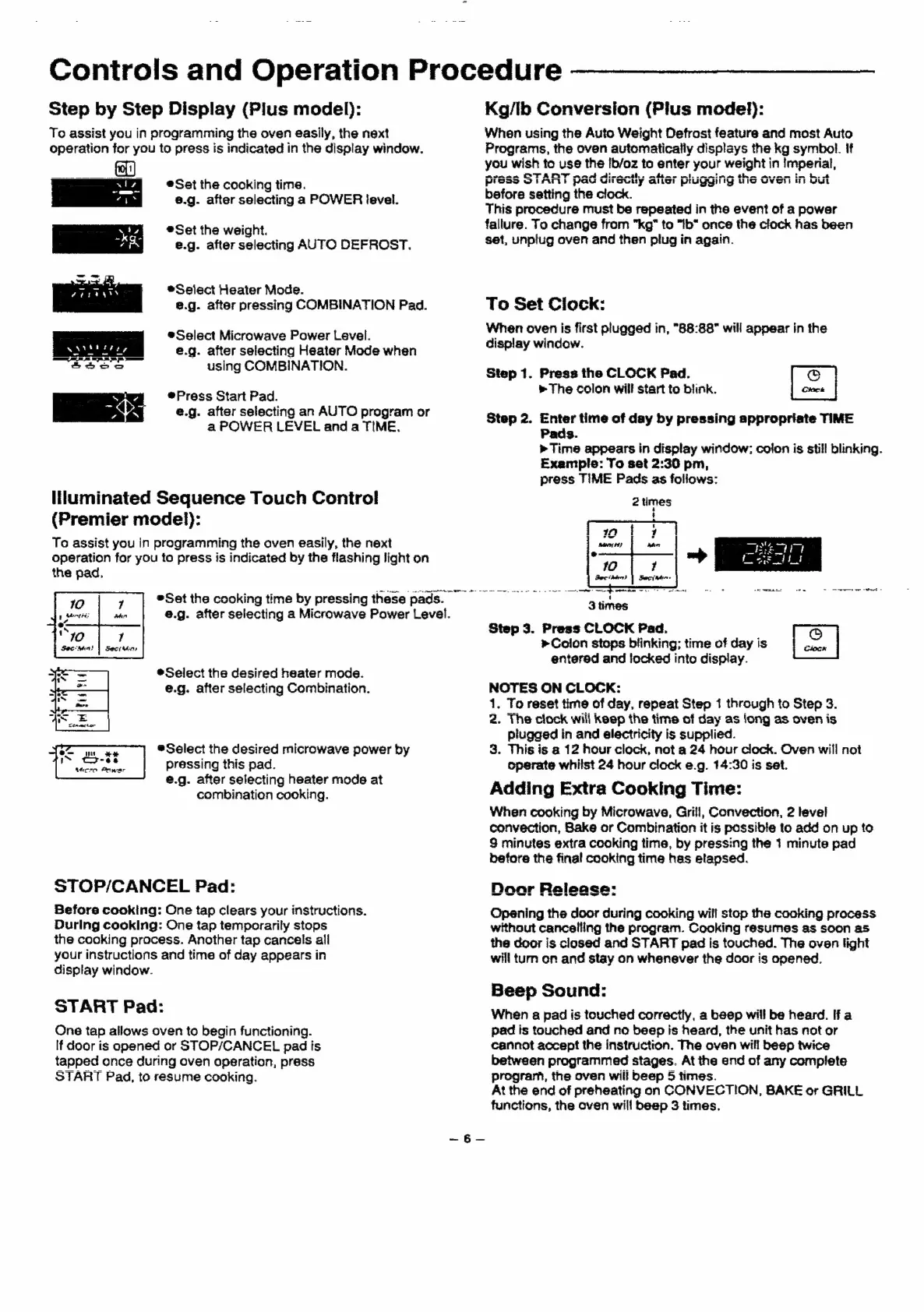
Step
by
Step
Display
(Plus
model):
To
assist
you
in
programming
the
oven
easily,
the
next
operation
for
you
to
press
is
indicated
in
the
display
window.
als
©Sat
the
cooking
time.
4%
8.g.
after
selecting
a
POWER
level.
Mea
|
@
Set
the
weight.
AR
e.g.
after
selecting
AUTO
DEFROST.
®Select
Heater
Mode.
e.g.
after
pressing
COMBINATION
Pad.
eSelect
Microwave
Power
Level.
e.g.
after
selecting
Heater
Mode
when
aoaoe
using
COMBINATION.
Press
Start
Pad.
PY
@.g.
after
selecting
an
AUTO
program
or
a
POWER
LEVEL
and
a
TIME.
liluminated
Sequence
Touch
Control
(Premier
model):
To
assist
you
in
programming
the
oven
easily,
the
next
operation
for
you
to
press
is
indicated
by
the flashing
light
on
*Select
the
desired
heater
mode.
€.g.
after
selecting
Combination.
®Select
the
desired
microwave
power
by
pressing
this
pad.
e.g.
after
selecting
heater
mode
at
combination
cooking.
STOP/CANCEL
Pad:
Before
cooking:
One
tap
clears
your
instructions.
During
cooking:
One
tap
temporarily
stops
the
cooking
process.
Another
tap
cancels
ail
your
instructions
and
time
of
day
appears
in
display
window.
START
Pad:
One
tap
allows
oven
to
begin
functioning.
If
door
is
opened
or
STOP/CANCEL
pad
is
tapped
once
during
oven
aperation,
press
START
Pad,
to
resume
cooking.
®Set
the
cooking
time
by
pressing
these
pads.
_
e.g.
after
selecting
a
Microwave
Power
Level.
ene
ee
we
Kg/Ib
Conversion
(Plus
model):
When
using
the
Auto
Weight
Defrost
feature
and
most
Auto
Programs,
the
oven
automatically
displays
the
kg
symbol.
If
you
wish
to
use
the
Ib/oz
to
enter
your
weight
in
imperial,
menae
OTA
naw
dien
ns.
heme
whim
the
mem
in
Pipes
VALI)
Paw
UH
Souy
ae
pPriggii
yy
WIS
Weil
ere
but
before
setting
the
clock.
This
procedure
must
be
repeated
in
the
event
of
a
power
fallure.
To
change
from
"kg"
to
"Ib"
once
the
clock
has
been
set,
unplug
oven
and
then
plug
in
again.
To
Set
Clock:
When
oven
is
first
plugged
in,
"88:88"
will
appear
in
the
display
window.
ee
Clock
Step
2.
Enter
time
of
day
by
pressing
appropriate
TIME
Pads.
Step
1.
Press
the
CLOCK
Pad.
The
colon
will
start
to
blink.
»
Time
appears
in
display
window;
colon
is
still
blinking.
Example:
To
set
2:30
pm,
press
TIME
Pads
as
foliows:
2
times
:
3
times
Step
3.
Press
CLOCK
Pad.
»Coion
stops
blinking;
time
of
day
is
entered
and
locked
into
display.
—=
NOTES
ON
CLOCK:
1.
To
reset
time
of
day,
repeat
Step
1
through
to
Step
3.
2.
The
clock
will
keep
the
time
of
day
as
long
as
oven
is
piugged
in
and
electricity
is
supplied.
3.
This
is
a
12
hour
clock,
not
a
24
hour
clock.
Oven
will
not
operate
whilst
24
hour
clock
e.g.
14:30
is
set.
Adding
Extra
Cooking
Time:
When
cooking
by
Microwave,
Grill,
Convection,
2
level
convection,
Bake
or
Combination
it
is
possible
to
add
on
up
to
9
minutes
extra
cooking
time,
by
pressing
the
1
minute
pad
before
the
final
cocking
time
has
elapsed.
Door
Raleaca:
wes
5
OR
8
ee
ee
ee
Opening
the
door
during
cooking
will
stop
the
cooking
process
without
cancelling
the
program.
Cooking
resumes
as
soon
45
the
door
is
closed
and
START
pad
is
touched.
The
oven
light
will
turn
on
and
stay
on
whenever
the
door
is
opened.
Beep
Sound:
When
a
pad
is
touched
correctly,
a
beep
will
be
heard.
Ifa
pad
is
touched
and
no
beep
is
heard,
the
unit
has
not
or
cannot
accept
the
instruction.
The
oven
will
beep
twice
between
programmed
stages.
At
the
end
of
any
complete
program,
the
oven
will
beep
5
times.
At
the
end
of
preheating
on
CONVECTION,
BAKE
or
GRILL
functions,
the
oven
will
beep
3
times.