EasyManua.ls Logo

Panasonic DIMENSION 4 Premier - Page 9

Panasonic DIMENSION 4 Premier
18 pages
Print Icon
To Next Page IconTo Next Page
To Previous Page IconTo Previous Page
Loading...
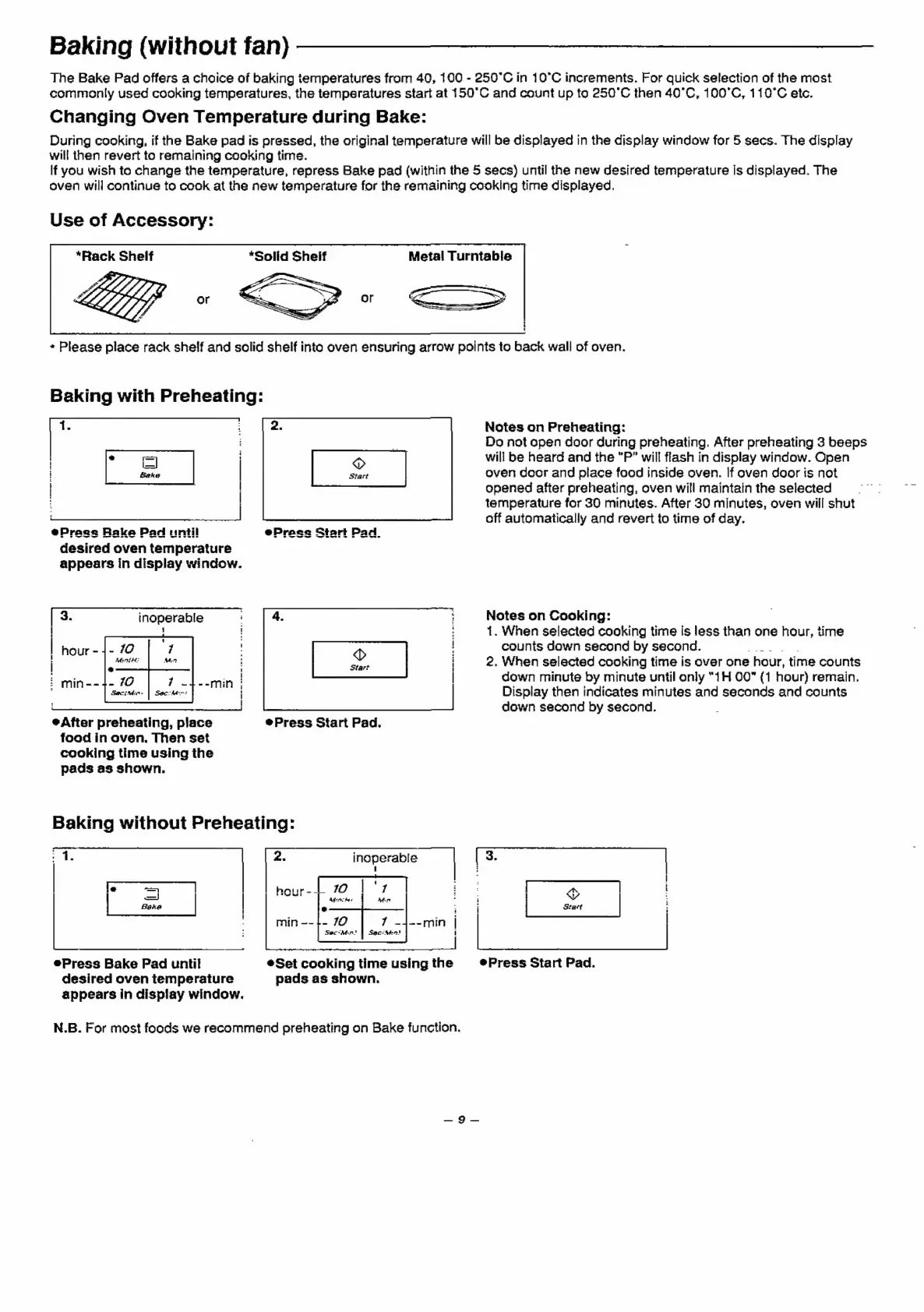
Baking
(without
fan)
The
Bake
Pad
offers
a
choice
of
baking
temperatures
from
40,
100
-
250°C
in
10°C
increments.
For
quick
selection
of
the
most
commonly
used
cooking
temperatures,
the
temperatures
start
at
150°C
and
count
up
to
250°C
then
40°C,
100°C,
110°C
etc.
Changing
Oven
Temperature
during
Bake:
During
cooking,
if
the
Bake
pad
is
pressed,
the
original
temperature
will
be
displayed
in
the
display
window
for
5
secs.
The
display
will
then
revert
to
remaining
cooking
time.
lf
you
wish
to
change
the
temperature,
repress
Bake
pad
(within
the
5
secs)
until
the
new
desired
temperature
is
displayed.
The
oven
will
continue
to
cook
at
the
new
temperature
for
the
remaining
cooking
time
displayed.
Use
of
Accessory:
“Rack
Shelf
Metal
Turntable
+
Please
place
rack
shelf
and
solid
shelf
into
oven
ensuring
arrow
points
to
back
wall
of
oven.
Baking
with
Preheating:
Notes
on
Preheating:
Do
not
open
door
during
preheating.
After
preheating
3
beeps
=]
will
be
heard
and
the
"P”
will
flash
in
display
window.
Open
Bake
|
oven
door
and
place
food
inside
oven.
If
oven
door
is
not
i
|
opened
after
preheating,
oven
will
maintain
the
selected
|
temperature
for
30
minutes.
After
30
minutes,
oven
will
shut
off
automatically
and
revert
to
time
of
day.
ePrese
Rake
Pad
until
desired
oven
temperature
appears
in
display
window.
Notes
on
Cooking:
1.
When
selected
cooking
time
is
less
than
one
hour,
time
counts
down
second
by
second.
seek
2.
When
selected
cooking
time
is
over
one
hour,
time
counts
down
minute
by
minute
until
only
“1H
007
(1
hour)
remain.
Display
then
indicates
minutes
and
seconds
and
counts
down
second
by
second.
[
3.
inoperable
1
After
preheating,
place
®Press
Start
Pad.
food
in
oven.
Then
set
cooking
time
using
the
pads
as
shown.
Baking
without
Preheating:
:
1.
:
inoperable
[
3.
|
|
:
|
Te
=
:
]
A
]
i
=
|
neh
Bare
i
Stact
|
Press
Bake
Pad
until
*Set
cooking
time
using
the
®Press
Start
Pad.
desired
oven
temperature
pads
as
shown.
appears
in
display
window.
N.B.
For
most
foods
we
recommend
preheating
on
Bake
function.