10 VQT2X42 (ENG) (ENG) VQT2X42 11
Camera care and the waterproof
performance
(Continued)
Opening and closing the card/battery door and terminal cover
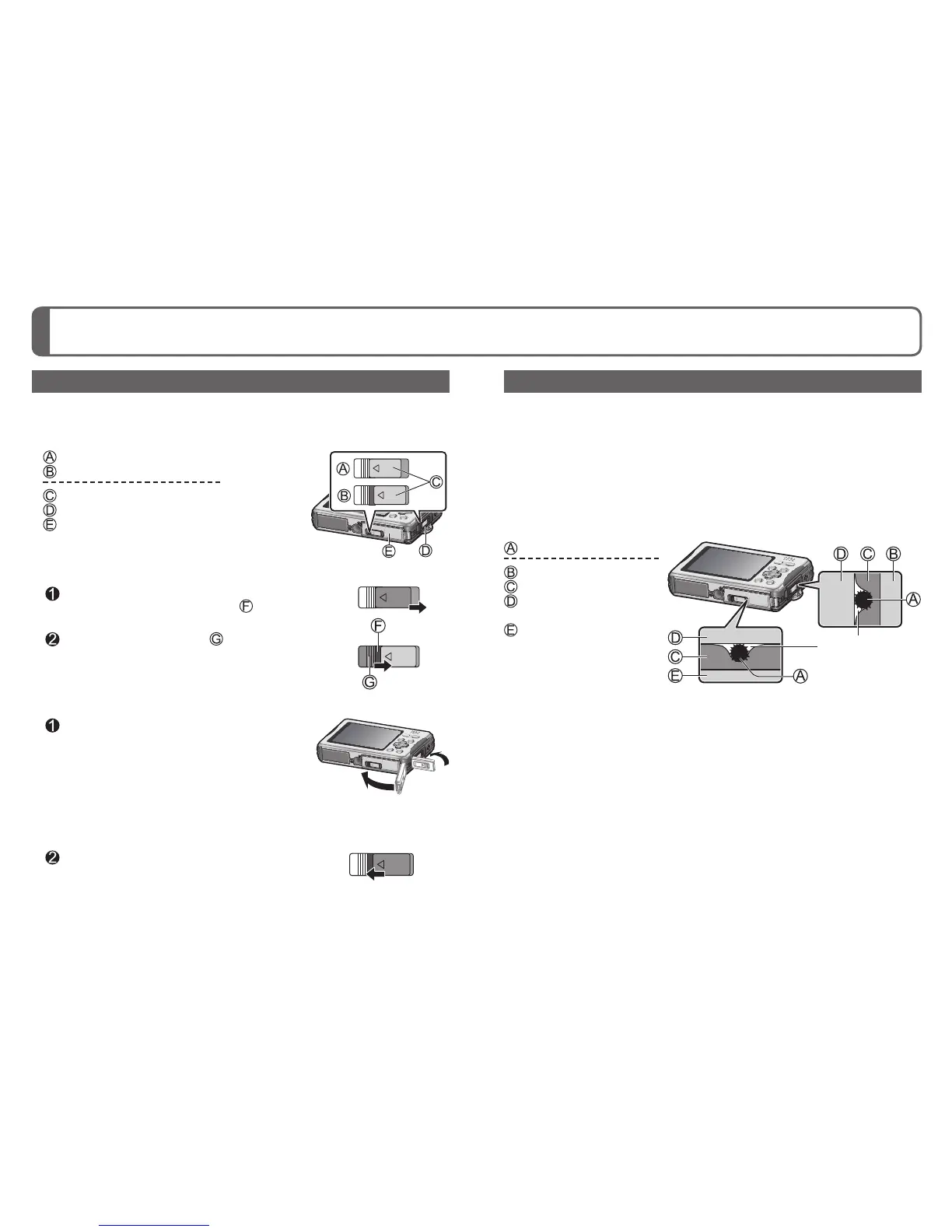
At the time of purchase, the [LOCK] switches of the card/battery door and
terminal cover are in the locked position.
■
[LOCK] switch position
: Locked position
: Unlocked position
: [LOCK] switch
: Terminal cover
: Card/Battery door
■
To open
Slide the [LOCK] switch in the direction of
the arrow until the red area ( ) is visible
The lock is unlocked.
Slide the release lever ( ) to the [LOCK]
switch side
The card/battery door and terminal cover open.
■
To close
While the [LOCK] switch is unlocked,
push the card/battery door and terminal
cover closed until they click
• To prevent water from entering the camera,
make sure that no foreign objects are trapped in
the card/battery door and terminal cover, such
as liquid, sand, hair or dust.
• If the door or cover is closed while the [LOCK]
switch is locked, it may cause damage or let
water enter the camera.
Lock the [LOCK] switch by sliding it in
the direction of the arrow until the red
area is no longer visible
• If the camera is used while a door or cover is
not closed properly, it may open.
Causes of water entering the camera
When the camera is used in the following conditions, a gap may be
formed between the camera and the card/battery door or terminal cover,
allowing water to enter and causing a malfunction.
• When the rubber seal has deteriorated
• When the [LOCK] switch of the card/battery door or terminal cover is
not locked
• When foreign objects such as lint, hair or sand are adhered to the inner
side of the card/battery door or terminal cover (rubber seal or rubber
seal contact area) and are trapped
: Foreign object
: Terminal cover
: Rubber seal
: Rubber seal contact
area
: Card/Battery door
A gap forms and
allows water to
enter



 To Next Page