12 VQT2X42 (ENG) (ENG) VQT2X42 13
Camera care and the waterproof
performance
(Continued)
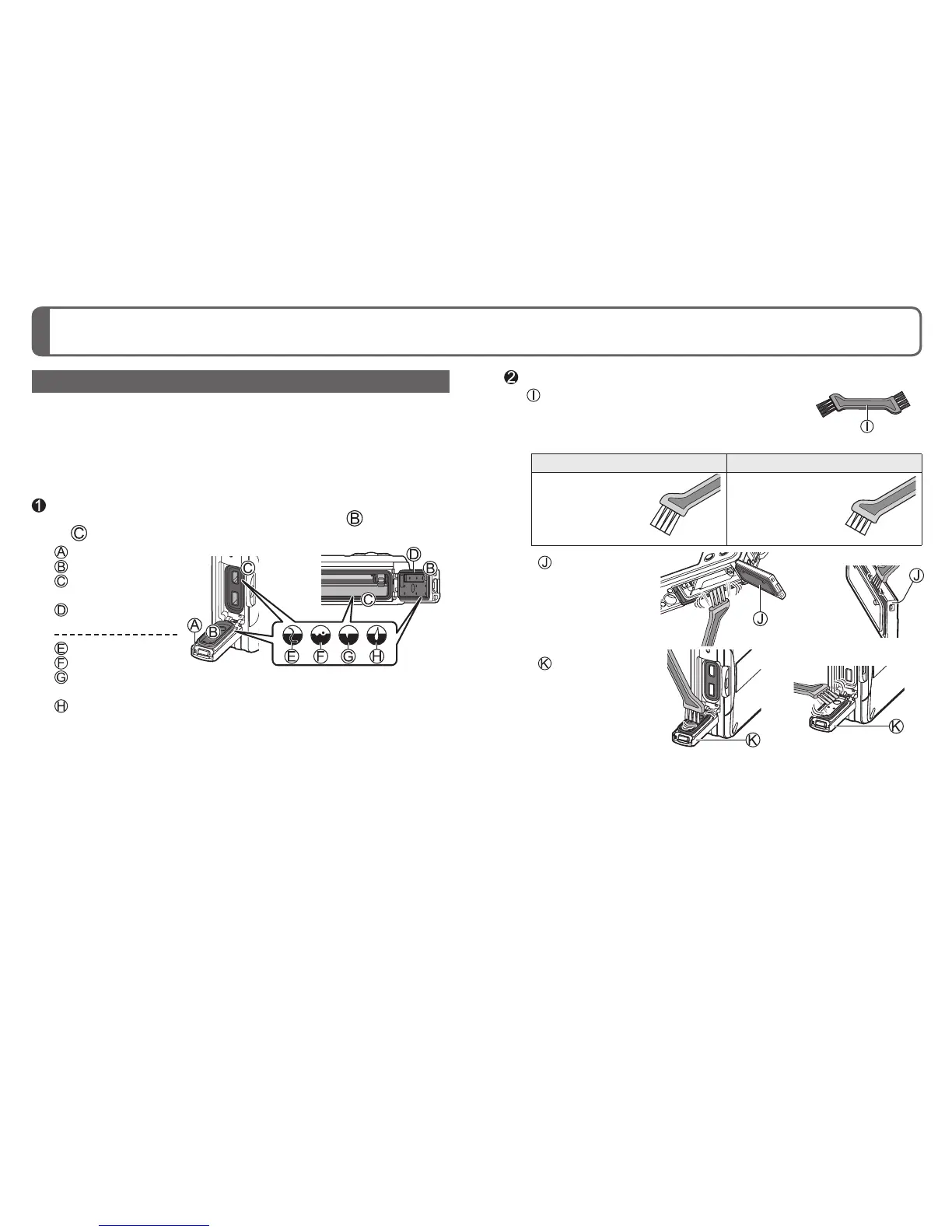
Cleaning the rubber seals
When a foreign object (such as hair, sand, dust or liquid) adheres to the
rubber seal or rubber seal contact area, water may enter within a few
seconds and cause a malfunction.
• When cleaning, make sure that no foreign objects get inside the
camera.
• Be especially careful when removing very small or wet sand particles.
Make sure that there are no foreign objects adhered to the inner
side of the card/battery door or terminal cover ( rubber seal
or rubber seal contact area)
: Terminal cover
: Rubber seal
: Rubber seal
contact area
: Card/
Battery door
: Hair or lint
: Sand or dust
: Crack or
deformation
: Liquid
• When the rubber seal attached to the inner side of the card/
battery door or terminal cover is cracked or deformed, contact
a Panasonic Service Center.
Remove adhered foreign objects with the supplied brush
: Brush (supplied)
Long brush Short brush
Use to remove
substances such
as fine or dry
sand.
Use to remove
large foreign
objects, and
substances such
as wet sand.
: Card/
Battery door
: Terminal cover
●
Handling the brush
• Before using the brush, make sure that no foreign objects are
adhered to it.
• After using the brush, clean it by removing any adhered foreign
objects.




 To Next Page