RQT9378
12
Connections
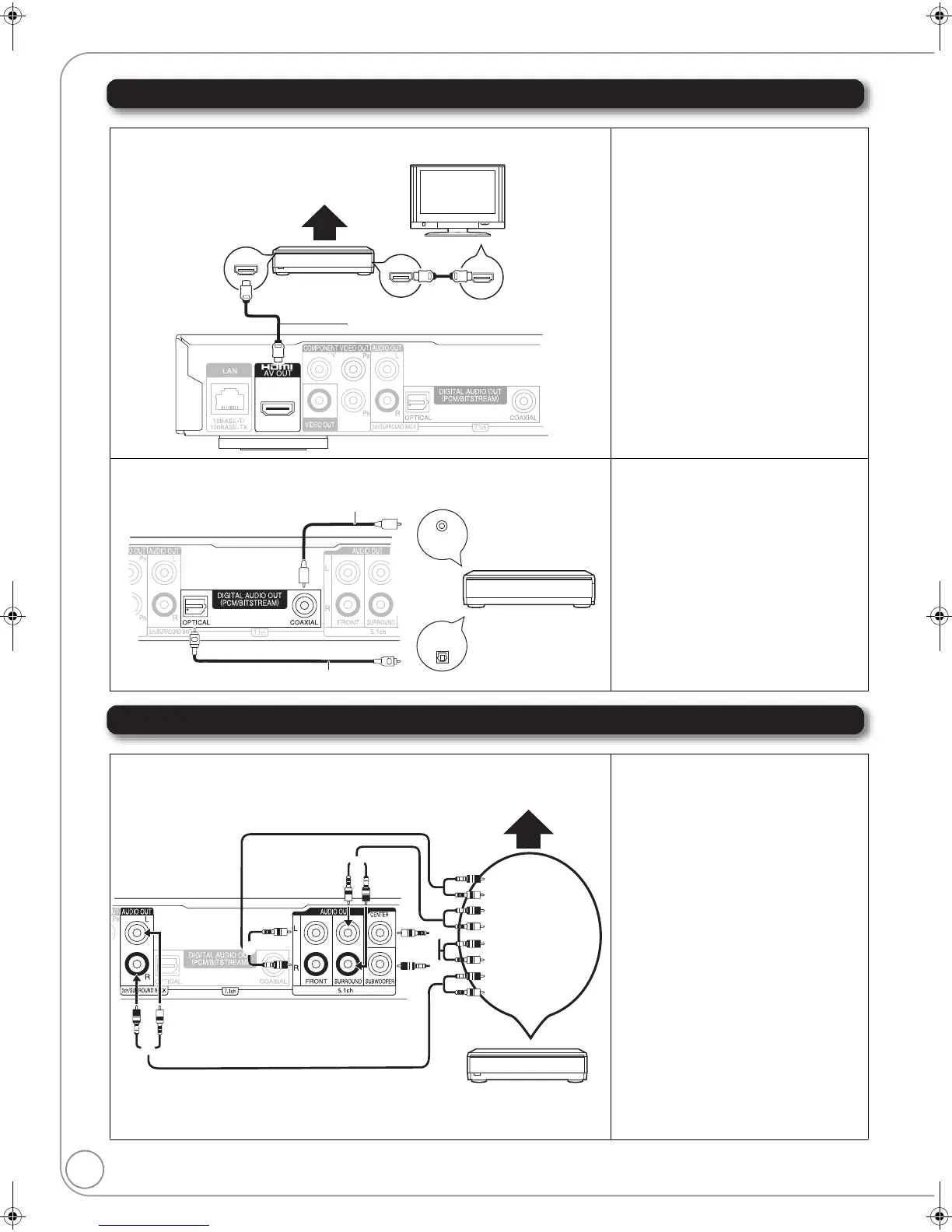
Digital Audio Connections
Analog Audio Connections
D Connecting to HDMI AV OUT terminal
≥“HDMI Video Mode” and “HDMI Audio Output”
should be set to “On”. (> 34)
≥“Digital Audio Output” : Depending on the
connected amplifier/receiver. (> 33)
≥The HDMI connection supports VIERA Link
“HDAVI Control” (> 28) when used with a
compatible Panasonic TV.
≥Enjoying High Bit rate Audio of BD-Video
(> 8)
E
Connecting to Digital Audio Output terminal
≥Please set “Digital Audio Output” to the
connection you will use, coaxial or optical
digital. (> 33)
≥When connecting a TV (> 11, A) with HDMI
AV OUT terminal, set “HDMI Audio Output” to
“Off”. (> 34)
(Otherwise, the sound may not be output with
the desired audio.)
F Connecting to 7.1ch AUDIO OUT terminal [BD80]
≥“Analog Audio Output” should be set to
“7.1ch”. (> 34)
≥Enjoying High Bit rate Audio of BD-Video
(> 8)
≥
When connecting amplifier/receiver or other
devices with HDMI AV OUT terminal, set “HDMI
Audio Output” to “Off”. (
>
34)
(Otherwise, depending on the specifications of
connected devices, the audio from AUDIO OUT
terminal may be output as two channels only.)
≥When connecting a TV (> 11, A) with HDMI
AV OUT terminal, set “HDMI Audio Output” to
“Off”. (> 34)
(Otherwise, the sound may not be output with
the desired audio.)
≥Depending on how the disc was recorded, the
audio may not be output properly on the
number of channels desired.
Cable connections
a Surround back speaker (L/R)
b Front speaker (L/R)
c Surround speaker (L/R)
d Center speaker
e Subwoofer
HDMI IN
Multi channel speakers
Amplifier/receiver
Back of the unit
Television
HDMI IN
HDMI OUT
HDMI cable
(Only included in DMP-BD605)
COAXIAL IN
OPTICAL IN
Back of the unit
Coaxial cable
Amplifier/receiver
With COAXIAL ([BD80]) or OPTICAL
Optical digital audio cable
OR
Connect Audio
cables to
terminals
corresponding to
the speakers you
have connected.
Back of the unit
Amplifier/receiver
Multi channel speakers
DMP-BD80_60PP-RQT9378_ENG.book 12 ページ 2009年1月14日 水曜日 午後5時28分



 To Next Page