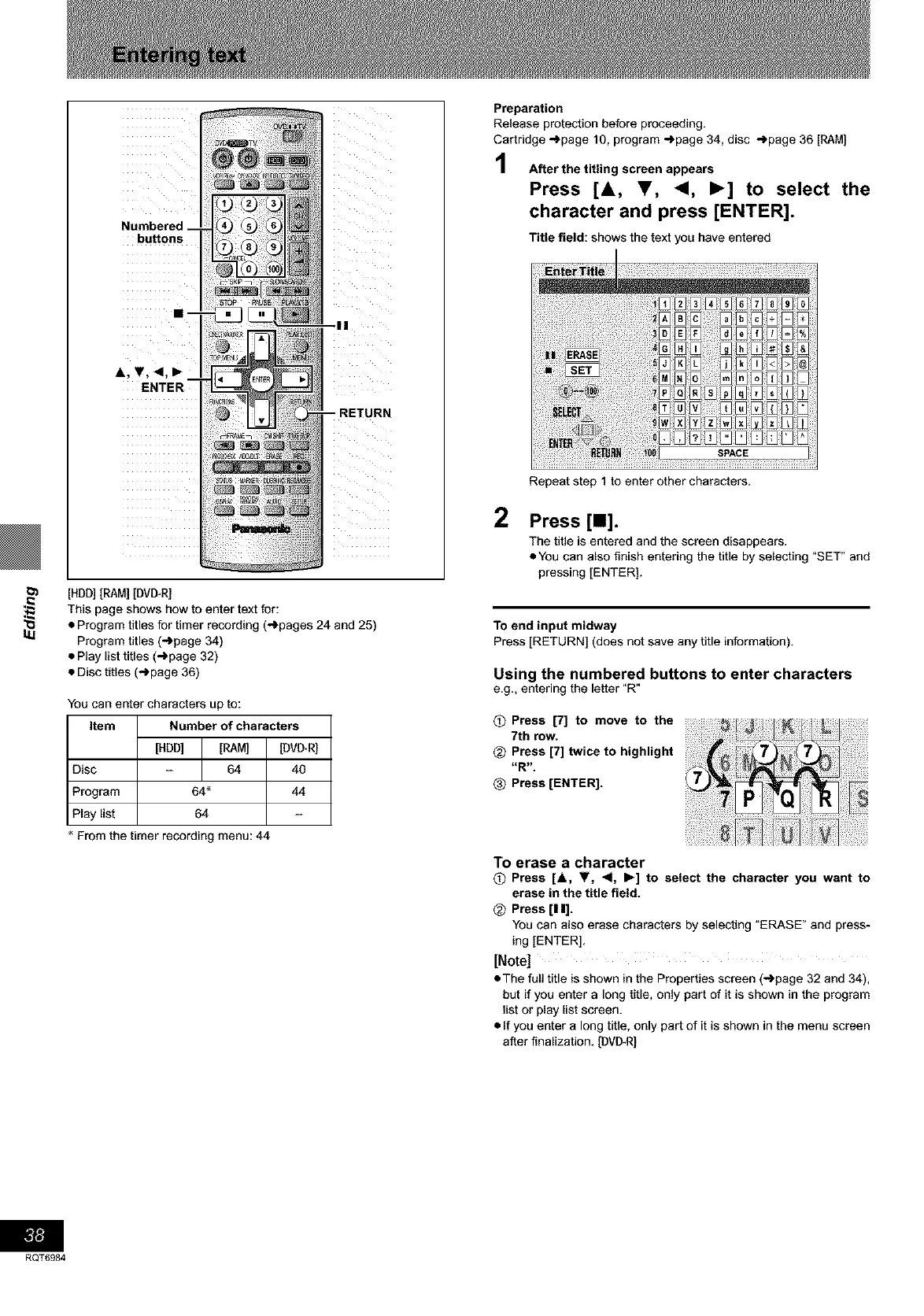
buttons
RETURN
l_ [HDD][RAM] [DVI_R]
This page shows how to enter text for:
_.1 • Program titles for timer recording (_pages 24 and 25)
Program titles (-)page 34)
• Play list titles (-_page 32)
• Disc titles (_page 36)
You can enter characters up to:
Item Number of characters
[HDD] [RAM] [DVD_R]
Disc - 64 40
Program 64 _ 44
Play list 64
From the timer recording menu: 44
Preparation
Release protection before proceeding.
Cartridge _page 10, program -')page 34, disc -_page 36 [RAM]
After the titling screen appears
Press [&, Y, <1, I_] to select the
character and press [ENTER].
Title field: shows the text you have entered
2
Repeat step 1 to enter other characters.
Press [11].
The title is entered and the screen disappears.
• You can also finish entering the title by selecting "SET" and
pressing [ENTER].
To end input midway
Press [RETURN] (does not save any title information).
Using the numbered buttons to enter characters
e.g,, entering the letter "R"
O Press [7] to move to the
7th row.
_) Press [7] twice to highlight
-R-
Press [ENTER].
To erase a character
O Press [A, V, <1, I_] to select the character you want to
erase in the title field.
<_ Press [11].
You can also erase characters by selecting _ERASE" and press-
ing [ENTER].
[Note]
• The full title is shown in the Properties screen (-_page 32 and 34),
but if you enter a long title, only part of it is shown in the program
list or play list screen.
• If you enter a long title, only part of it is shown in the menu screen
after finalization. [DVI_R]
RQT6984









 To Next Page