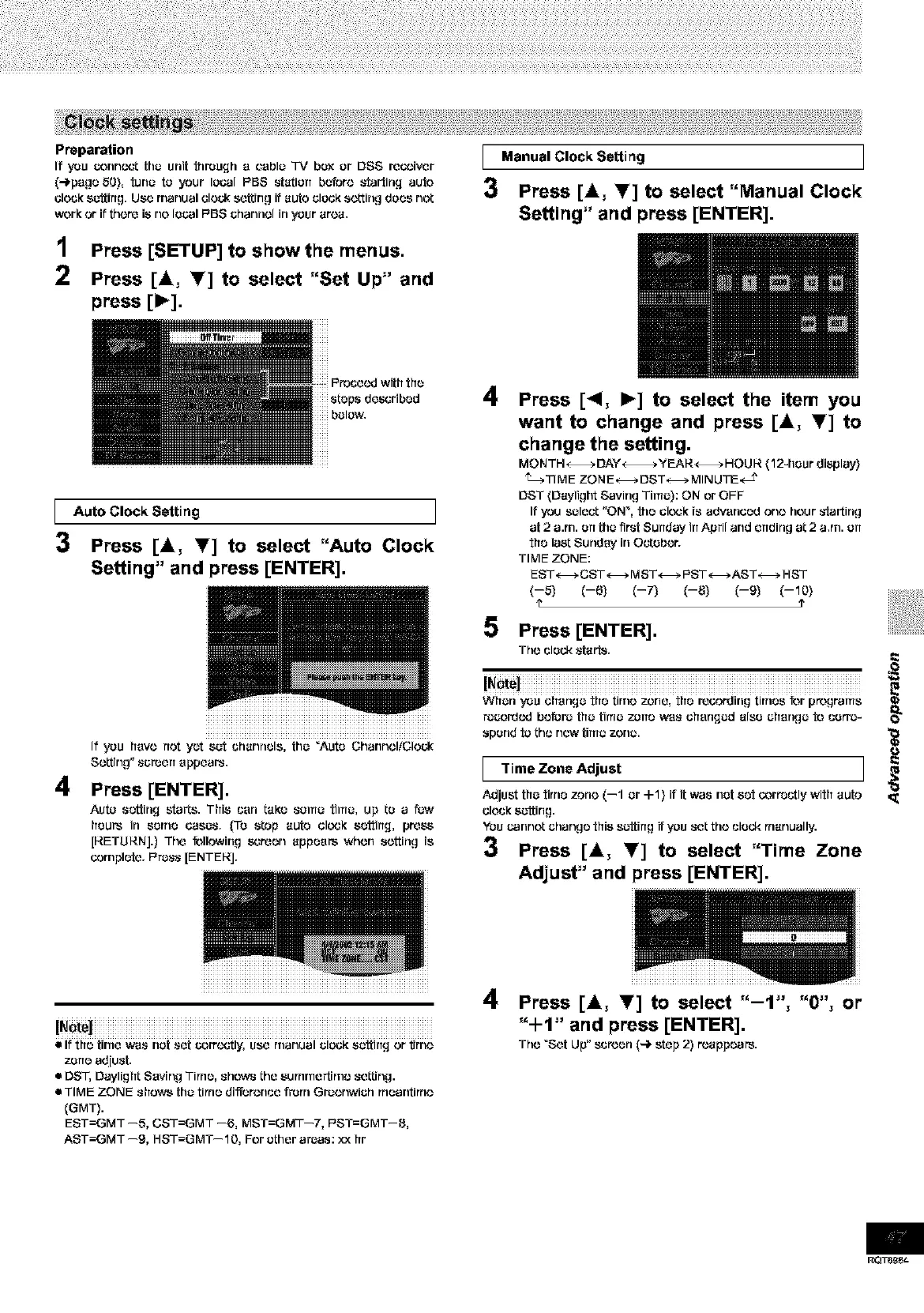
Preparation
If you c-onncct tha unit through a cauls "IV box or DSS recoiver
(4page 50}, tuna to your Is(:.31PBS station before _'tartirLq auto
clock satting. Use manual elouk setting if auto clock setting does not
work or if there isno Isual F'BS channel in your area.
1 Press [SETUP] to show[he menus.
2 Press [&, _] to select "Set Up" and
press [1_].
I Manual CIockSetting
3 Press [&, Y] to select "Manual Clock
Setting" and press [ENTER].
1
3
4
Auto Clock Setting I
Press [&, T] to select "Auto Clock
Setting" and press [ENTER].
iiiiiiiiiiiiiiiiiiiiiiiiiiiiiiiiiiiiiiiiiiiiiiiii
If you hays not yet sot channels, [ha "Auto ChannolfCIock
So, rig" _creerT appears.
Press [ENTER].
Auto setting starts. This can taro santo tiros, up to a law
[TOURSin some _O_r _0 _tOp aUtO clO'_K settirTq, pre_
[RETURN].} The following screen appears whorl sorting is
corrlplete. F'rass [ENTERJ.
4
Press [<1, I_] to select the item you
want to change and press [&, I'] to
change the setting,
MONTH _ DAY_ _fEAR_ HaUlS. (12-hour display}
_TIMF ZONF_DST_MINUTE,_ J'
DST (Daylight Saving Time): ON or OFF
If you select "ON _, the clo',._kis advanced ono hour_-tartirlg
at 2 a.rn. art tha first Sunday in April and ending at 2 a,rn. art
the last Sunday in Oetsbor.
TIME ZONE:
EST_CST_ MST_ PST_AST_ HST
(--5) (--6) (--7) (--8) (--9) (--10)
e ?
5 Press [ENTER].
The clock ,_tai'_r
WilOrlYOU changO _ilatimo 70riO,tfl_recordirlgtirrl_S_r p_gramS
ra£:ord¢.vJbefore tha titus zone w*a_ ohsrlqad also chsrlga to corre-
spond to tho new tima zona.
I "rimeZone Adjust I
Adjust tha tirne zone (--1 or -I-1) it it was not set _rr_utly with auto
clock sattirlg,
YOUuannot chango this s_tting if you _t tho clock rrtanually.
3 Press [A, Y] to select "Time Zone
Adjust" and press [ENTER].
iiiiiiiiiiiiiiiiiiiiiiiiiiiiiiiiiiiiiiiiiiiiiiiiiiiiiiiiiiiiiiiiiiiiiiiiiiiiiiiiiiiiiiiiiiiiiiiiiiiiiiiiiiiiiiiiiiiiiiiiiiiiiiiiiiiiiiiiiiii
• If the time w*a_nat _et _)rro,,_'tly, USe rrlanual clock sattirTg or fJrrlo
z_rle adjust.
• DST, Daylight Saving Time, ._howsthe surnrne_rno seGing.
• TIME ZONE shows [ha tinte differonue front Graonwich rrteantinto
(GMT).
EST=GMT --5, CST=GMT --6, MST=GMT--7, PST=GMT--8,
AST=GMT --9, HST=GMT--10, For ather art;as: xx hr
4 Press [_k, I'] to select "-1", "0", or
"+1" and press [ENTER].
Tho "Set Up" suroen (4 step 2) roappears.
RQT6_e_









 To Next Page