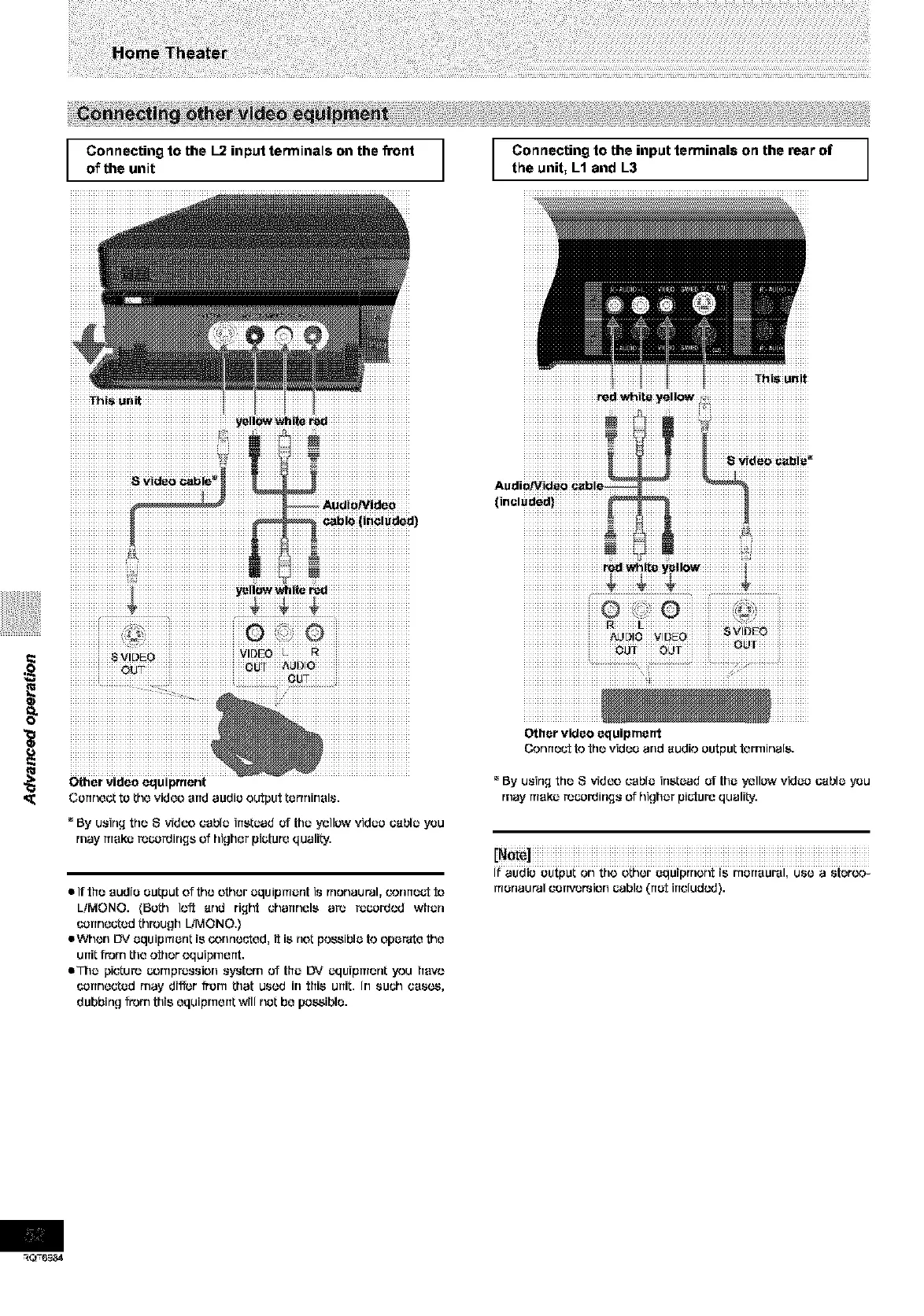
Connecting to the I-2 input terminals on the front
of the unit
1
Connecting to the input terminals on the rear of
the unit, L1 and L3
J
_hi_ ur_it
iiiiiiiiiiiiiiiiiiiiiiiiiiiiiiiiiiiiiiiiiiiiiiiiiiiiiiiiiiiiiiiii iiiiiiiiiIiiiiiiiiIiiiiiiii iiiiiiiiiiiiiiiiiiiiiiiiiiiiiiiiiiiiiiii
iiiiiiiiiiiiiiiiiiiiiiiiiiiiiiiiiiiiiLjiiiiiiiiiiiiiiiiiiiiiiiiiiiiiiiiiiiiiiiii
• hi_ urdt
• If tfre audio eutput of the other equipruer_t is rnonaut'al, cormeot to
LiMONO. (Beth loft and riqht charrnele are recordcd wfterl
connected through LiMONO.}
eWhon I_,' equipmerlt is (,'onrlouted, it is riot possible to operate the
unit from the other equipment.
eThe picture compression eyoterrl of tfre DV equipmer_t you frevo
uerrr_ected may di_,,r frorn that used in tfrie unit. In such css_,
dubbir_g from this equipment will net be possible.
iiiiiiiiiiiiiiiiiiiiiiiiii ¸i_iiiiiiiiiiiiiiiiiii ¸_iiiiiiiiiiiiiiiii ¸
Other video equipment
Connect to the video and audio output terminals.
_'By u_irLq the S video cable irletead of the yellow video (;able you
may make rocordirLqs of higher picture qualiLy.
If audio output on the other equiprrtont is r'nerreural, use a ster_._-
ruer_aut'al cerrversion cable (rret irrcludcd).









 To Next Page