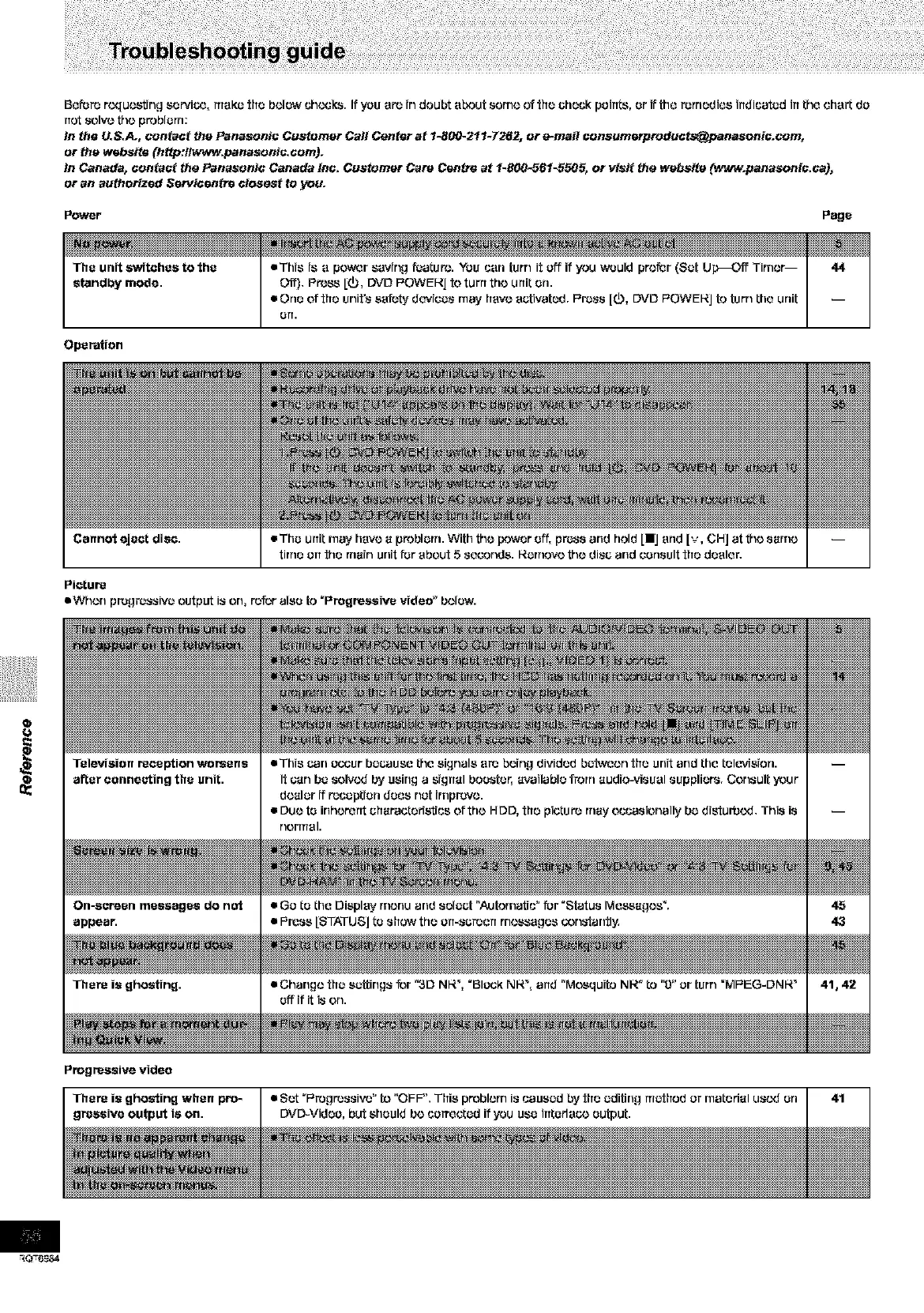
Beforerequ_trng eervi_,ITreKethe belowuh¢._k_.Ifyou ere indoubte_ut sorne o?the check peinl:s,orifttleremedies indicatedinthe oherl:de
notsolve_e problem:
In the U.S.A., contact the Panasonie Customer Call Center at 1-8_ 211-7262, or e-mail consumerpreduots@panesonis.com,
or the websi_ (http:flwww.panasonie.oom).
In Canada, contact the Panasonic Canada Inc. Customer Care Centre at 1-800-561-5505, or visit the website (www.panasonis.ca),
or an authorized Sewisentre closest _o you.
Power Page
Operation
• This is e power saving feature:. You can fern it off if you would prefer (Sat Up_C,f_ Timer--
Off). Press [(_, DVD F'OWEI_J to turn the unit on.
• One of the unit's safety do'vices r'nayhave activated. F'r_ss [0, DVD F'OWEI_J to turn the unit
arT.
Cannot eject diec.
Picture
mWhon progressive output is on, r_r also to "Progreseive video" below.









 To Next Page