16
RQT9101
Enjoying i n various si tuations
Enjoying i n various si tuations
Using this unit with other equipment
Turn off all equipment before connecting and read the appropriate operating instructions.
Connect the video output from this unit directly to the television.
≥
The unit’s speakers do not have magnetic shielding. Do not place the unit near televisions, personal computers or other devices easily influenced
by magnetism. Do not keep this unit and magnetized cards (bank cards, commuter passes, etc.) close together.
≥
If you raise the volume on the television while playing this unit, the volume may abruptly become very loud when you switch to a television
broadcast. Return the volume to its normal level before changing.
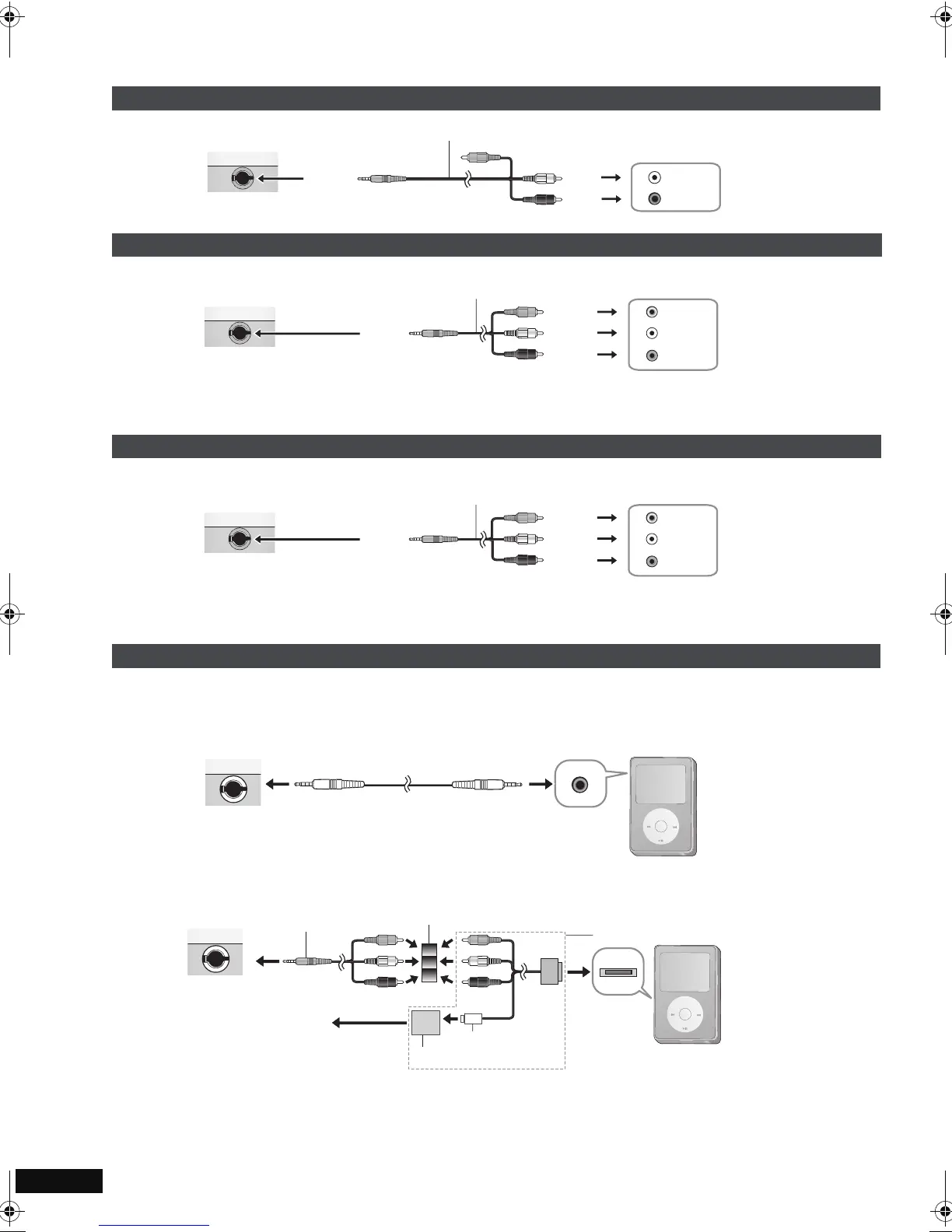
1 Connect the equipment to this unit.
2 Press [AV SELECT] to switch to “AUX”.
“AUX” lights on the unit’s display.
≥
Operate playback using the connected equipment. (Please read the operating instructions for the connected equipment)
≥
The unit does not turn off automatically while “AUX” mode is on. Turn the unit off when you have finished using it.
[DVD-LS86]
Connect the iPod to this unit to enjoy audio, pictures, or video recorded on the iPod. The connection for playing pictures or video is different
depending on the iPod type (
A or B).
A:Allows pictures or video recorded on the iPod 5th generation (video) or pictures recorded on the iPod 4th generation (color display) to
be played.
B:Allows pictures or video recorded on the iPod touch, iPod classic, or iPod nano 3rd generation to be played.
A commercially-available, iPod-exclusive cable is required.
≥
The input automatically switches to “iPod”, and then “iPod” lights on the unit’s display. You can also press [AV SELECT] to select “iPod”.
≥
Operate playback using the connected iPod. (Please read the operating instructions for the connected iPod.)
Enjoying stereo audio
Enjoying with a television
Watching video from other equipment
Enjoying with iPod
Left side of this unit
Yellow
Audio/video cable (included)
White
Red
L
R
Amplifier/System component
AUDIO IN
Yellow
Television
AUDIO IN
L
R
VIDEO IN
Audio/video cable (included)
Yellow
Left side of this unit
Yellow
White
Red
e.g. Video camera
AUDIO
OUT
L
R
VIDEO
OUT
Audio/video cable (included)
Yellow
Left side of this unit
Yellow
White
Red
M
E
N
U
iPod
Cable for iPod
(included only with [DVD-LS86])
Headphones
port
Left side of this unit
iPod
M
E
N
U
USB connector
Dock
connector
Left side of this unit
Apple composite AV cable (not included)
Plug adaptor (included only with [DVD-LS86])
Audio/video cable (included)
To household
mains socket
USB power adapter
RQT9101-L.book 16 ページ 2008年1月30日 水曜日 午後4時4分



 To Next Page