
 Need help?
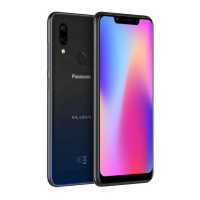
Do you have a question about the Panasonic ELUGA Ray 600 and is the answer not in the manual?
Instructions for inserting SIM cards into the Dual SIM phone for network connectivity.
How to charge the phone's battery or connect it to a PC using the USB cable.
Detailed description of each key and port, including volume, power, camera, and USB jack.
Instructions for accessing and dismissing the notification panel for system alerts and quick settings.
Guidance on moving widgets and icons to new locations or different Home screen panels.
Steps to create new folders by grouping icons and remove them by emptying their contents.
Steps to select and confirm a wallpaper to change the phone's background.
Instructions for making calls, accessing the call log, and managing call history.
Learn how to add new contacts to your phone or SIM card.
How to compose messages and reject calls using predefined busy messages.
Information on receiving, editing SMS/MMS, and viewing message conversations.
Guide to using the phone's browser to search and access website addresses.
Steps to download apps from the Android Market (Play Store) after adding a Google account.
How to view app info, force stop, or uninstall applications from device settings.
Enable installation of apps from sources other than the Play Store via settings.
Recommendations to resolve radio or television interference issues with the device.
Guidelines for using accessories and maintaining separation distance to comply with RF exposure limits.
 General
| Display | 5.5 inches |
|---|---|
| RAM | 3 GB |
| Storage | 32 GB |
| Rear Camera | 13 MP |
| Front Camera | 5 MP |
| Battery | 4000 mAh |
| Display Type | IPS LCD |
| Resolution | 720 x 1280 pixels |
| Expandable Storage | Yes, up to 128 GB |
| SIM | Dual SIM |
| Operating System | Android 7.0 (Nougat) |










 To Next Page