EasyManua.ls Logo

Panasonic KX-TU456 EX - User Manual

Panasonic KX-TU456 EX
84 pages
Print Icon
To Next Page IconTo Next Page
Loading...
Operating Instructions
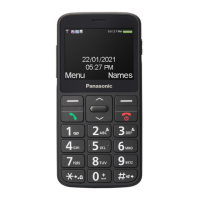
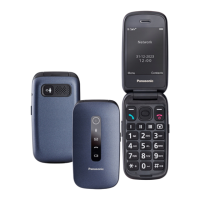
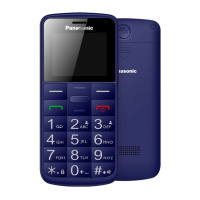
Easy Use Mobile Phone
Model No. KX-TU456 EX
KX-TU466 EX
Thank you for purchasing a Panasonic product.
Please read these operating instructions before using the
unit and save them for future reference.
Before initial use, see “Important Information” on
page 14.
Supplied accessories
– AC adaptor (Part No. TPA-97H050055VW01): 1 pc
– Rechargeable battery (Part No. 514047AR): 1 pc
– Headset (Part No. JYK-E112): 1 pc
– Charger: 1 pc (KX-TU466 only)

Questions and Answers

  • E
    Elijah JohnsonSep 9, 2025
    Why are the contacts in the contacts list not displayed correctly on my Panasonic KX-TU456 EX?
    • C
      Connie AguilarSep 9, 2025
      If the contacts in your contact list aren't displayed correctly, it's because only characters supported by this phone can be displayed.
  • B
    Brittany AlexanderAug 22, 2025
    Why does my Panasonic KX-TU456 EX Cell Phone say no service?
    • M
      Marcus ZamoraAug 23, 2025
      If your phone displays 'No Service', it means there is no network service available in your current location. To fix this, check the current status and move to a new location where you can get better reception.
  • F
    farleymaryAug 25, 2025
    What to do if my Panasonic Cell Phone has limited service?
    • M
      mcooperAug 25, 2025
      If your Panasonic Cell Phone indicates limited service, it means that there is no network service in your current location. You should move to another location where your network can be received properly. Note that with limited service, you can only call the international emergency number "112".
  • D
    davieswayneAug 26, 2025
    How to turn on Panasonic Cell Phone if it does not turn on?
    • B
      bobbysmithAug 27, 2025
      If your phone doesn't turn on even with a charged battery, press the power button for about 2 seconds to turn the power on.
  • U
    urodriguezAug 27, 2025
    Why is my Panasonic Cell Phone beeping and/or flashing?
    • K
      Kurt AdkinsAug 27, 2025
      If your phone is beeping and/or flashing, it indicates that the battery charge is low. To resolve this, fully charge the battery.
  • A
    April GardnerAug 29, 2025
    Why I cannot make a call with my Panasonic KX-TU456 EX Cell Phone?
    • M
      mitchellelizabethAug 29, 2025
      If you cannot make a call, it might be due to several reasons: outgoing calls are barred (you should deactivate the outgoing call bar settings), your call is withheld (change the show my ID setting to a setting other than "Hide ID"), or the fixed dialling feature is enabled (disable it).
  • P
    Pamela LittleSep 17, 2025
    What to do if PUK1 or PUK2 is blocked on Panasonic Cell Phone?
    • M
      Melissa PaulSep 18, 2025
      If PUK1 or PUK2 is blocked, it means you entered the incorrect PUK1/PUK2 code 10 times. In this case, contact your network operator or service provider.
  • J
    jbrennanSep 18, 2025
    Why I cannot receive E-mail messages on my Panasonic KX-TU456 EX?
    • N
      Natalie CannonSep 22, 2025
      This phone only supports SMS/ MMS message services. Contact your network operator/service provider for details of this service.
  • D
    Donna ThomasSep 7, 2025
    Why I cannot receive a call on my Panasonic KX-TU456 EX Cell Phone?
    • M
      Melissa BlackSep 7, 2025
      If you cannot receive calls, it may be because incoming calls are barred. Deactivate the incoming call bar settings.
  • H
    Hannah McguireSep 4, 2025
    Why doesn't my Panasonic KX-TU456 EX Cell Phone ring?
    • A
      Anthony CastroSep 4, 2025
      If your phone isn't ringing, it could be because the ringer volume is turned off, so adjust the ringer volume. Another possibility is that night mode is activated, so turn it off.

Summary

Controls

Getting Started

Setting up the Phone

Instructions for inserting SIM card, microSD card, and battery.

Battery Charging

Guide on how to charge the phone's battery using AC adapter or USB.

Important Information

Safety Precautions

Crucial safety warnings and precautions for using the phone and its accessories.

Product Specifications

Technical details of the phone, including hardware, frequency, and power.

Basic Operations

Making Calls

Step-by-step guide on how to initiate calls using different methods.

Messages

Information on sending and receiving SMS and MMS messages.

Phonebook Management

Guide to storing, managing, and assigning contacts.

Connecting to Other Devices

Bluetooth Wireless Connection

Steps to enable and use Bluetooth for connecting to other devices.

Useful Information

Troubleshooting

Solutions for common problems and display messages encountered with the phone.

Panasonic KX-TU456 EX Specifications

General IconGeneral
Display Size2.4 inches
Resolution240 x 320 pixels
Battery Capacity1400 mAh
Camera0.3 MP
BluetoothYes
Talk TimeUp to 5 hours
DisplayTFT
Battery TypeLi-Ion
Network2G

Related product manuals