16
Installing or removing the trimmings box
• Make sure that the power is off.
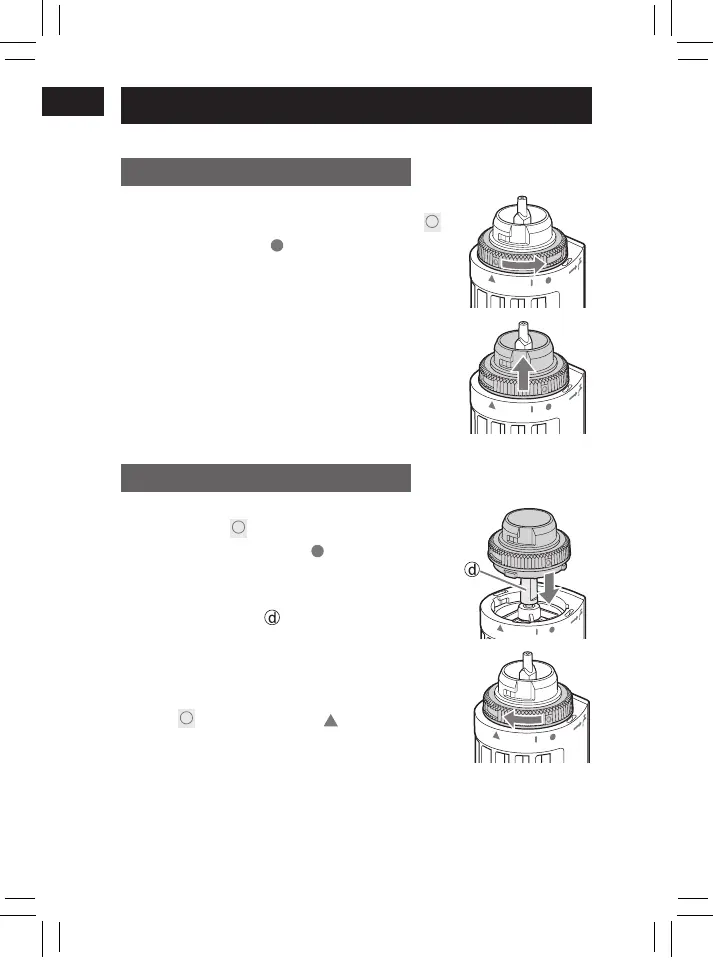
How to remove
Rotate to remove the wash switch ring.
• Rotate the wash switch ring until its “
”
mark aligns with “
” mark of the main
body.
How to attach
1. Insert the trimmings box.
• Align the “
” mark of the wash
switch ring with the “
” mark of the
main body.
• Be careful not to damage the lter
with the shaft (
).
2. Rotate to attach the wash switch
ring.
• Rotate the wash switch ring to align
its “
” mark and the “ ” mark of the
main body.
PB021091 - ER-GN70 香港向说明书_(01EN)_11-12-21.indd 16 2021/11/12 15:54:09




 To Next Page