12
English
Charging the shaver
• Turn the shaver o.
• Wipe o any water droplets on the appliance socket.
• Use the specied USB power adaptor and USB cable.
• The USB power adaptor is sold separately.
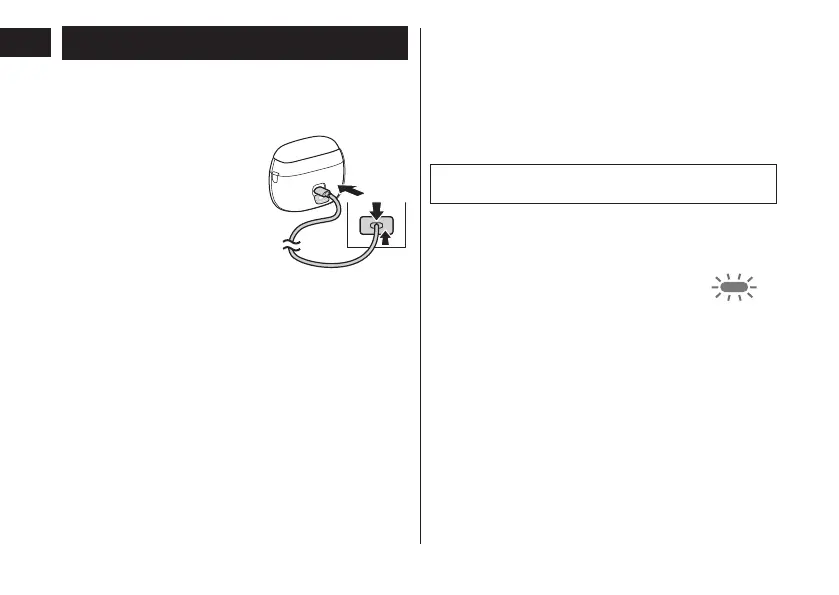
1
Open the socket
cover and insert
the USB plug
main body and
USB power
adaptor�
2
Insert the USB
household outlet�
1
2
1
• Check that the charge status lamp is glowing.
• Charging is completed after approx. 2 hours.
3
Remove the USB power adaptor
from the household outlet, and
remove the USB plug from the
main body after the charge
• Close the socket cover.
Note
You cannot operate the shaver while charging.
► When the battery capacity is low
• The appliance beeps twice after switched o.
• The charge status lamp blinks once
every second when operating the
shaver.
You can shave 2 to 3 times after the
charge status lamp blinks. (This will dier
depending on usage.)
► Notes
• The shaver may be charged with adaptors and cables
other than the specied ones, but Panasonic's
specied adaptor with splash-resistant design and a
USB cable with an overheating protection feature
should be used to ensure safety.
The adaptor is not completely waterproof, so prevent
it from getting wet.
•
After charging is completed, turning the power switch
ON with the shaver plugged in will cause the charge
status lamp to light up and then turn o after 5 seconds.






 To Next Page