14
English
Making foam in shaving foam mode
It is easier to make foam this way than by hand.
• Check the system outer foil for cracks or deformations
before use.
• Check that the socket cover is closed.
1
Preparing foam
Scoop a suitable amount of facial cleanser or
similar in your hand, and add a suitable amount of
cold or warm water.
2
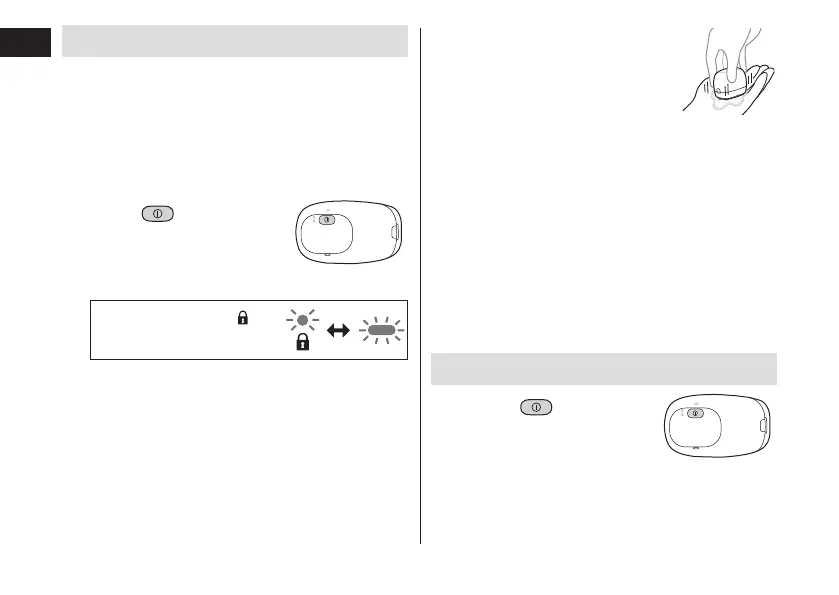
Hold for
2 seconds or more
to switch to shaving
foam mode�
The switch lock lamp ( )
and charge status lamp blink
alternately.
• The shaving foam mode ends after 15 seconds.
The shaver can then be used to shave.
• To stop using the shaving foam mode and start
shaving, press the power switch once.
3
Press the blades
gently in the palm of
facial cleanser etc�
around and move the
blades up and down
to make foam�
• If there is insucient foam, add
slightly more water, hot water or
facial cleanser etc. to make it
easier to create foam.
► Notes
• Do not use shaving agent (excluding foam), facial
cleansing foam (with scrubbing compounds) or soap
as these may cause the blades to clog, or be unable
to make foam.
Shaving beard
1
Press and
shave�
The “shaving sensor”, which automatically adjusts the
power depending on the beard thickness, will operate.
It will shave with high power on areas where the beard
is heavy, and reduce the power on areas where the
beard is thin, to reduce burden on the skin.







 To Next Page