17
English
* The replacement timing is a recommendation and is
subject to individual usage and preference.
Do not throw away the foil frame.
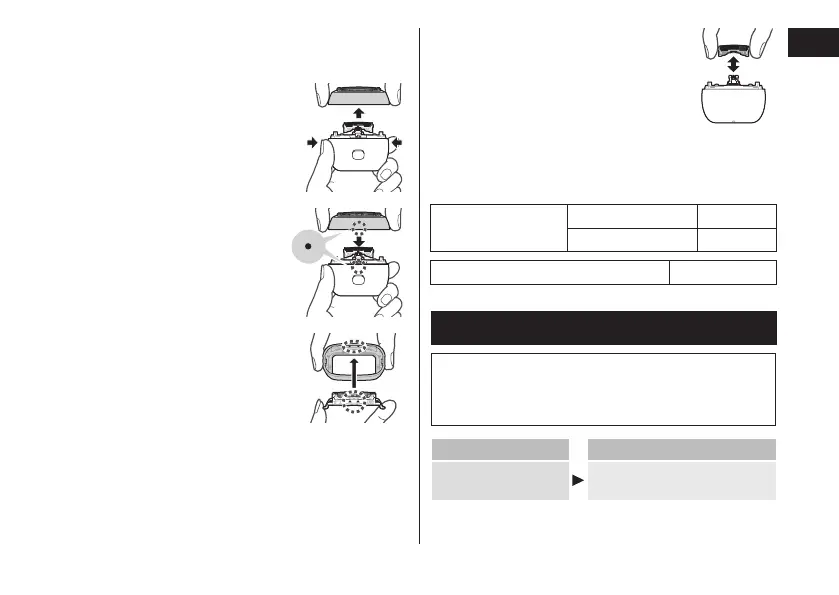
Removing the outer foil section
Press the foil frame release buttons
and lift the outer foil section upwards.
Attaching the outer foil
section
Align the foil frame (•) and the main
body (•) marks, and securely attach
it evenly until it clicks.
Replacing the system outer foil
1. Press the system outer foil release
buttons and pull down the system
outer foil.
• Do not press the system outer
foil release buttons with
excessive force.
Doing so may bend the system
outer foil, preventing complete
attachment to the foil frame.
2.
marks, and attach it until it clicks.
Replacing the inner blades
1.
Remove the inner blades one at a time.
2. Insert the inner blades one at a time.
Replacement parts and optional parts
Replacement parts and optional parts are available at
your dealer or Service Center.
Replacement parts
for ES‑PV6A
System outer foil WES9181
Inner blades WES9170
USB power adaptor ES‑RU1‑02
Troubleshooting
Perform the following actions.
If the problems still cannot be solved, contact the
store where you purchased the unit or a service
center authorized by Panasonic for repair.
Problem Action
The power switch
does not turn ON.
Unlock the switch lock. (See
page 15.)






 To Next Page