16
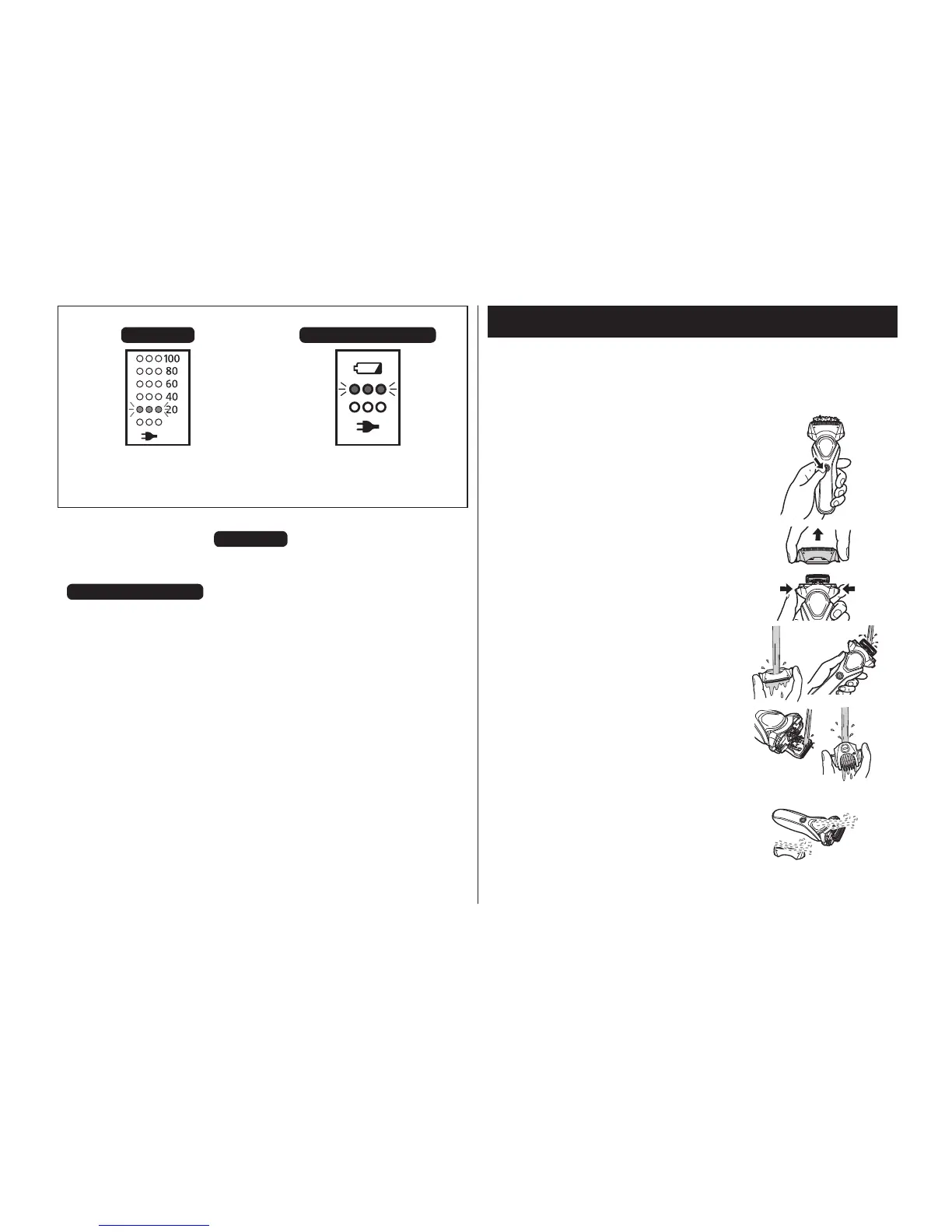
When the battery capacity is low
ES-RT67 ES-RT47/ES-RT37
“20” blinks for 5 seconds
when the power switch is
pressed.
The battery capacity lamp
blinks for 5 seconds when
the power switch is pressed.
• You can shave 2 to 3 times after “20” blinks. (This will differ
depending on usage.)
ES-RT67
• You can shave 2 to 3 times after the battery capacity lamp
blinks. (This will differ depending on usage.)
ES-RT47/ES-RT37
• A full charge will supply enough power for approx. 18 shaves
of 3 minutes each. (This will differ depending on usage.)
Cleaning the shaver
1. Disconnect the cord from the shaver.
2. Apply some hand soap and some water to the system
outer foil.
3. Turn the shaver on.
4. Turn off the shaver after 10 to 20
seconds.
5.
Remove the outer foil section [
A;
]
.
6.
Clean the shaver, the outer foil
section, the trimmer, and the comb
attachment with running water.
7. Wipe off any drops of water with a dry cloth.
8. Dry the outer foil section, the
shaver, the trimmer, and the comb
attachment completely.




 To Next Page