13
English
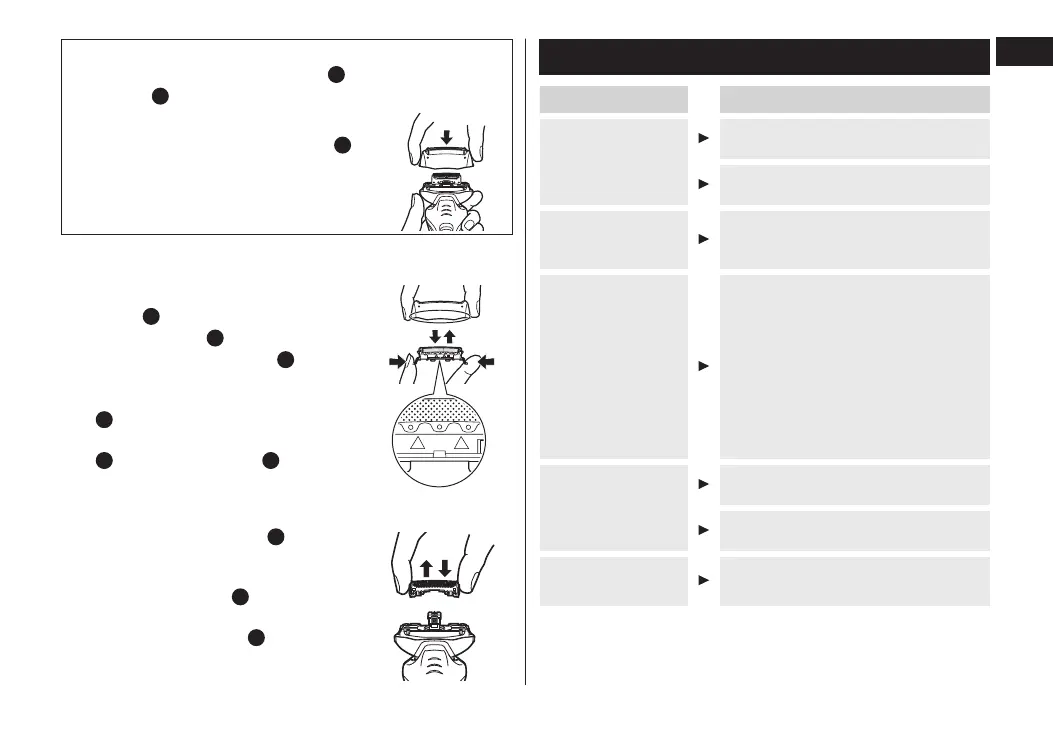
Removing the outer foil section
Press the foil frame release buttons [
D
d
] and lift the outer
foil section [
B
] upwards.
Attaching the outer foil section
Securely attach the outer foil section [
B
]
to the shaver until it clicks.
► Replacing the system outer foil
1.Press the system outer foil release
buttons [
B
c
] and pull down the
system outer foil [
B
b
].
2.Insert the system outer foil [
B
b
] until
it clicks as illustrated.
• Always attach the system outer foil
[
B
b
] in proper direction.
• Always insert the system outer foil
[
B
b
] to the foil frame [
B
a
] when
attaching to the shaver.
21
► Replacing the inner blades
1.Remove the inner blades [
C
] one at a
time.
• Do not touch the edges (metal parts)
of the inner blades [
C
] to prevent
injury to your hand.
2.Insert the inner blades [
C
] one at a
time until they click.
1 2
Troubleshooting
Problem Action
Shavings fly all
over.
This can be improved by cleaning
every time after shaving.
Clean the inner blades with the
brush.
System outer foil
gets hot.
Replace the system outer foil if it is
damaged or deformed.
(See page 12.)
Operating time is
short even after
charging.
Charge the battery for approximately
8 hours continuously to rejuvenate
it.
If few uses remain even after
charging, the battery has reached
the end of its life. (Fluid may be
leaking due to degradation at the
end of battery life.)
Contact an authorized service center
for repair.
Makes a loud
sound.
Conrm that the blades are properly
attached.
Clean the system outer foil with the
brush.
The odor is getting
stronger.
This can be improved by cleaning
every time after shaving.
ES-RT53 33_HK.indb 13 17/5/3 下午3:05



 To Next Page