5
Charging
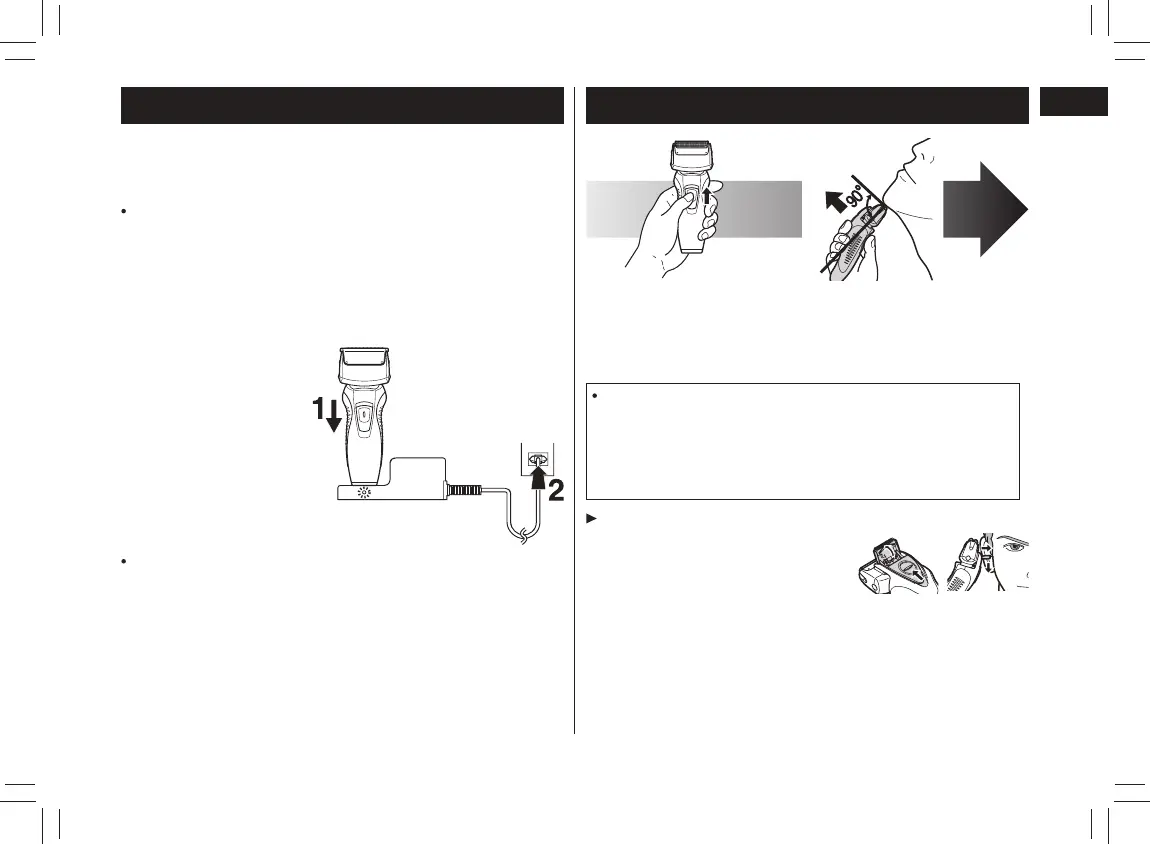
Perform the following steps to charge the shaver if it seems to lose
the speed.
The charging time differs depending on the rated voltage.
(See page 8.)
A full charge supplies enough power for approximately 30
minutes of use. (ES-RW33)
A full charge supplies enough power for approximately 21
minutes of use. (ES-RW31)
(Based on dry using at 20 °C-30 °C.)
The operating time may differ depending on the frequency of use
and the operating method.
1
1
Turn off the
shaver and
insert it in the
AC adaptor as
illustrated.
2
2
Plug in the
adaptor into a
householdoutlet.
The charge indicator lamp glows and stays on until the shaver is
removed from the AC adaptor.
Using the shaver
1
1
Depress the switch
lock button and slide
the power switch (0/1)
upwards.
2
2
Hold the shaver as
illustrated above
andshave.
Start out shaving by applying gentle pressure to your face.
Stretch your skin with your free hand and move the shaver
backandforthinthedirectionofyourbeard.Youmaygently
increase the amount of pressure as your skin becomes
accustomed to this shaver. Applying excessive pressure does
not provide a closer shave.
Using the trimmer
Slide the trimmer handle up. Place at
a right angle to your skin and move
downwards to trim your sideburns.
PB017458 - ES-RW31������_(01GB)_05-23-19.indd 5 2019/5/24 14:34:35




 To Next Page