9
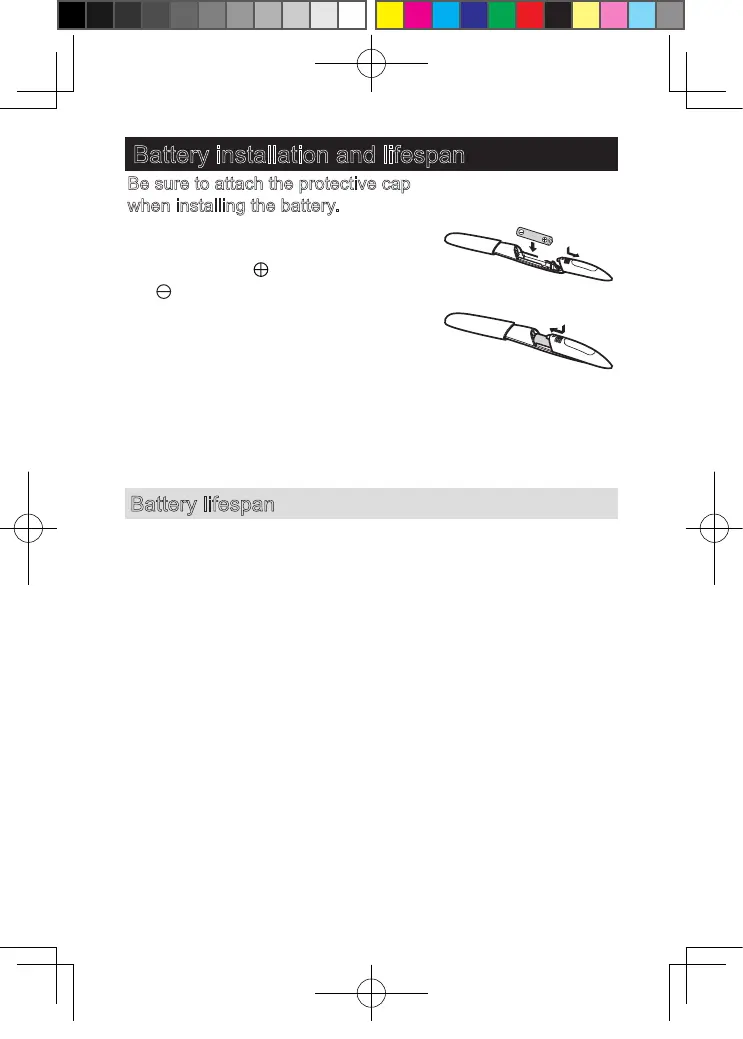
Battery installation and lifespan
Be sure to attach the protective cap
when installing the battery.
1
. Remove the battery cover.
2
. Identify the
“
”
and
“
”
terminals, and insert the dry
battery.
(To remove the battery: Lift the
battery from the
“⊕”
end.
)
3
. Attach the battery cover until a click
is heard.
1
3
2
Battery lifespan
With a Panasonic LR
03
(AAA alkaline battery), it can be used
for about one month.
(When it is used twice a week with approx.
5
min for each
use at a room temperature of
20
℃
.)
Use only LR
03
(AAA alkaline battery).
(The power or number of uses may vary if other battery is
used.)
ES-WF61 香港向v6.indb 9 2019/1/29 下午4:50











 To Next Page