Lamp unit replacement procedure
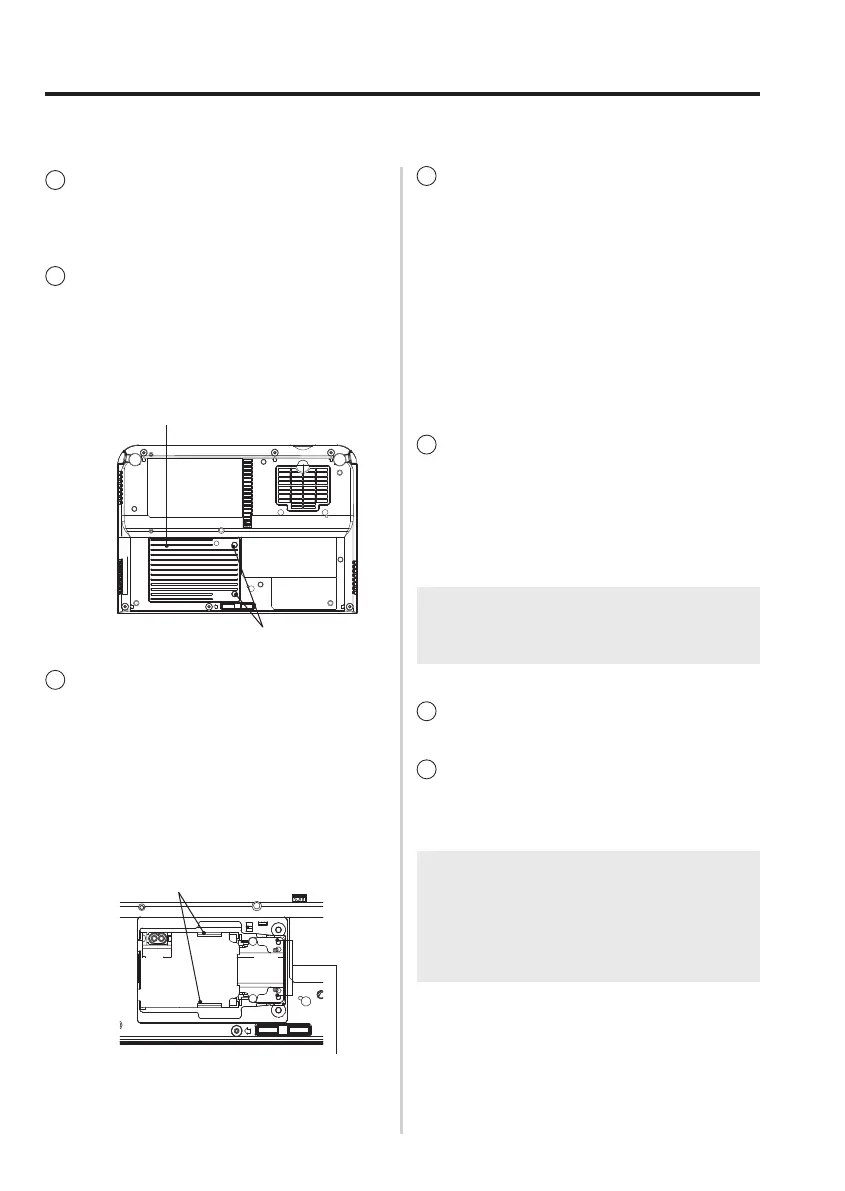
Lampunitcover
Lampunitcoverfixingscrews
Lampunitfixingscrews
4
Insert the new lamp unit
while making sure that
the direction of insertion
is correct, and then use
a Phillips screwdriver to
securely tighten the lamp
unit fixing screws.
•Wheninsertingthenewlamp
unit,besuretopushitinat
the point Ⓐ and Ⓑ .
1
Check that the area around
the lamp unit has cooled
down.
2
Use a Phillips screwdriver
to turn the lamp unit cover
fixing screws at the bottom
of the projector, and then
remove the lamp unit cover.
3
Use a Phillips screwdriver
to loosen the two lamp unit
fixing screws until the screws
turn freely. Then hold the
handles of the lamp unit and
gently pull the lamp unit out
from the projector.
Handles
Ⓐ
Ⓑ
NOTE:
• Besuretoinstallthelampunitandthe
lampunitcoversecurely.
5
Install the lamp unit cover,
and then use a Phillips
screwdriver to securely
tighten the lamp unit cover
fixing screws.
6
Connect the mains lead.
NOTE:
• If“DIRECTPOWERON”inthe
“OPTION”menuhasbeensetto“ON”,
projectionwillstartafterthemainslead
is connected.
7
Press the POWER button so
that a picture is projected
onto the screen.



 To Next Page