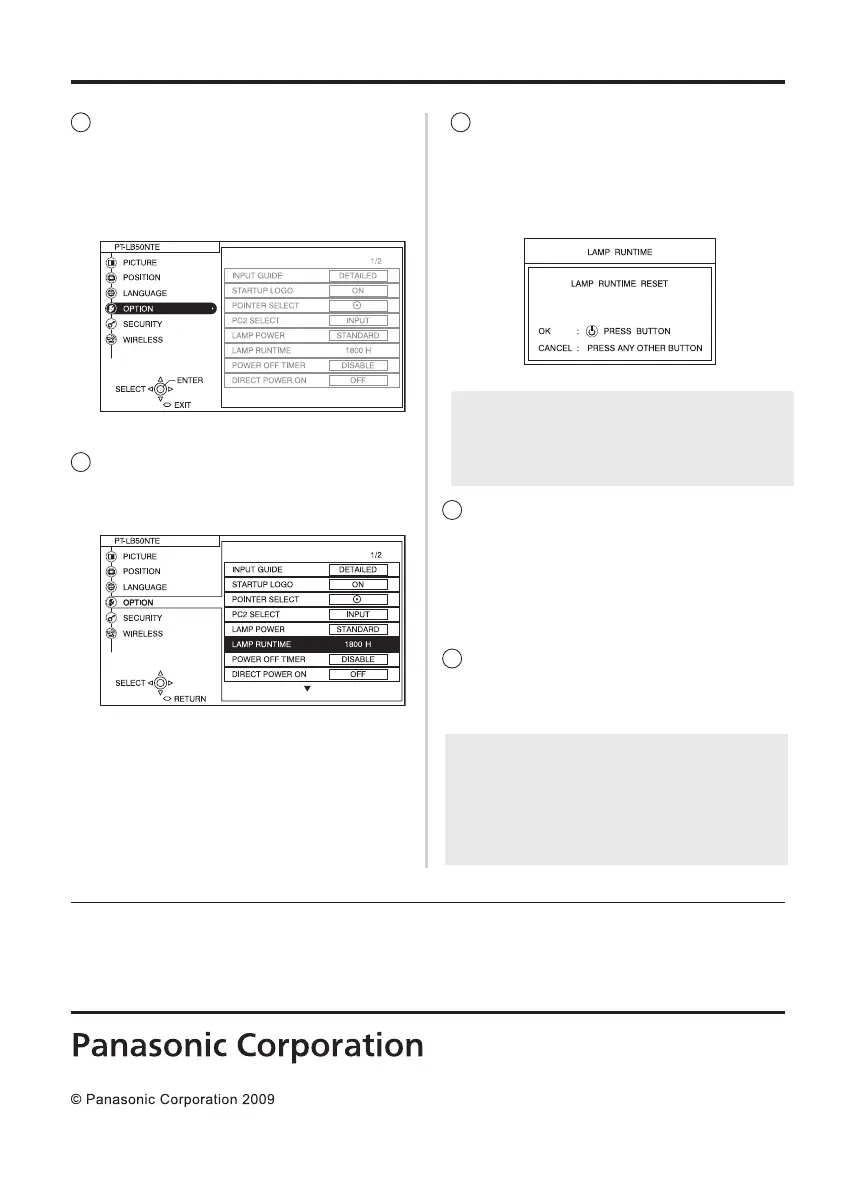
9
Press the ENTER button, and
then press the ▲ or ▼ button
to select “LAMP RUNTIME”.
10
Press and hold the ENTER
button for approximately 3
seconds.
• The “LAMP TIME RESET”
screen will be displayed.
8
Press the MENU button to
display the menu screen, and
then press the ▲ or ▼ button
to select the “OPTION”
menu.
11
Press the POWER button to
turn off the power.
• Disconnect the mains lead
after the POWER button on
the projector illuminates red.
12
This will reset the cumulative
usage time for the lamp unit
to “0”.
NOTE:
• Press any button other than the POWER
button to cancel the “LAMP RUNTIME
RESET” screen.
Accessory
• Air lter: 1
Printed in Japan
NOTE:
• Replace the air lter with the new lter
which is supplied as an accessory, while
referring to the replacement procedure
which appears in the Operating
Instructions for the LCD projector.
Web Site : https://panasonic.net/cns/projector/



 To Previous Page