29 (E)
Setting the menu items
Concerning initialization
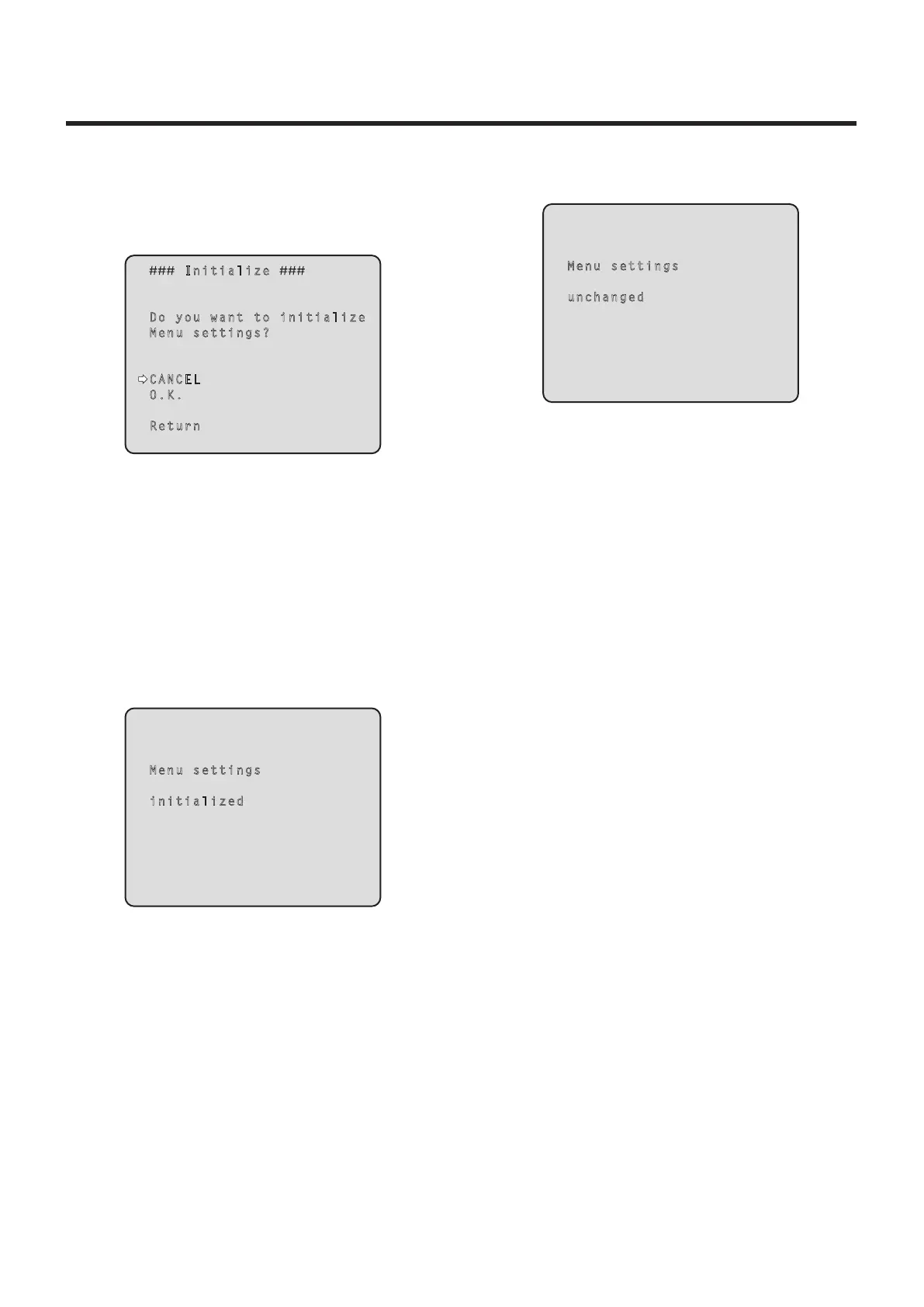
When “Initialize” is selected on the Maintenance screen, the
Initialize screen appears.
Initialize screen
Initialize
Do you want to initialize
Menu settings?
CANCEL
O.K.
Return
When the cursor is moved to “O.K.” on the Initialize
screen and the setting is entered, the Menu settings
initialize screen is displayed for 5 seconds, and the
camera settings are restored to the settings which
were established when the camera was purchased.
However, the Format settings (see page 24) are not
initialized.
When the initialization operation is completed, the
Initialize screen is restored to the display.
Menu settings initialized screen
Menu settings
initialized
When the cursor is moved to “CANCEL” on the
Initialize screen and the setting is entered, the Menu
settings unchanged screen is displayed for 5 seconds,
the initialization operation is not performed, and the
Initialize screen returns to the display.
Menu settings unchanged screen
Menu settings
unchanged


 To Next Page