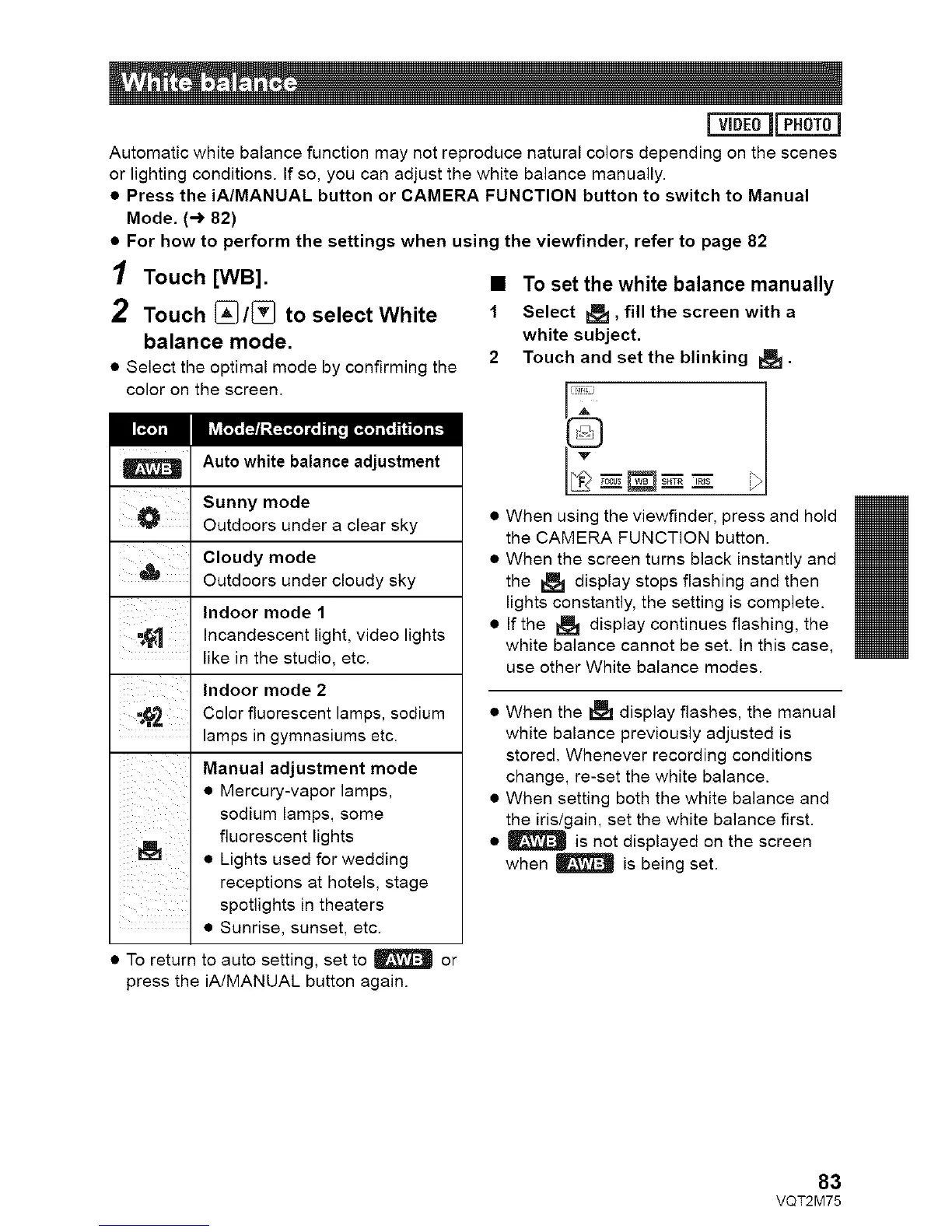
Automaticwhitebalancefunctionmaynotreproducenaturalcolorsdependingonthescenes
orlightingconditions.Ifso,youcanadjustthewhitebalancemanually.
• Press the iA/MANUAL button or CAMERA FUNCTION button to switch to Manual
Mode. (-) 82)
• For how to perform the settings when using the viewfinder, refer to page 82
1 Touch [WB]. •
2 Touch [_/[_ to select White 1
balance mode.
2
• Select the optimal mode by confirming the
color on the screen.
Auto white balance adjustment
Sunny mode
_ Outdoors under a clear sky
Cloudy mode
Outdoors under cloudy sky
' ' Indoor mode 1
, "_1 Incandescent light, video lights
• . like in the studio, etc.
Indoor mode 2
-_'_ Color fluorescent lamps, sodium
lamps in gymnasiums etc.
Manual adjustment mode
• Mercury-vapor lamps,
sodium lamps, some
fluorescent lights
• Lights used for wedding
receptions at hotels, stage
spotlights in theaters
• Sunrise, sunset, etc.
• To return to auto setting, set to | or
press the iA/MANUAL button again.
To set the white balance manually
Select R:_, fill the screen with a
white subject.
Touch and set the blinking I:_ •
_z_zz _
When using the viewfinder, press and hold
the CAMERA FUNCTION button.
When the screen turns black instantly and
the _ display stops flashing and then
lights constantly, the setting is complete.
If the I_ display continues flashing, the
white balance cannot be set. In this case,
use other White balance modes.
• When the _ display flashes, the manual
white balance previously adjusted is
stored. Whenever recording conditions
change, re-set the white balance.
• When setting both the white balance and
the iris/gain, set the white balance first.
• | is not displayed on the screen
when _ is being set.
83
VQT2M75






 To Next Page