EasyManua.ls Logo

Panasonic K-STD14 - User Manual

Panasonic K-STD14
28 pages
Print Icon
To Next Page IconTo Next Page
Loading...
1
Rev.1.0
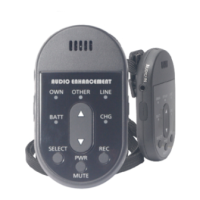
1.9GHz Wireless Pendant Microphone
K-STD14

Questions and Answers

  • C
    creedAug 11, 2025
    How to pair Panasonic K-STD14 Microphone with receiver?
    • M
      Melanie LittleAug 11, 2025
      If your Panasonic Microphone does not use (at the time of Power ON,CHG LED is RED), it may be because pairing registration with a receiver has not been performed. To resolve this: 1. Press the receiver's [LINK] button to put it into register mode. 2. With the microphone powered off, simultaneously press the [PWR/MUTE] and [INT/E1] buttons to register it with the receiver.
  • R
    Rachel OliverAug 19, 2025
    How to increase the volume on my Panasonic K-STD14?
    • D
      daniel43Aug 19, 2025
      If your Panasonic Microphone's volume is too low or there's no sound, make sure the [OWN] selection indicator is lit. If it is, press the volume button to increase the volume. Also, check the settings.
  • M
    Mary GonzalesAug 27, 2025
    Why is the charge indicator blinking on my Panasonic K-STD14 Microphone?
    • R
      Randall ObrienAug 27, 2025
      If your Panasonic Microphone is not charging and the charge indicator is blinking, it could be due to the battery being extremely hot or deteriorated. If the battery is hot, disconnect the charger and let the battery cool off before reconnecting. If the battery has deteriorated, replace it with a new rechargeable one.
  • D
    Dawn GarzaSep 3, 2025
    Why is there no sound from external microphone on Panasonic?
    • M
      Matthew SmithSep 3, 2025
      If you're not getting any sound from an external microphone connected to your Panasonic Microphone, connect the external microphone to the microphone input terminal.

Panasonic K-STD14 Specifications

Operating Environment IconOperating Environment
temperature range5°C ~ +35°C
humidity range~90%
Power IconPower
battery typeLithium Ion Battery
battery lifeabout 2 years
talk timearound 8 hours
charge timearound 4 hours
Weight and Dimensions IconWeight and Dimensions
weight50 g
height3.31"
width1.89"
depth0.63"
height in mm84 mm
width in mm48 mm
depth in mm16 mm

Related product manuals