10
Rev.1.0
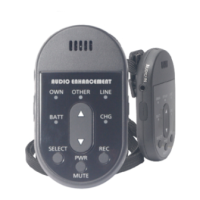
[8] DC input terminal [DC IN] (side)
Used to connect the charger for charging the battery installed in the microphone.
[9] [INT/E1] button
Pressing this button will activate E1 output and an Intercom call ( or a response ).
(
Explanation of the intercom is referring to the DECT AP[K-SAP14] manual..)
[10] [PWR/MUTE] button
Pressing this button will turn the microphone power [ON/OFF]. To turn "ON", press it for 1
second or more, to turn "OFF", press it for 2 seconds or more.
While the power is on, pressing this button short once will mute the microphone, and
pressing this button again will cancel muting.
[11] [SELECT] button
Selects the target for volume control.
Each time the button is pressed, the selection indicator changes as follows:
[OWN] -> [OTHER] -> [LINE] -> [OWN].
[12] Battery indicator [BATT]
Indicates the status of the microphone power supply and the battery condition as follows:
Green light: Power is turned "ON".
Yellow light: Power is turned “ON”, but battery is nearing its end.
Red light: Battery is depleted. Charge the battery or E2 state.
Light off: Power is turned "OFF".
Blinking ( green ): Standby state.( A microphone is ready )
Blinking ( yellow ): Out of Range.
[13] External input terminal [AUDIO IN] (side)
Transmits the audio from a connected external device to the receiver.
When an external device is connected to this terminal, audio from the [1] Microphone
opening and [6] Microphone input terminal is muted.
[14] E2 Button (side)
Pressing simultaneously both side E2 button or more will be an activate E2 output.
( E2 release : Press [PWR/MUTE] button 2 seconds or more. )


 To Next Page