EasyManua.ls Logo

Panasonic KX-TGE260 - User Manual

Panasonic KX-TGE260
109 pages
Print Icon
To Next Page IconTo Next Page
Loading...
Operating Instructions
Link-to-Cell Bluetooth Convergence Solution
Model No.
KX-TGE260
KX-TGE262
KX-TGE263
KX-TGE264
KX-TG454SK
KX-TGE270
KX-TGE272
KX-TGE273
KX-TGE274
KX-TGE275
KX-TG465SK
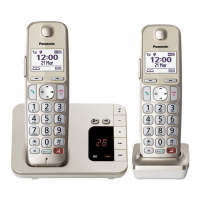
Model shown is KX-TGE260.
Before initial use, see “Getting Started”
on page 11.
Thank you for purchasing a Panasonic product.
Please read these operating instructions before using the unit and save them for
future reference.
Consulte “Guía Rápida Española”, página 79.
For assistance, visit our Web site: http://www.panasonic.com/help for customers
in the U.S.A. or Puerto Rico.
Please register your product: http://www.panasonic.com/prodreg
TGE26x_27x(en)_1216_ver041.pdf 1TGE26x_27x(en)_1216_ver041.pdf 1 2013/12/16 19:32:262013/12/16 19:32:26

Table of Contents

Other manuals for Panasonic KX-TGE260

Questions and Answers

  • K
    Kristen BrownJul 26, 2025
    Why can't I pair my cellular phone to my Panasonic KX-TGE260 Cordless Telephone?
    • G
      gomezjamesJul 26, 2025
      If you are having trouble pairing your cellular phone to the Panasonic Cordless Telephone base unit, there might be a few reasons. It could be a compatibility issue, so ensure your phone supports the hands-free profile (HFP) specification. Also, double-check that Bluetooth is enabled on your phone. Try turning your cellular phone off and on again, as the Bluetooth technology may not be working correctly. Disconnect any other Bluetooth devices connected to your phone, like a headset, and make sure you're entering the correct Bluetooth PIN if prompted.
  • B
    bowmansamanthaAug 2, 2025
    What to do if my Panasonic Cordless Telephone does not work?
    • J
      Jessica GrayAug 2, 2025
      If your Panasonic Cordless Telephone unit isn't working, there are several things you can check: * Make sure the batteries are correctly installed. * Ensure the batteries are fully charged. * Check all the connections. * Try resetting the unit by unplugging the base unit’s AC adapter, then reconnecting it. * The handset may not be registered to the base unit; in this case, register the handset.
  • D
    Dave TravisAug 7, 2025
    What to do if my Panasonic KX-TGE260 unit does not work?
    • A
      allenjasmineAug 7, 2025
      If your Panasonic Cordless Telephone unit isn't working, try the following: Ensure the batteries are correctly installed. Fully charge the batteries. Check all connections. Unplug the base unit’s AC adapter to reset the unit, then reconnect it. Also, make sure the handset is registered to the base unit.
  • L
    Laura MossAug 13, 2025
    Why can't I pair my phone to my Panasonic Cordless Telephone?
    • J
      James OlsonAug 13, 2025
      You may not be able to pair your phone to the base unit due to compatibility issues. Confirm that your cellular phone supports the hands-free profile (HFP) specification and that the Bluetooth feature is turned on. If your phone is connected to another Bluetooth device, disconnect it. Ensure you enter the correct PIN if prompted. Also, the Bluetooth technology on your cellular phone may not be functioning normally, so try turning it off and on again.
  • P
    pzamoraAug 19, 2025
    How to turn on Panasonic KX-TGE260 Cordless Telephone handset?
    • R
      Rodney OliverSep 12, 2025
      If your Panasonic Cordless Telephone handset doesn't turn on even after installing charged batteries, place the handset on the base unit or charger to turn it on.

Summary

Introduction

Model composition

Details the different Panasonic phone models and their part numbers.

Accessory information

Lists supplied and optional accessories with order numbers and quantities.

Other information and Trademarks

General notes, system expansion, and registered trademarks.

Important Information

For your safety

Critical safety precautions for power, installation, and product operation.

For best performance

Guidance on base unit placement, environment, and noise avoidance.

Specifications

Technical details including standard, frequency, power, and operating conditions.

Getting Started

Connections and Battery Setup

Guides for connecting the unit and installing handset batteries.

Battery Charging and Notes

Information on charging batteries and important setup notes.

Language and Greeting Settings

How to set display language and record greeting messages.

Other Settings

Configuration options like Smart function key and dialing mode.

Link to Cell

Pairing and Managing Cellular Phones

Steps to pair, unpair, and manage cell phones via Bluetooth.

Link to Cell Settings

Options for call routing, ring tones, and text alerts.

Cellular Line Modes and PIN

Setup for cell-only mode, line selection, and Bluetooth PIN.

Making;Answering Calls Using the Handset

Making Calls

Steps for making cellular and landline calls, using redial.

Answering Calls

Procedures for answering incoming calls.

Useful Call Features

Features like Hold, Mute, Flash, Clarity, Noise, Equalizer, Call Share.

Call Transfer and Conference

Managing call transfers and setting up conference calls.

Power Backup Operation

Using handset power for base unit during power failure.

Making;Answering Calls Using the Base Unit

Making Calls

Steps for making cellular and landline calls from the base unit.

Answering Calls

Procedures for answering calls on the base unit.

Useful Base Unit Features

Features like Hold, Mute, Flash, Call share for base unit.

Locator;Intercom

Handset Locator

Paging a misplaced handset to find it.

Cell Locator

Locating a misplaced cellular phone via the base unit.

Intercom Calls

Making calls between handsets and the base unit.

Phonebook

Adding and Managing Entries

How to add, edit, and erase contacts and caller info.

Finding and Calling from Phonebook

Searching and dialing numbers from the phonebook.

Speed Dial

Assigning phone numbers to speed dial keys.

Programming

Menu List and Command Codes

Navigating menus and using direct command codes.

Answering System Settings

Configuring message alerts, ring counts, and remote access.

Bluetooth Settings

Managing cell phone pairing, headset, and phonebook transfer.

Call Block Settings

Blocking unwanted calls by number or range.

Unit Registration and Naming

Adding handsets and customizing their names.

Caller ID Service

Using Caller ID Features

Displaying caller info, missed calls, and phonebook name display.

Talking Caller ID

Voice announcements of caller information.

Caller List Management

Viewing, editing, and erasing caller list entries.

Caller ID Number Auto Edit

Automatic editing of area codes for local calls.

Using Bluetooth Devices

Phonebook Transfer

Copying contacts from phone to unit.

Text Message (SMS) Alert

Notifying handset of text messages on the cell phone.

Bluetooth Headset Usage

Pairing and using a headset for landline calls.

Answering System for Landline

Answering System Operation

Turning on/off, greeting messages, and listening to messages.

Advanced Message Alerting

Audible alerts and call notifications for new messages.

Remote Operation

Accessing messages and settings remotely via phone.

Answering System Settings

Configuring call screening, ring count, and recording time.

Useful Information

Voice Mail Service

Information about external voicemail services.

Wall Mounting

Instructions for mounting the base unit on a wall.

Error Messages and Troubleshooting

Common errors, their causes, solutions, and general troubleshooting.

FCC and Other Information

Regulatory compliance, safety, and hearing aid compatibility.

Appendix

Customer Services and Accessory Purchases

Contact info for support, parts, and accessories.

Limited Warranty

Details of the product warranty terms and conditions.

Panasonic KX-TGE260 Specifications

General IconGeneral
BrandPanasonic
ModelKX-TGE260
TypeCordless Telephone
Frequency1.9 GHz
Number of Handsets1
Answering SystemYes
SpeakerphoneYes
Caller IDYes
Talking Caller IDYes
Battery TypeNi-MH
Call WaitingYes
IntercomYes
Backlit DisplayYes
Power BackupNo
Keypad on BaseYes
Handsets Included1
ExpandableYes
RangeUp to 1, 000 feet

Related product manuals