EasyManua.ls Logo

Panasonic KX-TGJ420E - User Manual

Panasonic KX-TGJ420E
60 pages
Print Icon
To Next Page IconTo Next Page
Loading...
Operating Instructions
Digital Cordless Answering System
Model No.
KX-TGJ420E
KX-TGJ422E
KX-TGJ423E
KX-TGJ424E
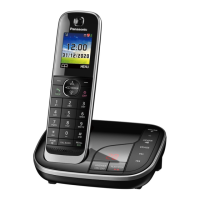
Model shown is KX-TGJ420.
Before initial use, see “Getting Started”
on page 11.
Thank you for purchasing a Panasonic product.
Please read these operating instructions before using the unit and save them for
future reference.

Other manuals for Panasonic KX-TGJ420E

Questions and Answers

Summary

Introduction

Model composition

Details the different model numbers and their base unit/handset configurations.

Accessory information

Lists supplied accessories with quantities for each model.

General information

Covers network compatibility, declaration of conformity, and ecodesign info.

Graphical symbols for use on equipment and their descriptions

Explains the meaning of various symbols used on the equipment.

Important Information

For your safety

Provides crucial warnings and precautions for safe product operation.

Operating safeguards

Essential precautions for using the product safely, including cleaning and volume.

Important safety instructions

General safety advice to prevent risks like fire, electric shock, and injury.

For best performance

Tips for optimal product operation and placement.

Getting Started

Setting up

Step-by-step guide for initial installation and connection of the unit.

Battery installation

Instructions for correctly inserting rechargeable batteries into the handset.

Battery charging

Information on how to charge the handset batteries and expected charging time.

Controls

Identifies and explains the function of handset and base unit buttons.

Display icons

Explains the meaning of various icons shown on the handset and base unit displays.

Making;Answering Calls

Making calls

How to initiate outgoing calls using the dial pad or speakerphone.

Answering calls

Procedures for receiving incoming calls and basic call handling.

Useful features during a call

Describes functions like Hold, Mute, and Call Waiting during an active call.

Key lock

How to lock the handset to prevent accidental operation.

Nuisance Call Block

Nuisance call block

How to block unwanted callers and manage the block list.

Storing a single phone number

Instructions for manually adding specific numbers to the call block list.

Automated call block

Automated call block

Feature to screen incoming calls, blocking automated or telemarketing calls.

Setting the automated call block

Guide on how to enable or disable the automated call blocking feature.

Phonebook

Phonebook

Information on storing, managing, and accessing contact numbers.

Adding phonebook entries

Step-by-step instructions for saving new contacts with names and numbers.

Speed dial

How to assign phone numbers to speed dial keys for quick dialing.

Programming

Menu list

Overview of accessing device features through menus.

Alarm

Setting and managing alarm functions with text memos.

Do Not Disturb Mode

How to set a period where the handset will not ring for outside calls.

Baby Monitor

Feature to listen to a remote room using another handset.

Registering a unit

Process for adding additional handsets or base units to the system.

Caller ID Service

Using Caller ID service

How to subscribe to and utilize Caller ID features.

Talking Caller ID

Enables the unit to announce the caller's name or number.

Caller list

Information on viewing call history and details of incoming calls.

Viewing the caller list and calling back

Steps to access the call log and return calls.

Answering System

Answering system

How the unit answers and records calls when unavailable.

Turning the answering system on;off

Simple guide to activate or deactivate the answering system.

Greeting message

Options for using a pre-recorded or custom greeting message.

Listening to messages

Methods for accessing recorded messages via base unit or handset.

Remote operation

How to control the answering system remotely using a touch-tone phone.

Useful Information

Voicemail service

Information on using voicemail provided by the phone service provider.

Error messages

Lists common error messages and their solutions.

Troubleshooting

General advice and solutions for common operational problems.

Conditions of guarantee

Details the terms and conditions of the product's warranty.

Summary

Introduction

Model composition

Details the different model numbers and their base unit/handset configurations.

Accessory information

Lists supplied accessories with quantities for each model.

General information

Covers network compatibility, declaration of conformity, and ecodesign info.

Graphical symbols for use on equipment and their descriptions

Explains the meaning of various symbols used on the equipment.

Important Information

For your safety

Provides crucial warnings and precautions for safe product operation.

Operating safeguards

Essential precautions for using the product safely, including cleaning and volume.

Important safety instructions

General safety advice to prevent risks like fire, electric shock, and injury.

For best performance

Tips for optimal product operation and placement.

Getting Started

Setting up

Step-by-step guide for initial installation and connection of the unit.

Battery installation

Instructions for correctly inserting rechargeable batteries into the handset.

Battery charging

Information on how to charge the handset batteries and expected charging time.

Controls

Identifies and explains the function of handset and base unit buttons.

Display icons

Explains the meaning of various icons shown on the handset and base unit displays.

Making;Answering Calls

Making calls

How to initiate outgoing calls using the dial pad or speakerphone.

Answering calls

Procedures for receiving incoming calls and basic call handling.

Useful features during a call

Describes functions like Hold, Mute, and Call Waiting during an active call.

Key lock

How to lock the handset to prevent accidental operation.

Nuisance Call Block

Nuisance call block

How to block unwanted callers and manage the block list.

Storing a single phone number

Instructions for manually adding specific numbers to the call block list.

Automated call block

Automated call block

Feature to screen incoming calls, blocking automated or telemarketing calls.

Setting the automated call block

Guide on how to enable or disable the automated call blocking feature.

Phonebook

Phonebook

Information on storing, managing, and accessing contact numbers.

Adding phonebook entries

Step-by-step instructions for saving new contacts with names and numbers.

Speed dial

How to assign phone numbers to speed dial keys for quick dialing.

Programming

Menu list

Overview of accessing device features through menus.

Alarm

Setting and managing alarm functions with text memos.

Do Not Disturb Mode

How to set a period where the handset will not ring for outside calls.

Baby Monitor

Feature to listen to a remote room using another handset.

Registering a unit

Process for adding additional handsets or base units to the system.

Caller ID Service

Using Caller ID service

How to subscribe to and utilize Caller ID features.

Talking Caller ID

Enables the unit to announce the caller's name or number.

Caller list

Information on viewing call history and details of incoming calls.

Viewing the caller list and calling back

Steps to access the call log and return calls.

Answering System

Answering system

How the unit answers and records calls when unavailable.

Turning the answering system on;off

Simple guide to activate or deactivate the answering system.

Greeting message

Options for using a pre-recorded or custom greeting message.

Listening to messages

Methods for accessing recorded messages via base unit or handset.

Remote operation

How to control the answering system remotely using a touch-tone phone.

Useful Information

Voicemail service

Information on using voicemail provided by the phone service provider.

Error messages

Lists common error messages and their solutions.

Troubleshooting

General advice and solutions for common operational problems.

Conditions of guarantee

Details the terms and conditions of the product's warranty.

Panasonic KX-TGJ420E Specifications

General IconGeneral
BrandPanasonic
ModelKX-TGJ420E
CategoryCordless Telephone
LanguageEnglish

Related product manuals