EasyManua.ls Logo

Panasonic KX-TGJ423E - User Manual

Panasonic KX-TGJ423E
60 pages
Print Icon
To Next Page IconTo Next Page
Loading...
Operating Instructions
Digital Cordless Answering System
Model No.
KX-TGJ420E
KX-TGJ422E
KX-TGJ423E
KX-TGJ424E
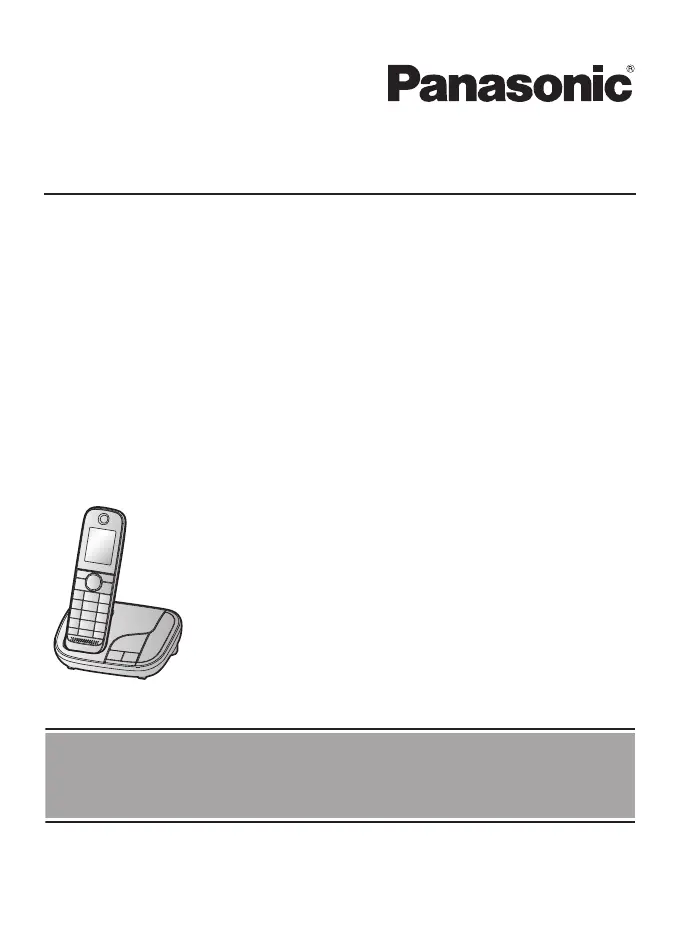
Model shown is KX-TGJ420.
Before initial use, see “Getting Started”
on page 11.
Thank you for purchasing a Panasonic product.
Please read these operating instructions before using the unit and save them for
future reference.

Other manuals for Panasonic KX-TGJ423E

Questions and Answers

  • E
    Eric SimpsonSep 23, 2025
    Why is caller information displayed or announced late on my Panasonic KX-TGJ423E?
    • K
      Kevin KellerSep 23, 2025
      If caller information is displayed or announced late on your Panasonic Cordless Telephone, depending on your phone service provider, the unit may display the caller’s information at the 2nd ring or later. Set the first ring to “Off”. Also, move closer to the base unit.
  • P
    Philip CooperAug 25, 2025
    Why can't I hear a dial tone on my Panasonic KX-TGJ423E?
    • A
      austinboydAug 25, 2025
      If you cannot hear a dial tone on your Panasonic Cordless Telephone, ensure that you are using the supplied telephone line cord, as your old telephone line cord may have a different wiring configuration. Check that the base unit’s AC adaptor or telephone line cord is properly connected. If the issue persists, disconnect the base unit from the telephone line and connect the line to a known working telephone. If the working telephone operates properly, contact our service personnel to have the unit repaired. If the working telephone does not operate properly, contact your phone service provider.
  • A
    Amber Perez DVMAug 25, 2025
    What to do if my Panasonic KX-TGJ423E unit does not work?
    • M
      Michael ThomasAug 26, 2025
      If your Panasonic Cordless Telephone is not working, make sure the batteries are installed correctly. Fully charge the batteries. Check all connections. Unplug the base unit’s AC adaptor to reset the unit and turn off the handset, then reconnect the adaptor, turn on the handset, and try again. Also, the handset may not be registered to the base unit, register the handset.
  • M
    Mr. Christopher Cohen IIAug 27, 2025
    Why is the display blank or dark on my Panasonic Cordless Telephone handset?
    • A
      Amy BanksAug 27, 2025
      If the Panasonic Cordless Telephone handset display is blank or dark, it may be in screen saver mode. Activate the handset display again by pressing M N when on a call or pressing any dial key at all other times. Also, check if “LCD in charging” is set to “Off” while on charge and change the setting. Ensure the handset is turned on.
  • L
    Laura ThomasAug 27, 2025
    Why is my Panasonic KX-TGJ423E handset not ringing?
    • J
      joshua90Aug 27, 2025
      If the handset does not ring on your Panasonic Cordless Telephone, the ringer volume may be turned off, adjust it. Also, the do not disturb mode may be turned on, turn it off. If the handset is registered to multiple base units, the handset may not be able to make or receive calls or communicate with the base unit when Eco mode is set to “Eco Plus” and Base unit selection is set to “Auto”. In this case, place the handset near the base unit, then press MECON and select “Eco” or “Eco Off”. Repeat for each base unit.
  • T
    Terry CarsonSep 13, 2025
    Why can't I use the intercom feature on my Panasonic Cordless Telephone?
    • T
      Tracey AlvaradoSep 14, 2025
      If you cannot use the intercom feature on your Panasonic Cordless Telephone, it is because this feature is available between handsets only and is not available for single handset models, even though the handset displays “Intercom”.
  • S
    Sally TrevinoSep 12, 2025
    How to turn off automatic display on Panasonic KX-TGJ423E?
    • R
      Rachel MendezSep 12, 2025
      To turn off demonstration mode on your Panasonic Cordless Telephone when the handset display begins operating automatically: MOFFN a MMENUN (right soft key) #899 a MbN: “Off” a MOKN
  • S
    Shelley BeardSep 12, 2025
    Why can't I activate the eco mode on my Panasonic KX-TGJ423E Cordless Telephone?
    • V
      vsanchezSep 12, 2025
      If you cannot activate the eco mode on your Panasonic Cordless Telephone, it is because you have set the repeater mode to “On”. If required, set the repeater mode to “Off”.
  • B
    Billy Harris IISep 4, 2025
    What does it mean when my Panasonic KX-TGJ423E Cordless Telephone displays ?
    • M
      mowensSep 4, 2025
      If your Panasonic Cordless Telephone is displaying , the handset is too far from the base unit, move closer. Also, the base unit’s AC adaptor may not be properly connected, reconnect it. The handset may not be registered to the base unit, register it. Activating eco mode reduces the range of the base unit in standby mode, turn eco mode off if needed.
  • C
    Curtis FoleySep 2, 2025
    Why does my Panasonic Cordless Telephone not ring the specified number of times?
    • S
      sullivanbenjaminSep 2, 2025
      If the unit does not emit the specified number of rings, the number of rings decreases by 1 from the specified number of rings in below situations: – the first ring is turned off (“Off”) – automated call block is set to “Block” – any number of rings selected for answering system

Summary

Important Information

For your safety

Covers essential safety precautions to prevent injury, electric shock, and property damage.

Operating safeguards

Outlines safe operating procedures, cleaning, and precautions for product usage.

Battery

Details recommendations and precautions for using rechargeable Ni-MH batteries.

Getting Started

Setting up

Step-by-step guide to connect and set up the base unit, charger, and handset.

Making;Answering Calls

Answering System

Turning the answering system on;off

How to activate or deactivate the answering system on the base unit and handset.

Useful Information

Troubleshooting

Provides solutions for common problems encountered with the unit.

Panasonic KX-TGJ423E Specifications

General IconGeneral
TypeCordless Telephone
Number of Handsets2
Maximum number of handsets supported6
Caller IDYes
Standby Time200 hours
DisplayLCD
Ringtones10
DECT TechnologyYes
Answering SystemYes
SpeakerphoneYes
Frequency1.9 GHz
RangeUp to 50 meters indoors, Up to 300 meters outdoors
Call WaitingYes
Conference CallYes
IntercomYes
Power SourceRechargeable NiMH battery

Related product manuals