EasyManua.ls Logo

Panasonic KX-TG6411 - User Manual

Panasonic KX-TG6411
64 pages
Print Icon
To Next Page IconTo Next Page
Loading...
Thank you for purchasing a Panasonic product.
This unit is compatible with Caller ID. You must subscribe to the appropriate
service offered by your service provider/telephone company.
Please read these operating instructions before using the unit and save
them for future reference.
For assistance, visit our website:
http://www.panasonic.com/help for customers in the U.S.A. or Puerto
Rico.
Charge the batteries for about 7 hours before initial use.
Consulte “Guía Rápida Española”, página 51.
Operating Instructions
Expandable Digital Cordless
Answering System
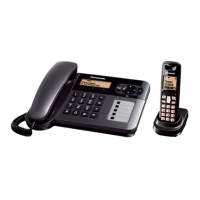
Model shown is KX-TG6411.
with 3 Handsets
Model No. KX-TG6423
KX-TG6473
Expandable Digital Cordless Phone
Model No. KX-TG6411
with 2 Handsets
Model No. KX-TG6412
with 3 Handsets
Model No. KX-TG6413
Panasonic’s environmental declaration labels
This mark is an environmental label
showing that the products are certified
as Panasonic’s Green Products.
Standby power consumption
reduced by 59%
TG640x(e).book Page 1 Wednesday, November 26, 2008 2:33 PM


Table of Contents

Questions and Answers

  • J
    James JohnsonSep 23, 2025
    What happens if while recording a greeting message or listening to messages, the unit rings and the operation stops on my Panasonic KX-TG6411?
    • K
      Katherine ShepardSep 23, 2025
      If the unit rings and the operation stops while recording a greeting message or listening to messages on your Panasonic Cordless Telephone, it means a call is being received. Answer the call and try again later.
  • G
    gmercerAug 23, 2025
    What to do if I cannot hear a dial tone on my Panasonic KX-TG6411?
    • E
      Erin HollowayAug 25, 2025
      If you cannot hear a dial tone on your Panasonic Cordless Telephone, first check that the base unit’s AC adapter and telephone line cord are properly connected. If you're using a splitter, remove it and connect the unit directly to the wall jack to see if the splitter is the problem. If the issue persists, disconnect the base unit and connect the telephone line to a working telephone to determine if the problem lies with the phone line or the unit.
  • D
    Denise WilliamsAug 25, 2025
    Why does my Panasonic KX-TG6411 handset beep and/or flash?
    • R
      rebecca27Aug 26, 2025
      If your Panasonic Cordless Telephone handset beeps and/or flashes, it indicates that the battery charge is low. Fully charge the batteries to resolve this issue.
  • M
    Michael GreeneAug 26, 2025
    What to do if my Panasonic KX-TG6411 Cordless Telephone handset does not ring?
    • A
      aprilmezaAug 27, 2025
      If your Panasonic Cordless Telephone handset does not ring, check if the ringer volume is turned off and adjust it. Also, ensure that silent mode is not turned on.
  • R
    Rebecca TurnerAug 27, 2025
    What to do if there is noise or sound cuts in and out on my Panasonic KX-TG6411?
    • E
      Elizabeth AguilarAug 27, 2025
      If you experience noise or sound cutting in and out on your Panasonic Cordless Telephone, it might be due to electrical interference. Try repositioning the base unit and using the handset away from sources of interference. Also, move closer to the base unit. If you are using a DSL/ADSL service, consider connecting a DSL/ADSL filter between the base unit and the telephone line jack.
  • K
    katie11Sep 16, 2025
    What to do if I cannot operate the answering system on my Panasonic Cordless Telephone?
    • M
      Michelle KingSep 16, 2025
      If you cannot operate the answering system on your Panasonic Cordless Telephone, it could be because someone else is using the unit or a caller is leaving a message. Also, make sure that the handset is close to the base unit.
  • M
    Madison ShafferSep 13, 2025
    Why I cannot make long distance calls on my Panasonic KX-TG6411 Cordless Telephone?
    • J
      Jillian MatthewsSep 13, 2025
      To make long distance calls on your Panasonic Cordless Telephone, ensure that you have long distance service.
  • L
    Lisa EllisSep 14, 2025
    Why I fully charged the batteries, but the operating time seems to be shorter on my Panasonic KX-TG6411?
    • M
      Melanie RiceSep 15, 2025
      If you fully charged the batteries, but the operating time seems to be shorter on your Panasonic Cordless Telephone, clean the battery ends and the charge contacts with a dry cloth and charge again.
  • T
    Todd RodriguezSep 5, 2025
    Why is caller information not displayed on my Panasonic KX-TG6411?
    • A
      ashley45Sep 5, 2025
      Caller information may not be displayed on your Panasonic Cordless Telephone if you have not subscribed to Caller ID service. Also, if the unit is connected to additional telephone equipment, try plugging it directly into the wall jack. Interference from other equipment or the unavailability of the name display service in your area could also be reasons.
  • E
    Erika BensonSep 3, 2025
    What to do if my Panasonic Cordless Telephone unit does not record new messages?
    • B
      Benjamin MilesSep 3, 2025
      If your Panasonic Cordless Telephone unit does not record new messages, ensure the answering system is turned on. Check if the message memory is full and erase unnecessary messages. Also, verify that the recording time is not set to “Greeting only”.

Summary

Introduction

Model composition

Details the different models in the series and their included components.

Accessory information

Lists all supplied accessories with order numbers and quantities.

Important Information

For your safety

Crucial safety precautions to prevent injury, fire, or electric shock.

Power connection and safeguards

Guidelines for safe power connection, operation, and medical device interaction.

Battery

Instructions for handling, charging, and safety of rechargeable batteries.

For best performance

Tips for optimal placement and usage to ensure best performance and avoid noise.

Specifications

Technical details including standard, frequency range, power source, and consumption.

Getting Started

Setting up

Step-by-step guide for initial setup of the phone system.

Battery installation and charge

Procedures for installing batteries and charging the handset.

Note when setting up

Important reminders and tips for connections, power failures, and battery handling.

Controls

Overview of handset and base unit controls, including soft keys and navigator.

Display

Explanation of handset display items and symbols.

Initial settings

Guide to configuring display language, dialing mode, and date/time.

Making;Answering Calls

Making calls

Step-by-step instructions for initiating phone calls.

Answering calls

How to receive incoming phone calls.

Useful features during a call

Functions available during an active call, such as Hold, Mute, and Flash.

Shared Phonebook

Adding entries

Instructions for adding new contacts with names and phone numbers.

Finding and calling a phonebook entry

How to search for and dial contacts from the phonebook.

Editing and Erasing entries

Procedures for modifying or deleting existing phonebook entries.

Programming

Programmable settings

Overview of features that can be customized on the unit.

Programming by scrolling through the display menus

Navigating menus to access and change system settings.

Programming using the direct commands

Using feature codes to directly access and program settings.

Special programming

Advanced programming options, including alarm settings.

Call block (Caller ID subscribers only)

Feature to reject calls from unwanted numbers or callers.

Registering a unit

Process for adding new handsets or accessories to the base unit.

Caller ID Service

Using Caller ID service

How to subscribe to and utilize Caller ID features.

Caller ID features

Details on caller name/number display, call logging, and missed calls.

Talking Caller ID

Enables voice announcements of incoming caller information.

Caller list

Viewing and managing the history of incoming calls.

Editing caller phone numbers

How to modify phone numbers from the caller list before calling back.

Answering system

Turning the answering system on;off

Controls for activating and deactivating the answering system.

Call screening

Allows listening to callers while they leave messages.

Greeting message

Setting up custom or pre-recorded greeting messages for callers.

Listening to messages

Accessing recorded messages via the base unit or handset.

Remote operation

Controlling the answering system from an external phone.

Number of rings before call answer

Setting how many rings before the answering system answers.

Voice Mail Service

Storing voice mail access number

Entering the number required to access external voicemail service.

Listening to voice mail messages

How to access and listen to voicemail messages.

Intercom;Locator

Intercom

Making and answering calls between handsets.

Transferring and conference calls

How to transfer calls or set up conference calls with other handsets.

Useful Information

Wall mounting

Guide to mounting the base unit and charger on a wall.

Error messages

Explanation of displayed error messages and their potential causes/solutions.

Troubleshooting

General guide to resolving common problems with the unit.

Caller ID and Talking Caller ID troubleshooting

Resolving issues related to Caller ID and voice announcements.

Answering system troubleshooting

Solutions for common problems encountered with the answering system.

FCC and other information

Regulatory compliance information, including FCC rules and hearing aid compatibility.

Appendix

Warranty Information

Details of the limited warranty coverage, terms, and exclusions.

Ship-In Service

Instructions for sending the product for repair under warranty.

Customer services

Contact information for product support, parts, and accessories.

Panasonic KX-TG6411 Specifications

General IconGeneral
TypeDECT telephone
Alarm clockYes
Phonebook capacity100 entries
Redial list capacity10
Backlight colorAmber
Display resolution103 x 65 pixels
Display number of colorsMonochrome
Product colorBlack
Mac compatibilityNo
Battery typeAAA
Standby time170 h
Battery technologyNickel-Metal Hydride (NiMH)
Battery recharge time7 h
Number of batteries supported2
Weight and Dimensions IconWeight and Dimensions
Base weight140 g
Handset weight130 g
Base dimensions126 x 126 x 55 mm
Handset dimensions (WxDxH)48 x 30 x 158 mm

Related product manuals