EasyManua.ls Logo

Panasonic KX-TG6841 - User Manual

Panasonic KX-TG6841
68 pages
Print Icon
To Next Page IconTo Next Page
Loading...
Operating Instructions
Model No. KX-TG6841
KX-TG6842
KX-TG6843
KX-TG6844
KX-TG6845
KX-TG6872
KX-TG6873
Digital Cordless Answering System
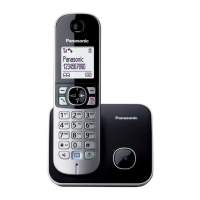
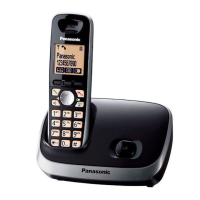
Model shown is KX-TG6841.
Before initial use, see “Getting Started”
on page 10.
Thank you for purchasing a Panasonic product.
Please read these operating instructions before using the unit and save them for
future reference.
Consulte “Guía Rápida Española”, página 60.
For assistance, visit our Web site: http://www.panasonic.com/help for customers
in the U.S.A. or Puerto Rico.
Please register your product: http://www.panasonic.com/prodreg
TG684x7x(en)_1127_ver021.pdf 1 2012/11/27 18:16:41

Questions and Answers

  • R
    Rachel HarrisonSep 23, 2025
    What to do if liquid has entered the handset/base unit of my Panasonic KX-TG6841 Cordless Telephone?
    • C
      Cody MillerSep 23, 2025
      If liquid or other form of moisture has entered the handset/base unit of your Panasonic Cordless Telephone, disconnect the AC adaptor and telephone line cord from the base unit. Remove the batteries from the handset and leave to dry for at least 3 days. After the handset/base unit are completely dry, reconnect the AC adaptor and telephone line cord. Insert the batteries and charge fully before use. If the unit does not work properly, contact an authorized service center.
  • C
    Christian KellyAug 25, 2025
    Why I cannot hear a dial tone on my Panasonic KX-TG6841 Cordless Telephone?
    • E
      emayAug 25, 2025
      If you cannot hear a dial tone on your Panasonic Cordless Telephone, the base unit’s AC adaptor or telephone line cord may not be connected properly; check the connections. Alternatively, disconnect the base unit from the telephone line and connect the line to a known working telephone. If the working telephone operates properly, contact service personnel to have the unit repaired. If the working telephone does not operate properly, contact your service provider/telephone company.
  • C
    Charles SalinasAug 25, 2025
    What to do if the handset does not ring on my Panasonic Cordless Telephone?
    • J
      Jason SaundersAug 26, 2025
      If the handset of your Panasonic Cordless Telephone does not ring, the ringer volume may be turned off; adjust the ringer volume. Silent mode may be turned on; turn it off.
  • S
    Steve SchneiderAug 27, 2025
    What to do if the base unit does not ring on my Panasonic Cordless Telephone?
    • B
      Bryan VaughnAug 27, 2025
      If the base unit of your Panasonic Cordless Telephone does not ring, the ringer volume may be turned off; adjust the ringer volume. Silent mode may be turned on; turn it off.
  • D
    duranbiancaAug 27, 2025
    Why is there noise on my Panasonic KX-TG6841, and the sound cuts in and out?
    • B
      Brooke ValenzuelaAug 27, 2025
      If you experience noise or sound cutting in and out on your Panasonic Cordless Telephone, it could be due to high electrical interference in your area. Try re-positioning the base unit and using the handset away from sources of interference. Also, move closer to the base unit. If you use a DSL/ADSL service, consider connecting a DSL/ADSL filter between the base unit and the telephone line jack.
  • A
    Andrew JohnsonSep 15, 2025
    What to do if the 2nd caller’s information is not displayed during an outside call on my Panasonic KX-TG6841?
    • A
      Alexander LoweSep 15, 2025
      In order to use Caller ID, call waiting, or Call Waiting Caller ID (CWID) on your Panasonic Cordless Telephone, you must first contact your service provider/telephone company and subscribe to the desired service. After subscribing, you may need to contact your service provider/telephone company again to activate this specific service, even if you already subscribed to both Caller ID and Call Waiting with Caller ID services (CWID).
  • J
    johnsonmichaelSep 12, 2025
    Why I cannot make long distance calls on my Panasonic KX-TG6841?
    • A
      Austin LeeSep 13, 2025
      If you cannot make long distance calls on your Panasonic Cordless Telephone, make sure that you have long distance service.
  • K
    Keith SimonSep 14, 2025
    What to do if I fully charged the batteries, but my Panasonic KX-TG6841 Cordless Telephone still flashes, displays , or the operating time seems shorter?
    • D
      david33Sep 14, 2025
      If you have fully charged the batteries of your Panasonic Cordless Telephone, but it still flashes, displays , or the operating time seems shorter, clean the battery ends (, ) and the charge contacts with a dry cloth and charge again. It may also be time to replace the batteries.
  • L
    Lisa GomezSep 5, 2025
    What to do if my Panasonic Cordless Telephone displays the message 'is displayed'?
    • K
      Katherine RobertsSep 5, 2025
      If your Panasonic Cordless Telephone displays this message, it indicates that the handset is too far from the base unit, so move closer. Another possible reason is that the base unit’s AC adaptor is not properly connected; try reconnecting it. Also, the handset may not be registered to the base unit; in that case, you should register it.
  • T
    Tiffany JohnsonSep 3, 2025
    What to do if I cannot register a handset to a base unit on my Panasonic Cordless Telephone?
    • J
      Joseph BradleySep 3, 2025
      If you cannot register a handset to a base unit on your Panasonic Cordless Telephone, the maximum number of handsets (6) may already be registered to the base unit. Cancel unused handset registrations from the base unit.

Summary

Introduction

Model Composition

Details the physical components and models of the system.

Accessory Information

Lists supplied accessories included with the product.

Additional;Replacement Accessories

Lists optional accessories available for purchase.

Expanding Your Phone System

Information on adding more handsets to the system.

Important Information

Safety and Operational Precautions

Covers warnings, safeguards, medical, installation, and general safety instructions.

Performance, Environment, and Care

Guidelines for optimal placement, environment, routine care, and battery.

Specifications and Notices

Technical specs, disposal, energy efficiency, and other notices.

Getting Started

Initial Setup and Connections

Connecting base unit, charger, and installing batteries.

Setup Notes and Eco Mode

Important setup notes, battery performance, and eco mode.

Controls and Display Overview

Identification of handset/base unit controls and display icons.

Initial Settings and Dialing Modes

Setting date/time, language, voice guidance, and dialing modes.

Making;Answering Calls

Making Calls

Using handset, speakerphone, redial, and phonebook.

Answering Calls and Basic Call Features

Answering, ringer volume, hold, mute, flash, and call waiting.

Advanced Call Features

Clarity booster, noise reduction, equalizer, and call share.

Power Failure Operations

Making/answering calls during power outages.

Shared Phonebook

Adding Entries

How to add new contacts to the phonebook.

Character Table and Groups

Keypad guide for names and organizing entries.

Phonebook Management

Changing group names, finding, editing, and erasing entries.

Speed Dial

Adding and Managing Speed Dial Entries

Assigning, editing, and erasing speed dial numbers.

Making Calls Using Speed Dial

How to dial using speed dial keys.

Programming

Programmable Settings and Menu Navigation

Overview of features, menu trees, and command codes.

System Settings Configuration

Settings for answering device, intercom, alerts, date/time.

Customization Options

Settings for alarm, silent mode, caller ID, handset names, key detectors.

Call Management and Line Settings

Call block, speed dial, voice mail, line modes, and call sharing.

Base Unit Specific Settings

Phonebook, caller list, and support access via base unit.

Notes on Programming

Explanations for programming options and settings.

Special Programming

Alarm and Silent Mode

Setting alarms and activating/deactivating silent mode.

Silent Mode Time and Handset Naming

Setting silent mode duration and handset names.

Call Block Functionality

Blocking unwanted calls and storing numbers.

Call Block List Management

Setting first ring and managing call block numbers.

Blocking Calls Without Phone Number

Rejecting calls with no displayed number.

Registering and Deregistering Units

Adding and removing handset registrations.

Caller ID Service

Using Caller ID Service

Requirements, features, and missed calls display.

Talking Caller ID and Phonebook Integration

Announcing callers and phonebook names.

Ringer ID and Caller List Management

Assigning ringers and managing caller lists.

Caller ID Number Auto Edit

Auto-editing caller numbers for local calls.

Managing Caller Information

Erasing caller information and storing it in the phonebook.

Answering System

Answering System Overview and Settings

System functions, memory, on/off, screening, and greetings.

Message Playback and Recording

Recording greetings and listening to messages.

Message Playback Controls

Controls for message playback and calling back.

Message Management

Erasing messages and listening via handset.

New Message Alerting Features

Features for notifying about new messages.

Remote Operation and Access Codes

Accessing system remotely and managing codes.

Voice Guidance and Remote Commands

Using voice prompts and direct commands for remote operation.

Answering System Settings

Configuring answering system parameters like ring count.

Voice Mail Service Notes

Notes for subscribers of voice mail service.

Recording Time and Greeting Options

Setting recording time and greeting-only modes.

Voice Mail Service

Voice Mail Service Overview

Explanation of service provided by telephone provider.

Storing and Erasing VM Access Number

Managing voice mail access numbers.

VM Tone Detection

Detecting provider signals for voice mail.

Listening to Voice Mail Messages

Accessing voice mail messages.

Intercom;Locator

Intercom Functionality

Making, answering, and transferring intercom calls.

Handset Locator

Using the locator feature to find misplaced handsets.

Transferring Calls

Procedures for transferring outside calls.

Conference Calls

Establishing and managing conference calls.

Useful Information

Wall Mounting

Instructions for mounting the base unit on a wall.

Error Messages

Common display messages and their solutions.

Troubleshooting - General Use

Solutions for general operational problems.

Troubleshooting - Settings and Battery

Solutions for settings and battery recharge issues.

Troubleshooting - Calls and Intercom

Solutions for call and intercom related issues.

Troubleshooting - Caller ID

Solutions for Caller ID and announcement problems.

Troubleshooting - Answering System and Liquid Damage

Solutions for answering system issues and liquid damage.

FCC and Other Information

Regulatory compliance and FCC information.

FCC RF Exposure Warning

Safety guidelines regarding RF exposure limits.

Hearing Aid Compatibility

Information on using the phone with hearing aids.

Compliance with TIA-1083 Standard

Details on TIA-1083 standard compliance.

Appendix

Customer Services and Accessory Purchases

Contact info for support and buying parts.

Limited Warranty Information

Details of the product's limited warranty coverage.

Ship-In Service and Online Repair

Instructions for sending the product for repair and online requests.

Limited Warranty Limits and Exclusions

Specific terms and conditions excluded from warranty.

Shipping the Product

Guidelines for packing and shipping the product.

Panasonic KX-TG6841 Specifications

General IconGeneral
TypeCordless Telephone
Number of Handsets1
DECT TechnologyYes
DECT SecurityYes
SpeakerphoneYes
Answering SystemYes
Caller IDYes
DisplayLCD
Talk Time15 hours
Standby Time170 hours
Frequency1.9 GHz
Call WaitingYes
IntercomYes
Headset JackYes
Power BackupNo
RangeUp to 50 meters indoors
HandsetsUp to 6
Battery TypeNi-MH
ExpandableYes

Related product manuals