EasyManua.ls Logo

Panasonic KX-TG6500C - User Manual

Panasonic KX-TG6500C
104 pages
Print Icon
To Next Page IconTo Next Page
Loading...
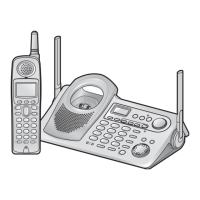
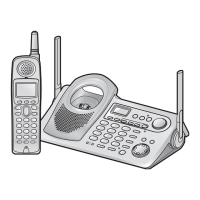
5.8 GHz Expandable Cordless Answering System
Operating Instructions
Model No. KX-TG6500C
Pulse-or-tone dialing capability
This unit is Call Display compatible. To display the caller’s name and phone
number, you must subscribe to Call Display service.
PLEASE READ BEFORE USE AND SAVE.
For assistance, please call 1-800-561-5505 or visit us at www.panasonic.ca
Charge the battery for 6 hours before initial use.
TG6500C_Cover.fm Page 1 Thursday, September 30, 2004 4:53 PM

Table of Contents

Questions and Answers

  • D
    danielle09Sep 8, 2025
    Why does my Panasonic KX-TG6500C announce the wrong day and time during message playback?
    • E
      Elizabeth PerrySep 8, 2025
      If your Panasonic Cordless Telephone announces the wrong day and time during message playback, the date and time may be set incorrectly. Set the date and time again.
  • B
    Brenda WellsAug 23, 2025
    Why is my Panasonic KX-TG6500C Cordless Telephone base unit/handset not ringing?
    • K
      Kevin LambertAug 23, 2025
      If your Panasonic Cordless Telephone base unit or handset isn't ringing, the ringer volume may be turned off. Set it to high, medium, or low. Additionally, if more than one other user is using the handset and/or base unit, the handset/base unit may not ring.
  • R
    Richard JohnsonAug 25, 2025
    Why can't I program any function items on my Panasonic KX-TG6500C?
    • A
      Ashley CarrollAug 25, 2025
      If you cannot program function items on your Panasonic Cordless Telephone, it might be because programming is not possible while the handset or base unit is being used. Also, do not pause for over 60 seconds while programming. While another user is listening to messages or the Answering System is handling a call, you cannot program. Try again later. Walking closer to the base unit may also help.
  • R
    Richard RyanAug 26, 2025
    Why does the CHARGE indicator on my Panasonic KX-TG6500C not go out after the battery has been charged?
    • P
      perezjodiAug 27, 2025
      If the CHARGE indicator on your Panasonic Cordless Telephone does not go out after charging, fully charge the battery. The battery may have been discharged. Clean the charge contacts and charge again. The battery may need to be replaced. If you install a new battery, fully charge it. This may also be normal.
  • K
    Kenneth MillerAug 27, 2025
    What to do if my Panasonic Cordless Telephone handset display is blank?
    • L
      Leonard JohnsonAug 28, 2025
      If the handset display of your Panasonic Cordless Telephone is blank, fully charge the battery.
  • C
    Christopher BurkeSep 22, 2025
    What to do if my Panasonic Cordless Telephone handset/base unit does not work?
    • D
      Daniel NelsonSep 22, 2025
      If your Panasonic Cordless Telephone handset/base unit does not work, check the settings. Also, check whether the dialing mode setting is correct. Fully charge the battery. Clean the charge contacts and charge again. Check battery installation. Unplug the base unit’s AC adaptor to reset it, then plug it in and try again. The handset may not have been registered to the base unit. Re-install the battery and fully charge it.
  • A
    Alex WardSep 16, 2025
    What to do if all messages are not erased on my Panasonic KX-TG6500C?
    • L
      Lindsey CohenSep 16, 2025
      If all messages are not erased on your Panasonic Cordless Telephone, it may be because you pressed a button to start another operation before you hear 'No messages'. Erase messages again.
  • K
    Kimberly MedinaSep 18, 2025
    Why does the NEW MESSAGE indicator still flash even if I have listened to all new messages on my Panasonic KX-TG6500C Cordless Telephone?
    • S
      Shannon AlexanderSep 18, 2025
      If the NEW MESSAGE indicator still flashes even if you have listened to all new messages on your Panasonic Cordless Telephone, the other line has new messages. Select that line by pressing [LINE SELECT], then play back the new messages. If you selected lines to play back messages, memo messages will not be played. Play back messages without selecting lines first.
  • C
    Chelsea GomezSep 7, 2025
    Why can't I operate the Answering System from the base unit or the handset of my Panasonic Cordless Telephone?
    • J
      Justin FlynnSep 7, 2025
      If you cannot operate the Answering System from the base unit or handset of your Panasonic Cordless Telephone, it may be because more than 1 other user is using the handset and/or base unit. Try again later. Also, if another user is listening to messages or the Answering System is handling a call, you cannot operate the Answering System. Try again later.
  • J
    Jeremy GordonSep 4, 2025
    Why can't I operate the Answering System from a touch tone phone on my Panasonic KX-TG6500C Cordless Telephone?
    • J
      jacksonbenjaminSep 4, 2025
      If you cannot operate the Answering System from a touch tone phone on your Panasonic Cordless Telephone, make sure you entered the correct remote touch code. Press each button firmly, as the Answering System may not respond if the tones are too short. Also, the Answering System may be off, so turn it on.

Summary

For Best Performance

Battery Charge Tips

Details on charging the handset battery before initial use and for subsequent charges.

Installation

Connecting the AC Adaptor

Instructions for connecting the AC power adaptor to the base unit and power outlet.

Connecting the Telephone Line Cord

Steps for connecting the telephone line cord to the base unit for a 2-line jack.

For DSL Service Users

Guidance on connecting the unit to a telephone line with DSL service, including noise filter use.

Handset Battery Installation and Charging

Procedure for installing and charging the handset battery for optimal performance.

Preparing the Answering System

Greeting Message

Procedure for recording a personal or common greeting message for the answering system.

Making Calls

Using the Handset

Instructions for making calls using the handset, including hands-free conversation.

Making Calls (Continued)

Using the Base Unit

Instructions for making calls using the base unit speakerphone.

Answering Calls

Answering with Handset

Instructions for answering calls using the handset.

Answering with Base Unit

Instructions for answering calls using the base unit speakerphone.

Using the Other Line During a Conversation

Handling Second Calls on Handset

How to handle a second incoming call or make a second call from the handset.

Handling Second Calls on Base Unit

How to handle a second incoming call or make a second call from the base unit.

Call Display Service

Caller Information Display

Explanation of how caller names and numbers are displayed and recorded.

Using the Caller List

Viewing the Caller List

Instructions on how to view missed calls and logged caller information on the handset.

Calling Back from the Caller List

Procedure for calling back a number directly from the caller list.

Using the Caller List (Continued)

Storing Caller Information in Phone Book

How to save caller list entries into the handset's phone book.

Phone Book

Storing Names and Numbers

Step-by-step guide to saving names and phone numbers in the phone book.

Dialing from the Phone Book

How to make calls by selecting names or numbers from the phone book.

Phone Book (Continued)

Copying Items Between Handsets

How to copy phone book items between handsets when the system has multiple handsets.

Speed Dialer

Storing Phone Numbers in Base Unit

How to store up to 10 phone numbers in the base unit's memory stations.

Dialing Stored Phone Numbers

How to dial numbers stored in the base unit's speed dial memory.

Intercom

Making Intercom Calls from Handset

Instructions for initiating intercom calls from the handset to the base unit or other handsets.

Making Intercom Calls from Base Unit

Instructions for initiating intercom calls from the base unit to handsets or paging all handsets.

Answering Intercom Calls

How to answer an intercom call when the handset or base unit is paged.

Transferring a Call

Transferring from Handset to Base Unit

Procedure for transferring an outside call from the handset to the base unit.

Transferring from Base Unit to Handset

Procedure for transferring an outside call from the base unit to a handset.

Transferring Between Handsets

How to transfer a call between handsets when the system has multiple handsets.

Conference Calls

Conference Call with Two Outside Calls

How to establish a conference call with two outside callers using the handset or base unit.

Conference with Outside and Intercom Calls

How to create a conference call involving an outside call and an intercom call.

Room Monitor

Monitoring with Handset

Procedure for using a handset to monitor another room or unit.

Monitoring with Base Unit

Procedure for using the base unit to monitor another room or handset.

Special Features

Muting Your Conversation

How to mute your conversation so the other party cannot hear you, using handset or base unit.

Special Features (Continued)

Automatic Answering Operation

Setting the Unit to Answer Calls

Instructions for turning on the answering system for one or both lines.

Automatic Answering Operation (Continued)

Monitoring Incoming Calls

How to listen to callers leaving messages through the base unit speaker.

Listening to Messages

Using the Base Unit to Play Back Messages

How to play back recorded messages using the base unit.

Listening to Messages (Continued)

Remote Operation Using Handset

How to play back messages remotely using the handset, including voice menu operations.

Erasing Messages

Erasing All Messages (Base Unit)

How to erase all messages (except greetings) from the base unit.

Erasing Messages (Continued)

Recording a Memo Message

Procedure for recording a voice memo message for other users or yourself.

Transferring a Call to the Answering System

Transferring from Base Unit

How to transfer a call to the answering system from the base unit.

Transferring from Handset

How to transfer a call to the answering system from the handset.

Remote Operation from a Touch Tone Phone

Summary of Remote Operation

Overview of how to operate the answering system remotely using a touch-tone phone.

Remote Operation from a Touch Tone Phone (Continued)

Setting the Remote Code

How to set and confirm a 2-digit remote code to prevent unauthorized access.

Remote Operation from a Touch Tone Phone (Continued)

Direct Remote Operation Commands

How to control the unit using direct commands instead of the voice menu.

Optional Headset

Connecting an Optional Headset

How to connect an optional headset to the handset for hands-free conversation.

Direct Commands

Phone Book Operations

Direct commands for copying phone book items and setting dial mode.

Remote Code Setup

Direct command for setting or changing the remote access code.

Cancelling Registration;Re-registration

Cancelling Handset Registration

Procedure to cancel a handset's registration from the current base unit.

Re-registering the Handset

Steps to re-register a handset to the same or a different base unit.

Troubleshooting (Continued)

Answering System Recording Issues

Troubleshooting why messages aren't recorded, e.g., recording time, memory full, or system off.

General Unit Not Working and Battery Issues

Troubleshooting when the unit does not work and battery-related display messages.

Safety Instructions

General Safety Precautions

Essential safety advice for using the unit, including power connection and environment.

Safety Instructions (Continued)

WARNING: Fire or Shock Hazard Prevention

Critical warning against exposing the product to rain or moisture.

Panasonic KX-TG6500C Specifications

General IconGeneral
Number of Handsets1
Caller IDYes
DisplayLCD
Ringtones5
SpeakerphoneYes
Call WaitingYes
IntercomYes
TypeCordless Phone
Phonebook Capacity50 stations
Battery TypeNi-MH
ColorBlack

Related product manuals