EasyManua.ls Logo

Panasonic KX-TG6572 - User Manual

Panasonic KX-TG6572
64 pages
Print Icon
To Next Page IconTo Next Page
Loading...
Thank you for purchasing a Panasonic product.
Please read these operating instructions before using the unit and save
them for future reference.
This unit is compatible with Caller ID. You must subscribe to the appropriate
service offered by your service provider/telephone company.
For assistance, visit our Web site: http://www.panasonic.com/help for
customers in the U.S.A. or Puerto Rico.
Before initial use, see “Getting
Started” on page 10.
Consulte “Guía Rápida Española”, página 56.
Please register your product: http://www.panasonic.com/prodreg
Operating Instructions
Expandable Digital Cordless Answering System
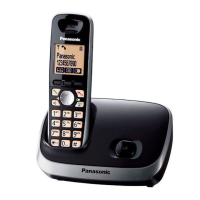
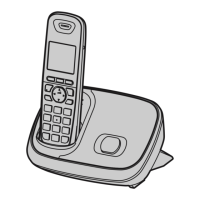
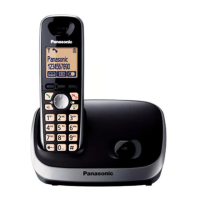
Model shown is KX-TG6511.
KX-TG6524
KX-TG6525
KX-TG6572
KX-TG6531
KX-TG6532
KX-TG6533
KX-TG6534
KX-TG6541
KX-TG6542
KX-TG6543
KX-TG6544
KX-TG6545
Model No.
KX-TG6522
KX-TG6523
Expandable Digital Cordless Phone
Model No. KX-TG6511
KX-TG6512
KX-TG6513
TG6511(e).book Page 1 Wednesday, April 28, 2010 4:35 PM


Questions and Answers

  • T
    Todd HoffmanAug 16, 2025
    What to do if my Panasonic KX-TG6572 unit does not work?
    • D
      Dr. Randy HarrisAug 17, 2025
      If your Panasonic Cordless Telephone unit does not work, make sure the batteries are installed correctly and fully charged. Check the connections. Unplug the base unit’s AC adaptor to reset the unit, then reconnect the adaptor and try again. Ensure the handset has been registered to the base unit and register the handset if needed.
  • G
    Gregg MitchellAug 22, 2025
    What to do if I cannot hear a dial tone on my Panasonic Cordless Telephone?
    • B
      Brandon BaxterAug 22, 2025
      If you cannot hear a dial tone on your Panasonic Cordless Telephone, check the connections, ensuring the base unit’s AC adaptor or telephone line cord is connected. Disconnect the base unit from the telephone line and connect the line to a known working telephone. If the working telephone operates properly, contact our service personnel to have the unit repaired. If the working telephone does not operate properly, contact your service provider/ telephone company.
  • S
    Samantha TaylorAug 25, 2025
    What to do if I cannot make a call on my Panasonic KX-TG6572 Cordless Telephone?
    • S
      Sean MorganAug 25, 2025
      If you cannot make a call on your Panasonic Cordless Telephone, the dialing mode may be set incorrectly, so change the setting. The handset may be too far from the base unit; move closer and try again.
  • V
    Vanessa GoodmanAug 27, 2025
    Why is caller information not displayed on my Panasonic KX-TG6572 Cordless Telephone?
    • C
      Catherine CannonAug 27, 2025
      Several factors can cause caller information not to be displayed. First, ensure you subscribe to Caller ID service. If your unit connects to additional telephone equipment such as a Caller ID box or cordless telephone line jack, plug the unit directly into the wall jack. If you use a DSL/ADSL service, consider connecting a DSL/ADSL filter between the base unit and the telephone line jack. Also, the name display service may not be available in some areas, or other telephone equipment may be interfering with this unit, so disconnect the other equipment and try again.
  • J
    James McintyreAug 30, 2025
    Why does my Panasonic Cordless Telephone not record new messages?
    • D
      dunnpaulAug 30, 2025
      There are several reasons why your Panasonic Cordless Telephone unit may not be recording new messages. The answering system may be turned off, so turn it on. The message memory might be full, so erase unnecessary messages. The recording time might be set to “Greeting only”, so change the setting. If you subscribe to a voice mail service, messages are recorded by your service provider/telephone company, not your telephone.
  • C
    Christina NguyenSep 1, 2025
    What to do if I cannot operate the answering system remotely on my Panasonic KX-TG6572 Cordless Telephone?
    • W
      William GregorySep 2, 2025
      If you cannot operate the answering system remotely on your Panasonic Cordless Telephone, the remote access code may not be set, so set the remote access code. You might be entering the wrong remote access code; if you have forgotten it, enter the remote access code setting to check your current code. Ensure you press each key firmly. Also, the answering system may be turned off, so turn it on.
  • M
    Michael GilbertSep 5, 2025
    What to do if liquid entered the handset/base unit of my Panasonic Cordless Telephone?
    • M
      Mr. Dalton JonesSep 5, 2025
      If liquid or other form of moisture has entered the handset/base unit of your Panasonic Cordless Telephone, disconnect the AC adaptor and telephone line cord from the base unit. Remove the batteries from the handset and leave to dry for at least 3 days. After the handset/base unit are completely dry, reconnect the AC adaptor and telephone line cord. Insert the batteries and charge fully before use. If the unit does not work properly, contact an authorized service center.
  • P
    Preston BentonSep 7, 2025
    Why is the indicator on the handset flashing slowly on my Panasonic Cordless Telephone?
    • G
      Gabriel GarciaSep 7, 2025
      If the indicator on the handset of your Panasonic Cordless Telephone flashes slowly, new messages or new voice mail messages have been recorded. Listen to the new messages or new voice mail messages.
  • M
    Megan FieldsSep 10, 2025
    What to do if my Panasonic KX-TG6572 Cordless Telephone batteries still flash after being fully charged?
    • S
      Sean SmithSep 10, 2025
      If you fully charged the batteries, but the symbol still flashes, '0' is displayed, or the operating time seems shorter on your Panasonic Cordless Telephone, clean the battery ends and the charge contacts with a dry cloth and charge again. It may also be time to replace the batteries.
  • L
    Lori MurphySep 10, 2025
    Why does the handset beep and/or flash on my Panasonic KX-TG6572 Cordless Telephone?
    • T
      Thomas SimpsonSep 12, 2025
      If the handset of your Panasonic Cordless Telephone beeps and/or flashes, fully charge the batteries.

Summary

Important Information

Safety Precautions and Warnings

Covers general safety, operating safeguards, medical considerations, and installation guidelines.

Battery Safety and Handling

Provides essential guidelines for handling, charging, and disposing of batteries safely.

Getting Started

Basic Setup and Connections

Guides users through initial connections, battery installation, and charging the unit.

Making and Answering Calls

Making and Answering Calls

Covers the fundamental procedures for initiating and receiving calls using the handset or base unit.

Shared Phonebook

Managing Phonebook Entries

Details adding, editing, erasing entries, and organizing them into groups.

Programming

Customizing Unit Settings

Explains how to set alarms, silent mode, call blocking, and handset names.

Caller ID Service

Understanding Caller ID Features

Introduces Caller ID compatibility, name display, and Talking Caller ID functionality.

Answering System

Answering System Operation

Covers turning the system on/off, call screening, and managing greeting messages.

Managing Messages and Voice Memos

Explains listening to, erasing messages, and recording voice memos.

Intercom and Locator Features

Useful Information

Troubleshooting Guide

Offers solutions for common problems, error messages, and unit malfunctions.

Guía Rápida Española

Panasonic KX-TG6572 Specifications

General IconGeneral
TypeDECT telephone
Answering machineYes
Phonebook capacity- entries
Display diagonal1.9 \
Display number of colorsMonochrome
Frequency band1.9 GHz
Mac compatibilityNo
Dimensions (WxDxH)58 x 33 x 170 mm
Mounting typeDesk
Product colorGray
Weight and Dimensions IconWeight and Dimensions
Cable length162 m

Related product manuals