EasyManua.ls Logo

Panasonic KX-TG6811BX - User Manual

Panasonic KX-TG6811BX
52 pages
Print Icon
To Next Page IconTo Next Page
Loading...
Operating Instructions
Model No. KX-TG6811BX
KX-TG6812BX
KX-TG6881BX
KX-TG6811UE
KX-TG6812UE
KX-TG6881UE
Digital Cordless Phone
Model No. KX-TG6821BX
KX-TG6822BX
KX-TG6821UE
Digital Cordless Answering System
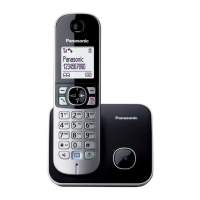
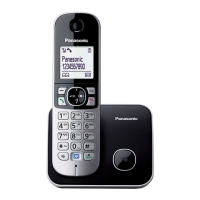
Model shown is KX-TG6811.
Before initial use, see “Getting Started”
on page 9.
Thank you for purchasing a Panasonic product.
Please read these operating instructions before using the unit and save them for
future reference.
Please access our online customer survey:
http://panasonic.net/pcc/tel/q
TG68xxBX_UE(en)_0523_ver021.pdf 1 2013/05/23 16:41:15

Questions and Answers

  • K
    Kathryn MeyerSep 23, 2025
    What to do if liquid entered my Panasonic Cordless Telephone?
    • J
      Jessica RowlandSep 23, 2025
      If liquid or other form of moisture has entered the handset/base unit of your Panasonic Cordless Telephone, disconnect the AC adapter and telephone line cord from the base unit. Remove the batteries from the handset and leave to dry for at least 3 days. After the handset/base unit are completely dry, reconnect the AC adapter and telephone line cord. Insert the batteries and charge fully before use. If the unit does not work properly, contact an authorised service centre.
  • S
    Susan MarksAug 23, 2025
    Why I cannot hear a dial tone on my Panasonic KX-TG6811BX?
    • E
      Edward AtkinsonAug 23, 2025
      If you cannot hear a dial tone on your Panasonic Cordless Telephone, first, make sure you are using the supplied telephone line cord as older cords may have different wiring. Check that the base unit’s AC adapter and telephone line cord are properly connected. If the issue persists, disconnect the base unit from the telephone line and connect the line to a known working telephone to determine if the problem lies with the unit or your telephone service.
  • J
    John VaughnAug 25, 2025
    How to fix a blank display on a Panasonic Cordless Telephone?
    • R
      Rebecca GarciaAug 26, 2025
      If the handset display of your Panasonic Cordless Telephone is blank, turn the power on.
  • D
    David DudleyAug 27, 2025
    How to fix a Panasonic KX-TG6811BX Cordless Telephone when the handset doesn't ring?
    • D
      Deborah SandersAug 27, 2025
      If the handset of your Panasonic Cordless Telephone does not ring, check if the ringer volume is turned off and adjust it accordingly. Also, verify that night mode is turned off, as this feature silences the ringer.
  • M
    Mary YoungAug 27, 2025
    Why my Panasonic KX-TG6811BX does not record new messages?
    • W
      Wesley JohnsonAug 27, 2025
      If your Panasonic Cordless Telephone does not record new messages, ensure that the answering system is turned on. Check if the message memory is full and erase unwanted messages if necessary. Also, verify that the recording time is not set to “Greeting Only”. If you subscribe to a voice mail service, messages may be recorded by your service provider, so you may need to adjust the unit’s number of rings setting.
  • J
    jon84Sep 18, 2025
    How to fix the phonebook name display on my Panasonic Cordless Telephone?
    • M
      melissawadeSep 18, 2025
      If the name stored in the phonebook of your Panasonic Cordless Telephone is not fully displayed while an outside call is being received, edit the phonebook entry name to fit in 1 line of text.
  • M
    michael74Sep 15, 2025
    Why I cannot activate eco mode on my Panasonic KX-TG6811BX?
    • R
      Robin GambleSep 15, 2025
      If you cannot activate eco mode on your Panasonic Cordless Telephone, you cannot set eco mode when you set the repeater mode “On”. If required, set the repeater mode to “Off”.
  • J
    Jennifer PhillipsSep 16, 2025
    Why can't I use the intercom or phonebook copy feature on my Panasonic KX-TG6811BX?
    • R
      Roberto NguyenSep 16, 2025
      These features are available between the handsets. Although the handset displays “Intercom”, “Copy All”, or “Copy”, these features are not available for single handset models.
  • E
    Erika TrevinoSep 6, 2025
    What does 'Out of Range' mean on my Panasonic Cordless Telephone?
    • A
      Angela WilliamsSep 6, 2025
      If 'Out of Range' is displayed on your Panasonic Cordless Telephone, the handset is too far from the base unit, so move closer. Ensure the base unit’s AC adapter is properly connected. Also, the handset may not be registered to the base unit, so register it. Activating one touch eco mode reduces the range of the base unit in standby mode, so turn eco mode off if required.
  • M
    Megan SkinnerSep 3, 2025
    Why does the time on my Panasonic KX-TG6811BX keep changing?
    • M
      Michael PerrySep 4, 2025
      If the time on your Panasonic Cordless Telephone has shifted, incorrect time information from incoming Caller ID may be changing the time. Set the time adjustment to “Manual” (off).

Panasonic KX-TG6811BX Specifications

General IconGeneral
BrandPanasonic
ModelKX-TG6811BX
CategoryCordless Telephone
LanguageEnglish

Related product manuals