EasyManua.ls Logo

Panasonic KX-TG6411FX - User Manual

Panasonic KX-TG6411FX
56 pages
Print Icon
To Next Page IconTo Next Page
Loading...
Thank you for purchasing a Panasonic product.
This unit is compatible with Caller ID and SMS. You must subscribe to the
appropriate service offered by your service provider/telephone company.
To use this unit in your country, first change the unit’s region setting
to match your country (page 25). Change the unit’s display language
as needed (page 16).
(For Czech and Slovakia)
This cordless telephone is possible to use according to General licence
No.: VO-R/8/08.2005-23 (for Czech), VPR-7/2001 (for Slovakia).
Please read these operating instructions before using the unit and save
them for future reference.
Charge the batteries for about 7 hours before initial use.
Operating Instructions
Model No. KX-TG6421FX
Digital Cordless Answering System
Model No. KX-TG6411FX
KX-TG6412FX
Digital Cordless Phone
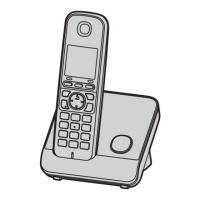
Model shown is KX-TG6411.
TG6411-6421FX(e).book Page 1 Friday, February 27, 2009 11:44 AM

Other manuals for Panasonic KX-TG6411FX

Questions and Answers

  • R
    Regina GreenSep 23, 2025
    What to do if liquid entered my Panasonic KX-TG6411FX?
    • M
      Marcus CoxSep 23, 2025
      If liquid or other form of moisture has entered your Panasonic Cordless Telephone handset/base unit, disconnect the AC adaptor and telephone line cord from the base unit. Remove the batteries from the handset and leave to dry for at least 3 days. After the handset/base unit are completely dry, reconnect the AC adaptor and telephone line cord. Insert the batteries and charge fully before use. If the unit does not work properly, contact your nearest Panasonic service centre.
  • C
    cameron30Aug 25, 2025
    What to do if my Panasonic Cordless Telephone does not work?
    • K
      Kim SellersAug 25, 2025
      If your Panasonic Cordless Telephone unit does not work, ensure the batteries are installed correctly. Fully charge the batteries. Check all connections to make sure they are secure. Unplug the base unit’s AC adaptor to reset the unit, turn off the handset, reconnect the adaptor, turn on the handset, and try again. Also, verify that the handset is registered to the base unit.
  • B
    brandtcharlesAug 25, 2025
    How to fix a blank display on my Panasonic KX-TG6411FX handset?
    • J
      jeremy33Aug 26, 2025
      If the handset display is blank on your Panasonic Cordless Telephone, ensure that the handset is turned on.
  • J
    Jill MartinAug 27, 2025
    Why I cannot make a call on my Panasonic KX-TG6411FX Cordless Telephone?
    • C
      curtis55Aug 27, 2025
      If you cannot make a call with your Panasonic Cordless Telephone, the dialling mode may be set incorrectly. Also, ensure that you are close enough to the base unit. If another unit is in use or the answering system is active, wait and try again later. If the key lock feature is turned on, turn it off.
  • S
    Stacy EvansAug 27, 2025
    Why is there noise or sound cutting in and out on my Panasonic Cordless Telephone?
    • D
      darren67Aug 27, 2025
      If you are experiencing noise or sound cutting in and out on your Panasonic Cordless Telephone, reposition the base unit and use the handset away from sources of electrical interference. Move closer to the base unit. If you use a DSL/ADSL service, connect a DSL/ADSL filter between the base unit and the telephone line jack.
  • T
    Timothy JohnsSep 13, 2025
    What does “FD” displayed on my Panasonic Cordless Telephone mean?
    • K
      Katie HunterSep 14, 2025
      If “FD” is displayed on your Panasonic Cordless Telephone, confirm that the correct SMS message centre numbers are stored and that SMS is turned on.
  • K
    Kenneth BradleySep 12, 2025
    Why is the SMS message centre number logged in the caller list and the message not received on my Panasonic KX-TG6411FX?
    • C
      clarkjosephSep 12, 2025
      To resolve this on your Panasonic Cordless Telephone, turn on SMS.
  • B
    Bryan WolfeSep 12, 2025
    Why I cannot send or receive SMS messages on my Panasonic KX-TG6411FX?
    • A
      Annette PatelSep 12, 2025
      If you cannot send or receive SMS messages on your Panasonic Cordless Telephone, you may not have subscribed to the appropriate service. Also, the SMS message centre numbers may not be stored or are incorrect. Message transmission may have been interrupted. If you use a DSL/ADSL service, connect a DSL/ADSL filter between the base unit and the telephone line jack.
  • B
    briandrakeSep 4, 2025
    Why is the operating time shorter after fully charging the batteries on my Panasonic KX-TG6411FX Cordless Telephone?
    • K
      Kirsten HawkinsSep 4, 2025
      If you fully charged the batteries, but the operating time seems shorter on your Panasonic Cordless Telephone, clean the battery ends (S, T) and the charge contacts with a dry cloth and charge again.
  • N
    Natalie RobinsonSep 2, 2025
    Why is caller information not displayed on my Panasonic KX-TG6411FX?
    • R
      Richard SnyderSep 2, 2025
      If caller information is not displayed on your Panasonic Cordless Telephone, you must subscribe to a Caller ID service. If the unit is connected to additional telephone equipment, remove it and plug the unit directly into the wall jack. If you use a DSL/ADSL service, connect a DSL/ADSL filter between the base unit and the telephone line jack. Disconnect any other telephone equipment that may be interfering with the unit.

Panasonic KX-TG6411FX Specifications

General IconGeneral
TypeCordless Telephone
ModelKX-TG6411FX
Number of Handsets1
Frequency1.9 GHz
DECTYes
GAP compatibleYes
Maximum number of handsets supported6
Caller IDYes
Call WaitingYes
DisplayLCD
Backlit DisplayYes
SpeakerphoneYes
IntercomYes
Answering MachineNo
Battery TypeNi-MH
Power SourceAC Adapter
Weight (Handset)120 g
RangeUp to 300 meters outdoors
Ringtones10
Number of Batteries Supported2

Related product manuals