Useful Information
For assistance, please visit http://www.panasonic.com/phonehelp 73
Connecting to your network
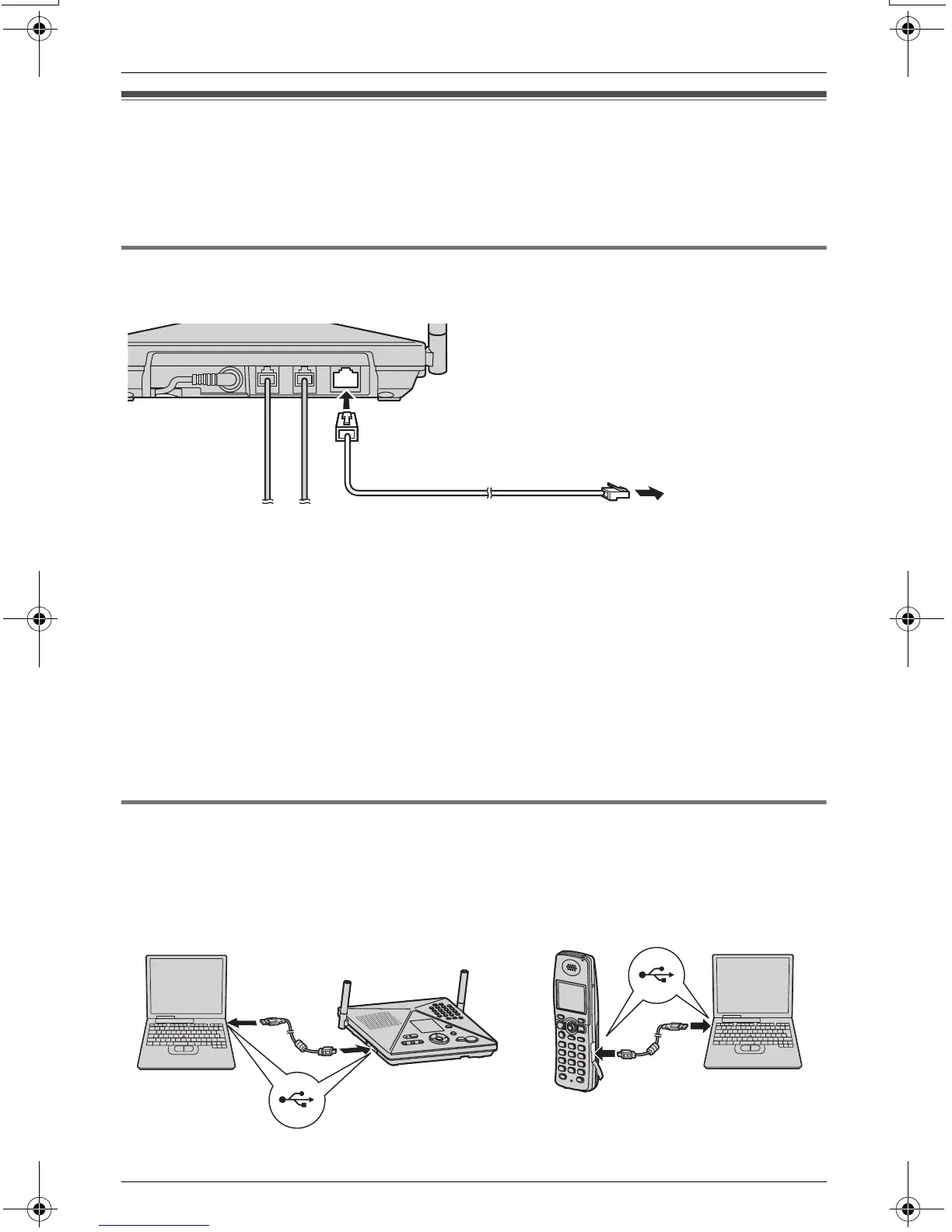
By connecting the base unit to your LAN, you can use this unit to:
– connect to the Internet (requires a high-speed Internet service subscription).
– connect to a computer on the same network.
Connecting to your LAN
Connect the base unit using LAN cable.
Note:
L Refer to the included “Installation Guide for MULTI TALK V Software” for connections.
L When connecting the MULTI TALK V devices to a local area network, you need to know
the following limitations.
– While you are using a dial up network (DUN) to access the Internet, no other data
communication can take place using the same computer (for example, file sharing,
browsing the cordless camera, printing with KX-THA16, etc.).
– If you have high-speed Internet service (DSL or Cable), it is better to connect the
base unit behind a router to utilize the networking features properly (for example,
sharing Internet connection, browsing the cordless camera with a computer, printing
with the KX-THA16, etc.).
Connecting the USB cable to the unit
By connecting the USB cable to the USB port, you can use this unit to:
– use MULTI TALK V USB Utility with your computer.
– access to the Internet with your computer.
LINE1/2 LINE2 LAN
LAN cable (Category 5 UTP cable)
See note below.
TH102-C.book Page 73 Monday, March 13, 2006 2:41 PM



 To Next Page