EasyManua.ls Logo

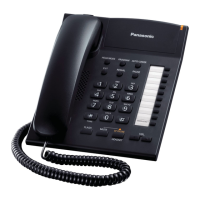
Panasonic KX-TS880 - User Manual

Panasonic KX-TS880
52 pages
Print Icon
To Next Page IconTo Next Page
Loading...
Operating Instructions
Integrated Telephone System
Model No. KX-TS880
Thank you for purchasing a Panasonic product.
Please read these operating instructions before using the unit and save them for
future reference.
This unit is compatible with Caller ID. You must subscribe to the appropriate
service offered by your service provider/telephone company.
For assistance, visit our website:
http://www.panasonic.com/help for customers in the USA or Puerto Rico.
Consulte “Guía Rápida en Español”, página 37.
Please register your product: http://www.panasonic.com/prodreg
KX-TS880.book Page 1 Friday, October 15, 2010 5:04 PM


Questions and Answers

  • M
    matthewjenkinsSep 8, 2025
    Why doesn't the number of missed calls display during standby mode on my Panasonic Telephone System?
    • M
      Matthew WilsonSep 8, 2025
      You have likely entered the caller list before, and there have been no new missed calls since then.
  • N
    nelsonlauraAug 23, 2025
    Why is caller information not displayed on my Panasonic Telephone System?
    • M
      Michelle ReedAug 23, 2025
      There are several reasons why caller information might not be displayed. You may need to subscribe to Caller ID service, so consult your service provider/telephone company for details. You may also need to install or replace the batteries. If your unit is connected to additional telephone equipment, plug the unit directly into the wall jack. If you use a DSL/ADSL service, connecting a DSL/ADSL filter between the unit and the telephone line jack is recommended. The name display service may not be available in some areas, so contact your service provider/telephone company for details. Other telephone equipment may be interfering with your phone, so disconnect it and try again.
  • M
    monroekathrynAug 25, 2025
    What to do if my Panasonic KX-TS880 does not work?
    • G
      Gregory MerrittAug 25, 2025
      First, check the connections. If that doesn't solve the problem, remove the batteries and reinstall them to reset the unit.
  • J
    Jennifer KellerAug 26, 2025
    What to do if I cannot dial on my Panasonic KX-TS880 Telephone System?
    • D
      Derrick MichaelAug 27, 2025
      Check for a dial tone. If there is no dial tone, check the connections. Also, the dialing mode may be set incorrectly, so change the settings. Finally, the dialed number may be restricted; to cancel, see page 22.
  • D
    Donna BarnettAug 27, 2025
    What to do if I cannot hear a dial tone on my Panasonic KX-TS880?
    • C
      Carl RobertsAug 27, 2025
      Disconnect the unit from the telephone line and connect the line to a known working telephone. If the working telephone operates properly, contact our service personnel to have the unit repaired. If the working telephone does not operate properly, contact your service provider/telephone company.
  • H
    Heather ValenciaSep 22, 2025
    What happens when information stored in the redial list is erased on my Panasonic KX-TS880 Telephone System?
    • L
      Laura ScottSep 22, 2025
      If “ ” flashes, replace the batteries as soon as possible. Otherwise, information stored in the redial list will be erased. Store the desired item in the phonebook, one-touch dial or speed dial memory before the battery replacement.
  • J
    John WongSep 16, 2025
    Why does the display exit the caller list on my Panasonic Telephone System?
    • V
      Valerie GonzalezSep 16, 2025
      Do not pause for over 60 seconds while searching.
  • A
    Adam LawrenceSep 18, 2025
    Why can't I redial by pressing {REDIAL} on my Panasonic Telephone System?
    • R
      Robin SimsSep 18, 2025
      If the last number dialed was more than 32 digits long, the number will not be redialed correctly.
  • J
    John ChanSep 7, 2025
    Why is the 2nd caller’s information not displayed during an outside call on my Panasonic KX-TS880?
    • M
      matthew68Sep 7, 2025
      In order to use Caller ID, call waiting, or Call Waiting Caller ID (CWID), you must first contact your service provider/telephone company and subscribe to the desired service. After subscribing, you may need to contact them again to activate this specific service, even if you already subscribed to both Caller ID and Call Waiting with Caller ID services (CWID).
  • R
    Roger HahnSep 4, 2025
    What to do if my Panasonic Telephone System does not ring?
    • T
      Timothy ChavezSep 4, 2025
      The RINGER selector is likely set to OFF. Set it to HIGH or LOW.

Summary

Introduction

Accessory Information

Details of accessories included with the phone.

Important Information

For Your Safety

Essential safety precautions to prevent injury and property damage.

Safety Instructions

General safety guidelines for product usage.

Important Information

Best Performance Guidelines

Guidelines for optimal product operation and environment.

Product Specifications

Technical details including power source, dimensions, and operating conditions.

Preparation

Unit Controls

Identifies and explains the function of each button on the telephone unit.

Navigator Key Usage

Explains how to use the navigation keys for menu selection and data entry.

Preparation

Display Items

Explains the meaning of various icons and indicators shown on the display.

Preparation

Battery Installation and Precautions

Provides detailed instructions for installing batteries and lists important warnings.

Preparation

Connecting the Phone

Step-by-step guide on connecting the handset and telephone line cord.

Preparation

Instruction Symbols

Explains the meaning of symbols used throughout the operating instructions.

Preparation

Initial Unit Setup

Instructions for initial setup including display language, date, time, and dialing mode.

Making and Answering Calls

Making Calls

Basic steps for initiating phone calls using the handset or speakerphone.

Speakerphone Usage

Instructions on how to use the speakerphone for hands-free conversations.

Redial List Operations

Explains how to make calls using the redial list and erase entries.

Making and Answering Calls

Answering Calls

Procedures for answering incoming calls using the handset or speakerphone.

Ringer Volume Adjustment

How to set the ringer volume to High, Low, or Off.

Making and Answering Calls

Useful Call Features

Covers Hold, Mute, and Flash functions for managing calls.

Call Waiting and Caller ID Usage

Information on using call waiting and Caller ID services for managing multiple calls.

One-Touch Dialer

Storing and Dialing Numbers

Steps for storing, erasing, and dialing numbers using one-touch buttons.

One-Touch Dialer

Using the Index Card

Guidance on using the index card to record stored one-touch dial numbers.

Speed Dialer

Storing and Dialing Numbers

Procedures for saving, erasing, and making calls using speed dial memory stations.

Phonebook

Adding Phonebook Entries

Instructions on how to add names and phone numbers to the phonebook.

Storing Emergency Numbers

How to store numbers that can be dialed even with call restriction active.

Phonebook

Finding, Calling, and Editing Entries

How to locate, make calls to, and modify stored phonebook entries.

Erasing Phonebook Entries

How to delete entries from the phonebook.

Programming

Programmable Settings Overview

Introduces customizable features and how to access them via menus.

Programming

Call Restriction and Password

How to set up call restrictions and change the unit's access password.

Caller ID Service

Using Caller ID Service

Explains how to subscribe to and use Caller ID features.

Caller ID Features and Information

Details the display of caller name, number, missed calls, and private names.

Caller ID Service

Caller List Management

How to view, call back, and edit entries in the caller list.

Caller ID Auto Edit Feature

Explains the feature that automatically edits caller numbers based on previous edits.

Caller ID Service

Erasing Caller Information

Steps for deleting selected or all caller list entries.

Storing Caller Information

How to save incoming caller information to the phonebook, one-touch dial, or speed dial.

Voice Mail Service

Listening to Voice Mail

How the unit indicates and allows access to new voice mail messages.

VM Tone Detection Settings

Information and steps to enable or disable the voice mail tone detection feature.

Useful Information

Optional Headset Usage

Instructions for connecting and using an optional headset for hands-free calls.

Useful Information

Desk Mount Setup

Guide on setting up the unit in two different positions on a desk.

Useful Information

Wall Mount Setup

Instructions for mounting the telephone unit securely on a wall plate.

Useful Information

Troubleshooting Guide

A comprehensive list of common problems and their solutions.

Useful Information

Troubleshooting Guide

Continues the guide to common issues and their resolutions.

Useful Information

Troubleshooting Guide

Further troubleshooting tips for various operational problems.

Liquid Damage Caution

Important warnings and procedures to follow in case the unit sustains liquid damage.

Useful Information

FCC and Other Information

Regulatory compliance details, including FCC rules and product identifiers.

Useful Information

FCC Compliance Notes

Further notes on FCC compliance, interference, and hearing aid compatibility.

Appendix

Customer Services Directory

Contact information and resources for product support and accessories in the US and Puerto Rico.

Accessory Purchases

Information on how to purchase replacement parts and accessories.

Appendix

Product Warranty Information

Details of the limited warranty coverage, duration, and terms for the product.

Appendix

Warranty Limitations and Exclusions

Outlines what is not covered by the product's limited warranty.

Index

Panasonic KX-TS880 Specifications

General IconGeneral
Volume controlRotary
Languages supportDUT, ENG, ESP, GRE, ITA, POR
Clock with calendarYes
Number of programmable buttons10
Phonebook capacity50 entries
Redial list capacity20
Answering machineNo
Display number of lines3 lines
Mounting typeDesk
Product colorWhite
Harmonized System (HS) code85171800
Weight and Dimensions IconWeight and Dimensions
Depth220 mm
Width172 mm
Height93 mm
Weight550 g

Related product manuals