Preparation/Basic
22
DVQX1324 (ENG)
Basic Operations
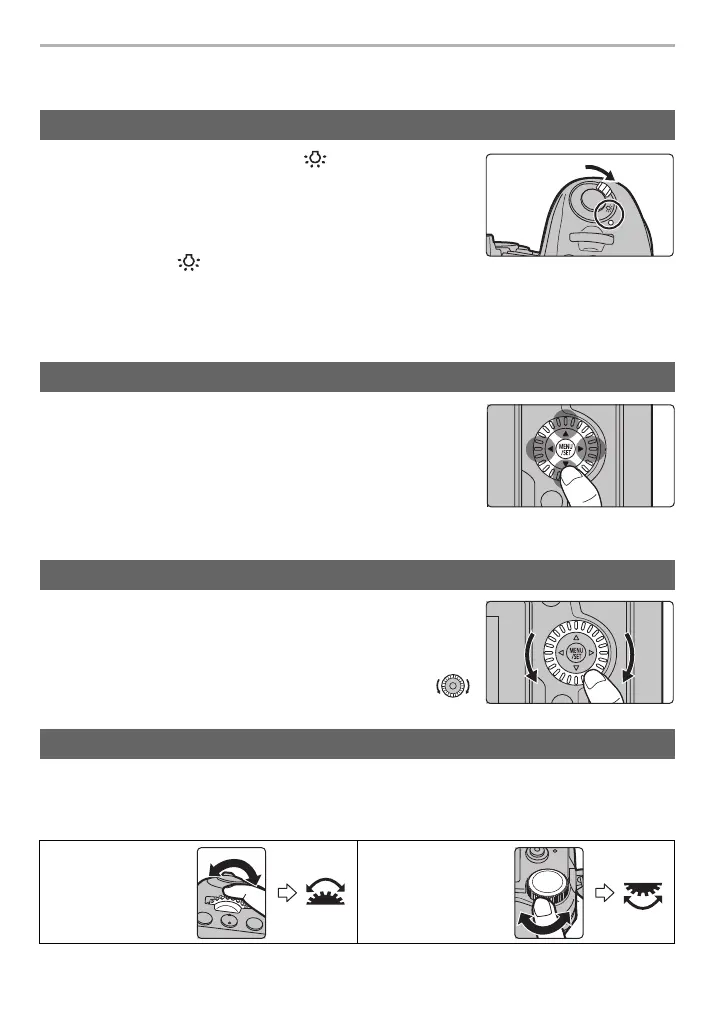
Set the camera ON/OFF switch to [ ].
• When the camera ON/OFF switch is released, it returns to the
[ON] position. The status LCD backlight turns off after approx.
5 seconds.
• To turn off the status LCD backlight immediately, set the camera
ON/OFF switch to [ ] again.
• If you start recording while the status LCD backlight is turned on, it will turn off.
• The status LCD backlight cannot be turned on when recording motion pictures or using [6K/4K
Pre-Burst] or [Pre-Burst Recording] in [6K/4K PHOTO].
Pressing the cursor button:
Selection of items or setting of values etc., is performed.
Pressing [MENU/SET]:
Confirmation of setting contents, etc., is performed.
• These operating instructions expresses the up, down, left, and
right of the cursor button as 3/4/2/1.
Rotating:
Selection of items or setting of values etc., is performed.
• The operation of rotating the control dial is illustrated as below in
these operating instructions.
Example: When rotating the control dial to the left or right:
Rotating:
Selection of items or setting of values is performed during the various settings.
• These operating instructions describe operations of the front dial/rear dial as follows:
Turn on the status LCD backlight
Cursor buttons/[MENU/SET] button
Control Dial
Front Dial/Rear Dial
e.g.: When
rotating the front
dial to the left or
right
e.g.: When
rotating the rear
dial to the left or
right
DC-G9LMBodyEB-DVQX1324_eng.book 22 ページ 2017年11月13日 月曜日 午前10時41分



 To Next Page
 Loading...