EasyManua.ls Logo

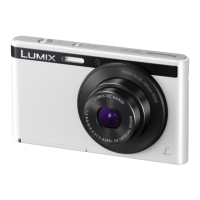
Panasonic Lumix DMC-FS50 - User Manual

Panasonic Lumix DMC-FS50
126 pages
Print Icon
To Next Page IconTo Next Page
Loading...
Operating Instructions
for advanced features
Digital Camera
Model No. DMC-XS1
DMC-FS50
VQT4P63
F1212HH0
Please read these instructions carefully before using this product,
and save this manual for future use.
until
2013/01/21
DMC-XS1 DMC-FS50

Table of Contents

Question and Answer IconNeed help?

Do you have a question about the Panasonic Lumix DMC-FS50 and is the answer not in the manual?

Summary

Battery Charging Procedures

Charging via AC Adapter

Detailed instructions for charging the battery using the AC adapter.

Setting the Camera Clock

Initial Clock Setup Procedure

Step-by-step guide to set the camera's date and time.

Selecting Shooting Modes

Intelligent Auto Mode Explained

Overview of the fully automatic shooting mode for ease of use.

Focusing Your Subject

Focus Indicators and AF Area

Explains how to confirm focus and understand the AF area.

Recording Motion Pictures

Starting and Stopping Video Recording

Instructions for initiating and ending video recording.

Deleting Pictures from Storage

Deleting Individual Pictures

Procedure for removing a single picture.

Navigating Camera Menus

Menu System Overview

General guide to accessing and using the camera's menu system.

Setup Menu: Clock and World Time

Setting Date, Time, and World Time

Detailed guide for setting the clock and managing world time zones.

Memory Formatting and Language

Formatting Memory Storage

Instructions for formatting the built-in memory or memory card.

Understanding LCD Screen Displays

Camera Zoom Operations

Built-in Flash Operation

Using the Self-Timer Feature

Exposure Compensation Techniques

Adjusting Exposure for Lighting

How to compensate for brightness differences between subject and background.

Creative Control Mode Effects (DMC-XS1)

Panorama Shot Mode Guide

Capturing Panoramic Images

Step-by-step instructions for setting up and initiating panorama shots.

Scene Mode Shooting Explained

Rec Menu: Picture Size Selection

Rec Menu: ISO Sensitivity Adjustment

Setting Light Sensitivity (ISO)

How to adjust ISO sensitivity for varying light conditions.

Rec Menu: White Balance Settings

Selecting White Balance Presets

Explains preset white balance options like Daylight, Cloudy, Incandescent.

Rec Menu: Autofocus Modes

Choosing Autofocus Methods

Explains Face Detection, 9-Area, and 1-Area autofocus.

Rec Menu: Burst Shooting Options

Configuring Burst Shooting Modes

Details on Burst On, Hi-Speed Burst, and Flash Burst modes.

Rec Menu: Red-Eye Removal

Motion Picture Menu Settings

Picture Retouching Functions

Automatic Picture Enhancement

How to use Auto Retouch to improve picture brightness and color.

Creative Retouching Effects (DMC-XS1)

Playback Menu Operations

Picture Protection Function

Viewing Pictures on a Television

Connecting Camera to TV for Playback

Steps for connecting the camera to a TV using an AV cable.

PC Data Transfer Process

Connecting Camera and PC via USB

Steps for establishing a USB connection between the camera and PC.

Printing Pictures Directly

Connecting Camera to Printer

Steps to connect the camera to a PictBridge printer for direct printing.

Understanding the Recording Screen Display

Understanding the Playback Screen Display

Battery and Power Information

Troubleshooting Power Issues

Picture Quality and Color Issues

Troubleshooting Connectivity Issues

Summary

Battery Charging Procedures

Charging via AC Adapter

Detailed instructions for charging the battery using the AC adapter.

Setting the Camera Clock

Initial Clock Setup Procedure

Step-by-step guide to set the camera's date and time.

Selecting Shooting Modes

Intelligent Auto Mode Explained

Overview of the fully automatic shooting mode for ease of use.

Focusing Your Subject

Focus Indicators and AF Area

Explains how to confirm focus and understand the AF area.

Recording Motion Pictures

Starting and Stopping Video Recording

Instructions for initiating and ending video recording.

Deleting Pictures from Storage

Deleting Individual Pictures

Procedure for removing a single picture.

Navigating Camera Menus

Menu System Overview

General guide to accessing and using the camera's menu system.

Setup Menu: Clock and World Time

Setting Date, Time, and World Time

Detailed guide for setting the clock and managing world time zones.

Memory Formatting and Language

Formatting Memory Storage

Instructions for formatting the built-in memory or memory card.

Understanding LCD Screen Displays

Camera Zoom Operations

Built-in Flash Operation

Using the Self-Timer Feature

Exposure Compensation Techniques

Adjusting Exposure for Lighting

How to compensate for brightness differences between subject and background.

Creative Control Mode Effects (DMC-XS1)

Panorama Shot Mode Guide

Capturing Panoramic Images

Step-by-step instructions for setting up and initiating panorama shots.

Scene Mode Shooting Explained

Rec Menu: Picture Size Selection

Rec Menu: ISO Sensitivity Adjustment

Setting Light Sensitivity (ISO)

How to adjust ISO sensitivity for varying light conditions.

Rec Menu: White Balance Settings

Selecting White Balance Presets

Explains preset white balance options like Daylight, Cloudy, Incandescent.

Rec Menu: Autofocus Modes

Choosing Autofocus Methods

Explains Face Detection, 9-Area, and 1-Area autofocus.

Rec Menu: Burst Shooting Options

Configuring Burst Shooting Modes

Details on Burst On, Hi-Speed Burst, and Flash Burst modes.

Rec Menu: Red-Eye Removal

Motion Picture Menu Settings

Picture Retouching Functions

Automatic Picture Enhancement

How to use Auto Retouch to improve picture brightness and color.

Creative Retouching Effects (DMC-XS1)

Playback Menu Operations

Picture Protection Function

Viewing Pictures on a Television

Connecting Camera to TV for Playback

Steps for connecting the camera to a TV using an AV cable.

PC Data Transfer Process

Connecting Camera and PC via USB

Steps for establishing a USB connection between the camera and PC.

Printing Pictures Directly

Connecting Camera to Printer

Steps to connect the camera to a PictBridge printer for direct printing.

Understanding the Recording Screen Display

Understanding the Playback Screen Display

Battery and Power Information

Troubleshooting Power Issues

Picture Quality and Color Issues

Troubleshooting Connectivity Issues

Panasonic Lumix DMC-FS50 Specifications

General IconGeneral
TypeCompact
Image SensorCCD
Optical Zoom5x
Digital Zoom4x
ISO sensitivityAuto, 100, 200, 400, 800, 1600
ISO Range100 - 1600
Video resolution1280 x 720
Video RecordingYes
LCD Screen Size2.7 inches
DisplayLCD
Image Sensor Size1/2.33 inch
Focal Length5 - 25 mm
Image stabilizationOptical
BatteryLithium-Ion Battery Pack
Maximum Aperturef/2.8 - f/5.9

Related product manuals