
 Need help?
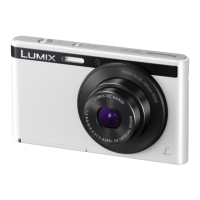
Do you have a question about the Panasonic Lumix DMC-XS1 and is the answer not in the manual?
Essential guidelines for protecting the camera from damage and ensuring proper function.
Lists and describes the items included with the camera for initial setup and use.
Identifies and explains the purpose of each button, dial, and component on the camera.
Instructions on how to charge the camera's battery using the provided AC adapter and cable.
Step-by-step guide for safely inserting and removing memory cards from the camera.
Details the camera's internal memory capacity and compatible external memory cards.
Procedure for setting the camera's internal clock for accurate date/time recording.
Advice on holding the camera steady and avoiding blur for better photo quality.
Guide to choosing different shooting modes like Intelligent Auto, Normal, and Scene Modes.
How to use the camera's fully automatic mode for effortless shooting.
Instructions for using the Normal Picture Mode to manually adjust settings for desired shots.
Explanation of how the camera's autofocus system works and how to achieve sharp focus.
Steps for capturing video clips using the camera's motion picture recording feature.
How to view recorded still images and motion pictures on the camera's LCD screen.
Methods for removing unwanted still images or motion pictures from the camera.
Overview of the camera's menu system for customizing settings and features.
Details on important settings found in the Setup menu, like clock and sound.
Explains the various icons and information displayed on the camera's LCD screen during recording.
Guide on how to use optical, extra optical, and digital zoom for framing shots.
Explains the Extra Optical Zoom feature for enhanced magnification without quality loss.
Details the Intelligent Zoom feature for magnified shots with minimized quality deterioration.
Information on using digital zoom for further enlargement, with potential quality impact.
Guide to activating and selecting appropriate settings for the camera's built-in flash.
Instructions for using the self-timer to capture photos with a delay.
How to adjust exposure settings to correct for brightness differences between subject and background.
Instructions for applying various artistic filters and effects to images during shooting.
Guide on how to capture wide panoramic images by moving the camera horizontally or vertically.
How to select scene-specific modes (e.g., Portrait, Scenery) for optimal settings.
Overview of settings available in the Recording menu for image customization.
Explains different ways to view recorded images, including slide shows and calendars.
Instructions for applying creative effects and adjustments to recorded pictures.
Details on options within the Playback menu for managing and editing photos.
Guide on connecting the camera to a TV to view images on a larger screen.
Instructions for transferring images from the camera to a computer using supplied software.
Steps for connecting the camera to a printer and initiating photo printing.
Explains the icons and indicators shown on the camera's LCD screen during various operations.
Important warnings and precautions for safe and optimal operation of the camera.
Explanation of common on-screen messages and error indicators displayed by the camera.
Guidance on identifying and resolving common issues encountered with the camera.
 General
| Megapixel | 16.1 MP |
|---|---|
| Camera type | Compact camera |
| Sensor type | CCD |
| Image stabilizer | Yes |
| Total megapixels | 16.6 MP |
| Image sensor size | 1/2.33 \ |
| Image formats supported | JPG |
| Supported aspect ratios | 3:2, 4:3, 16:9 |
| Maximum image resolution | 4608 x 3456 pixels |
| Still image resolution(s) | 640 x 480, 2048 x 1536, 2560 x 1920, 3456 x 3456, 3648 x 2736, 4608 x 2592, 4608 x 3072, 4608 x 3456 |
| Digital zoom | 4 x |
| Optical zoom | 5 x |
| Focal length range | 4.3 - 21.5 mm |
| Maximum aperture number | 6.9 |
| Minimum aperture number | 2.8 |
| Lens structure (elements/groups) | 6/5 |
| Maximum focal length (35mm film equiv) | 120 mm |
| Minimum focal length (35mm film equiv) | 24 mm |
| Auto focusing (AF) modes | Continuous Auto Focus, Multi Point Auto Focus, Single Auto Focus |
| Auto Mode focusing range (tele) | 1.00 - ∞ m |
| Auto Mode focusing range (wide) | 0.05 - ∞ m |
| ISO sensitivity | 100, 200, 400, 800, 1600, 3200, 6400 |
| Light exposure modes | - |
| ISO sensitivity (max) | 6400 |
| ISO sensitivity (min) | 100 |
| Light exposure control | Program AE |
| Light exposure correction | ± 2EV (1/3EV step) |
| Fastest camera shutter speed | 1/1600 s |
| Slowest camera shutter speed | 8 s |
| Flash modes | Auto, Forced off, Forced on, Red-eye reduction, Slow synchronization |
| Power source type | Battery, USB |
| Video resolutions | 320 x 240, 640 x 480, 1280 x 720 pixels |
| Motion JPEG frame rate | 30 fps |
| Video formats supported | M-JPEG |
| Maximum video resolution | 1280 x 720 pixels |
| Memory slots | 1 |
| Internal memory | 90 MB |
| Compatible memory cards | microSD (TransFlash), microSDHC |
| Field of view | 100 % |
| Display diagonal | 2.7 \ |
| Display resolution (numeric) | 230000 pixels |
| USB version | 2.0 |
| Product color | White |
| Scene modes | Children, Cuisine, Night landscape, Night portrait, Pet, Portrait, Snow, Sports, Sunset |
| Image editing | Resizing |
| Photo effects | Black&White, Sepia, Vivid |
| White balance | Auto, Cloudy, Daylight, Incandescent, Shade |
| Self-timer delay | 2, 10 s |
| Camera file system | DCF, DPOF 1.1, Exif 2.3 |
| On Screen Display (OSD) languages | ENG, ESP |
| Battery voltage | 3.6 V |
| Battery capacity | 690 mAh |
| Battery life (CIPA standard) | 360 shots |
| Cables included | USB |
| Bundled software | PHOTOfunSTUDIO 9.0 LE, Adobe Reader |
 Weight and Dimensions
| Depth | 17.6 mm |
|---|---|
| Width | 93.8 mm |
| Height | 53.5 mm |
| Weight | 88 g |
| Weight (including battery) | 103 g |

 To Next Page
